Chapter 7 Screen Capture, Memory Depth and Waveform Storage
75
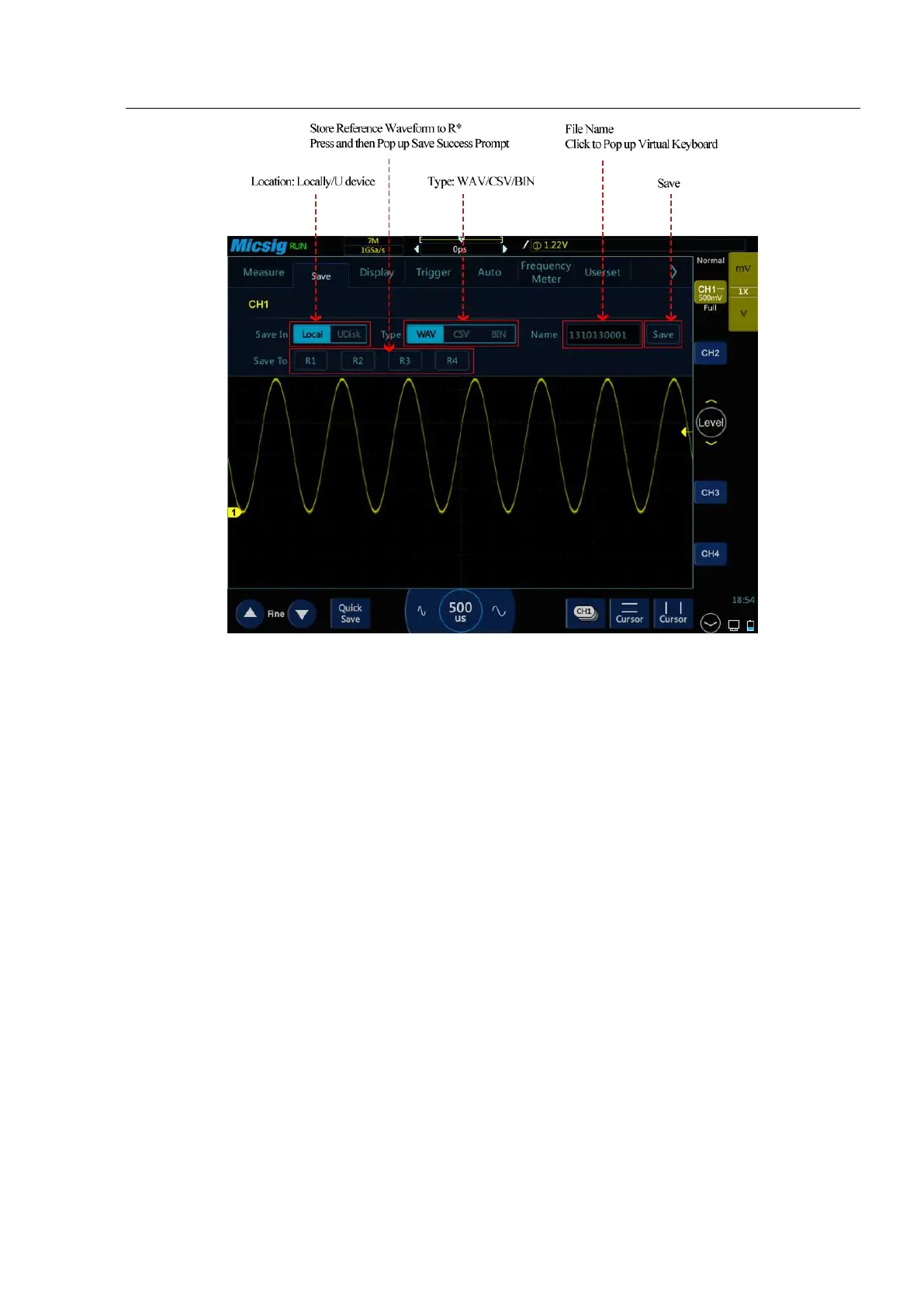
Figure 7-3 Save CH1 Reference Waveform Interface
Location: Stored locally and in USB device.
File types: WAV, CSV, and BIN.
File name: The initial file name is displayed as year + month + day + storage serial number. Press the file name
box to pop up the virtual keyboard, tap “Backspace” to delete the file name, and use the virtual keyboard to
rename the file.
Save: Tap to save the reference file and pop up the save success prompt. The most recently saved file will be
displayed at the top of the called menu.
Save to: Tap the R* (R1, R2, R3, R4) button to save the current channel waveform directly to the corresponding
reference channel, and the save success prompt will pop up.
Back: Tap to return to the previous level.
Method 1: Click the “save” button
In the Save Reference Waveform menu, select the channel waveform to be saved, select the file save location,
file type and file name, and click the “save” button to save the reference waveform file.
Save the reference waveform by steps as follows:
1) The current channel is set to the channel to be saved, which can be analog channel, math channel or reference.



 To Next Page