86
channel is turned on as the current channel waveform, and the reference waveform channel icon is
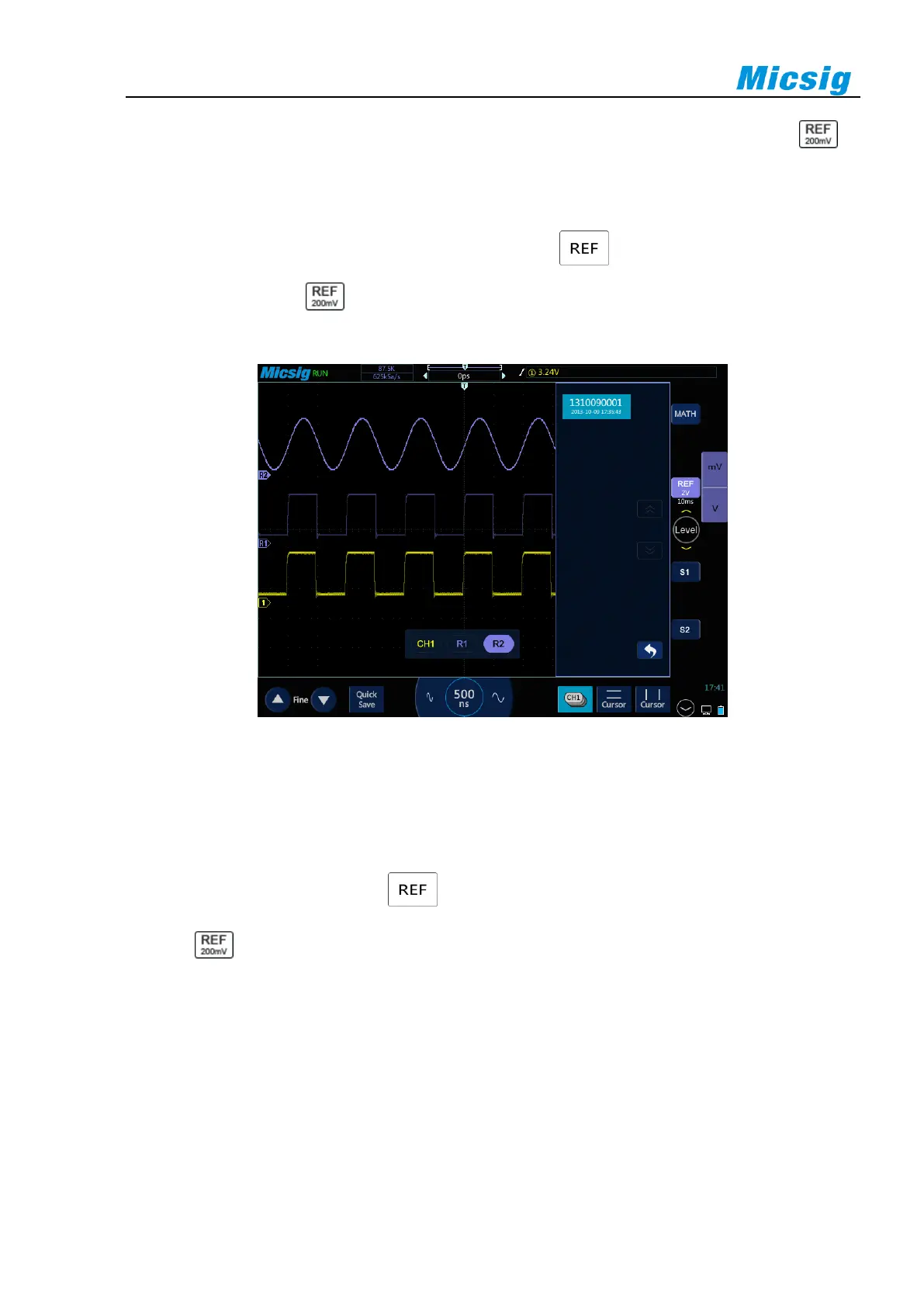
highlighted. The displayed state changes from “Close” to “Open”. As in Figure 8-6, the brighter reference
waveform is shown as the current reference channel.
If there are already files loaded into the reference channel, tap to open the reference channel of all
loaded reference files; tap to close all currently opened reference waveforms. A single reference channel
may also be opened with the Open/Close button.
Figure 8-6 Restore Reference Waveform
Close the reference waveform:
1) In the reference menu, tap “Open/Close” button in R1 to close the reference waveform.
2) Repeat step 1 to close other reference channels. When all reference waveform channels are closed, the
reference waveform channel icon becomes gray.
3) Tap to turn off all reference waveforms.
Reference waveform movement and time base adjustment
The horizontal or vertical movement and zoom of reference waveforms are independent of analog channels, and
the adjustments among different reference waveform channels are also independent of each other.
To adjust the reference waveform of a channel, first set the channel as the current channel, and then adjust the
reference waveform by move or zoom (in accordance with the analog channel method).
The scale and time base of the current channel reference waveform are displayed on the reference button. After



 To Next Page