Technical Information
26
CVA 265x & CVA 266x
2 Function
2.1 Optical Interface
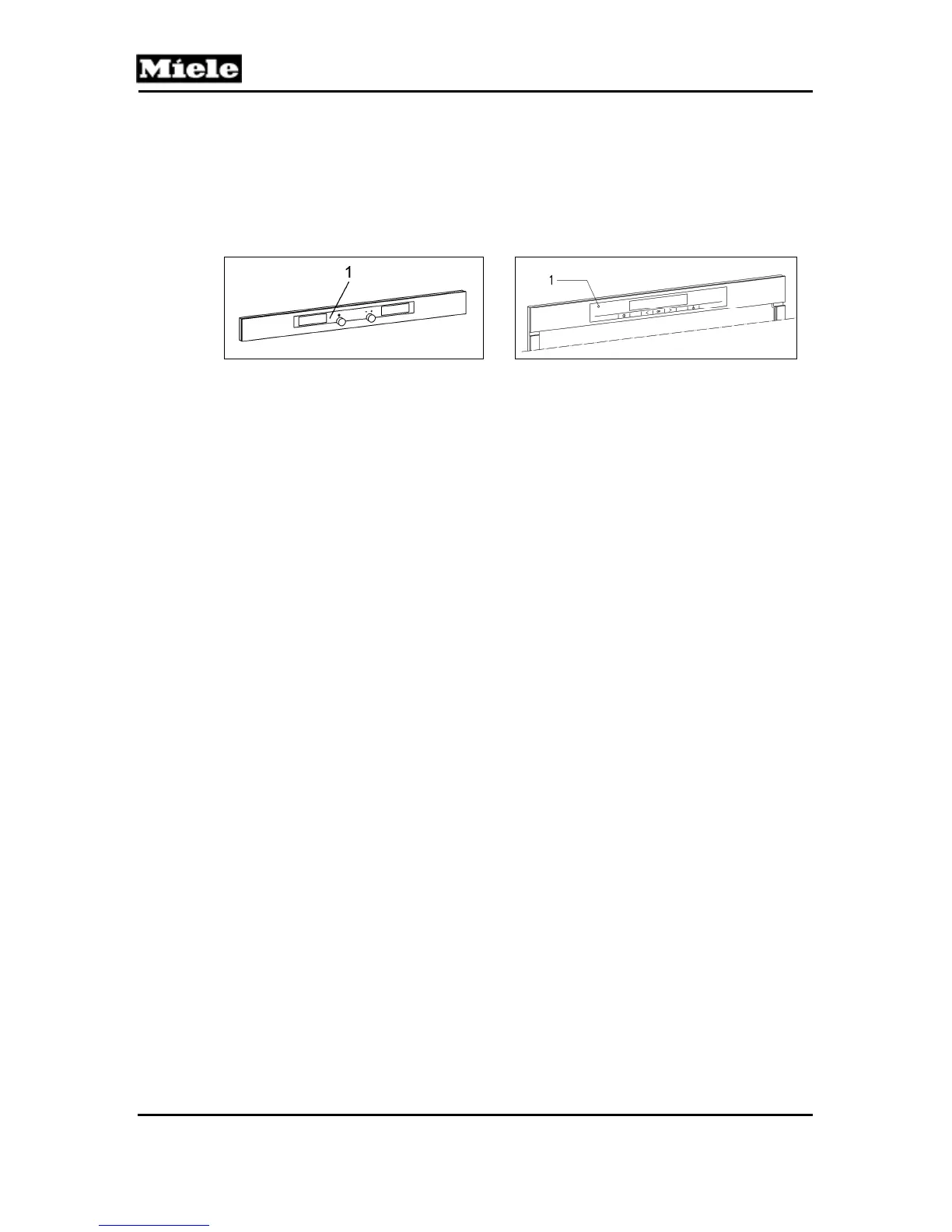
The appliance has an optical interface for diagnostic support or program
updating; see Figure 020-1, Item 1. Its location can be found by using the
optical interface search function of the Miele Diagnostic Support unit (MDU).
(a) CVA 2650/2660 (b) CVA 2652/2662
Figure 020-1: Optical Interface Location
2.2 Display Electronic (EPWZ 85x)
The display electronic is located in the door (see Figure D-5 or D-6, Item 2)
and houses the user controls and backlit LED matrix display. It has a
communication link to the power electronic and controls the displayed
messages; see Display Message Summary, Section 060-3.1.
A cable assembly connects the display electronic to the power electronic.
3 Fault Repair
3.1 Lighting Switches Itself Off
Cause:
Lighting switches off after about 10 minutes.
Remedy:
Not a fault. The lighting around the serving area is switched off automatically
by the electronics after about 10 minutes to extend LED life.
3.2 Stripes on Displays
Cause:
Protective film was not removed when display electronic was installed.
Remedy:
1. Remove the display electronic (see Section 020-4.4).
2. Peel the protective film off of the displays.
3. Re-install the display electronic.



 To Next Page