Technical Information
32
CVA 265x & CVA 266x
4.4 Display Electronic Removal
1. Disconnect the appliance from the power supply.
2. Pull off the switch knobs (if applicable).
3. Open the door.
4. Remove the coffee dispensing nozzle; see Section 020-4.2.
5. Remove the display electronic cover; see Section 020-4.3.
Note:
When removing the display/control electronic, ensure that the magnet in
the door does not fall out or cling to the screwdriver.
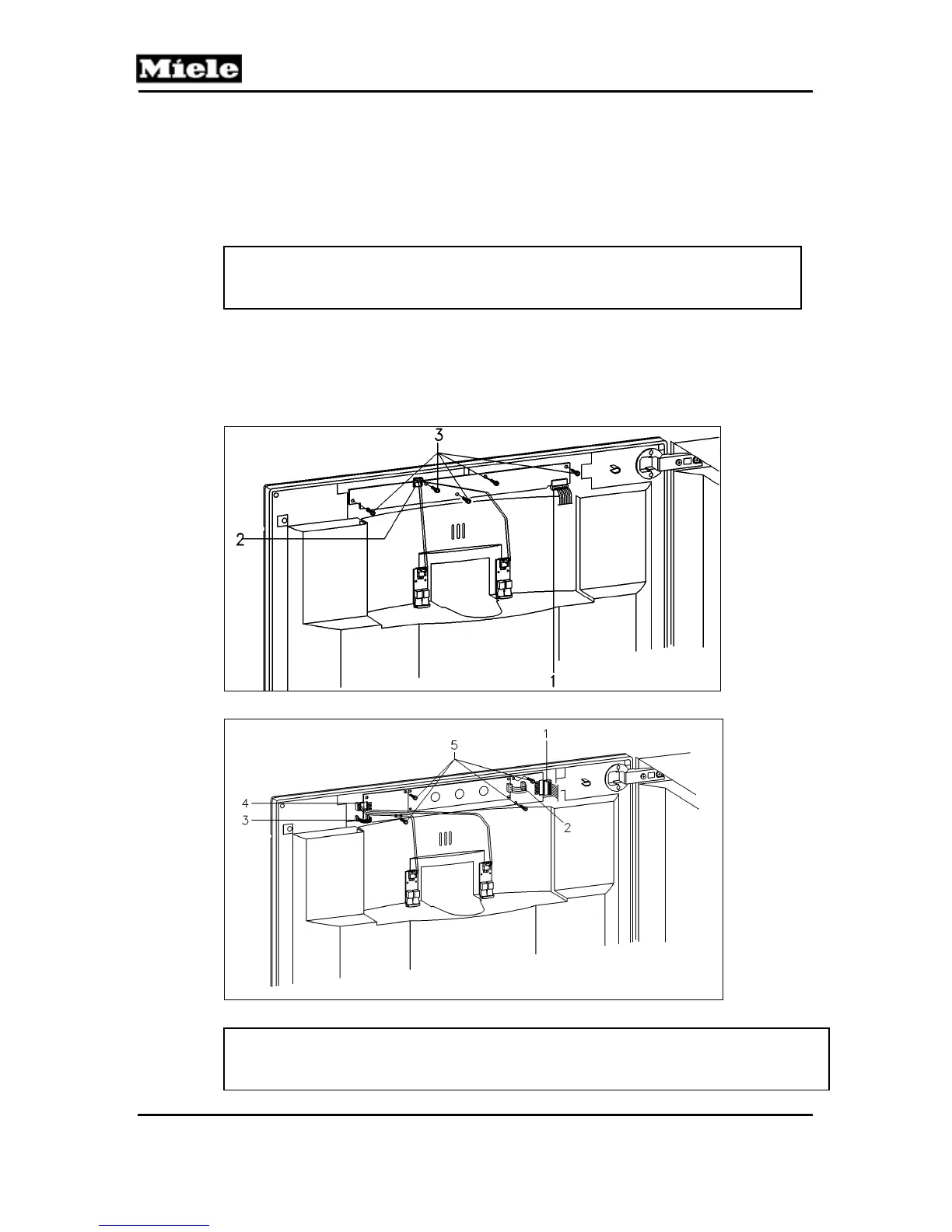
6. Disconnect all connections to the display electronic; see Figure 020-4,
Items 1 and 2, or Figure 020-5, Items 1 to 4.
7. Remove the display electronic retaining screws; see Figure 020-4, Item 3,
or Figure 020-5, Item 5.
8. Carefully remove the display electronic.
Figure 020-4: Display Electronic Removal, CVA 2650/2660
Figure 020-5: Display Electronic Removal, CVA 2652/2662
Note:
When installing a new display electronic, be sure to remove the protective
film from the display(s).



 To Next Page