UG65 User Guide
www.milesight-iot.com
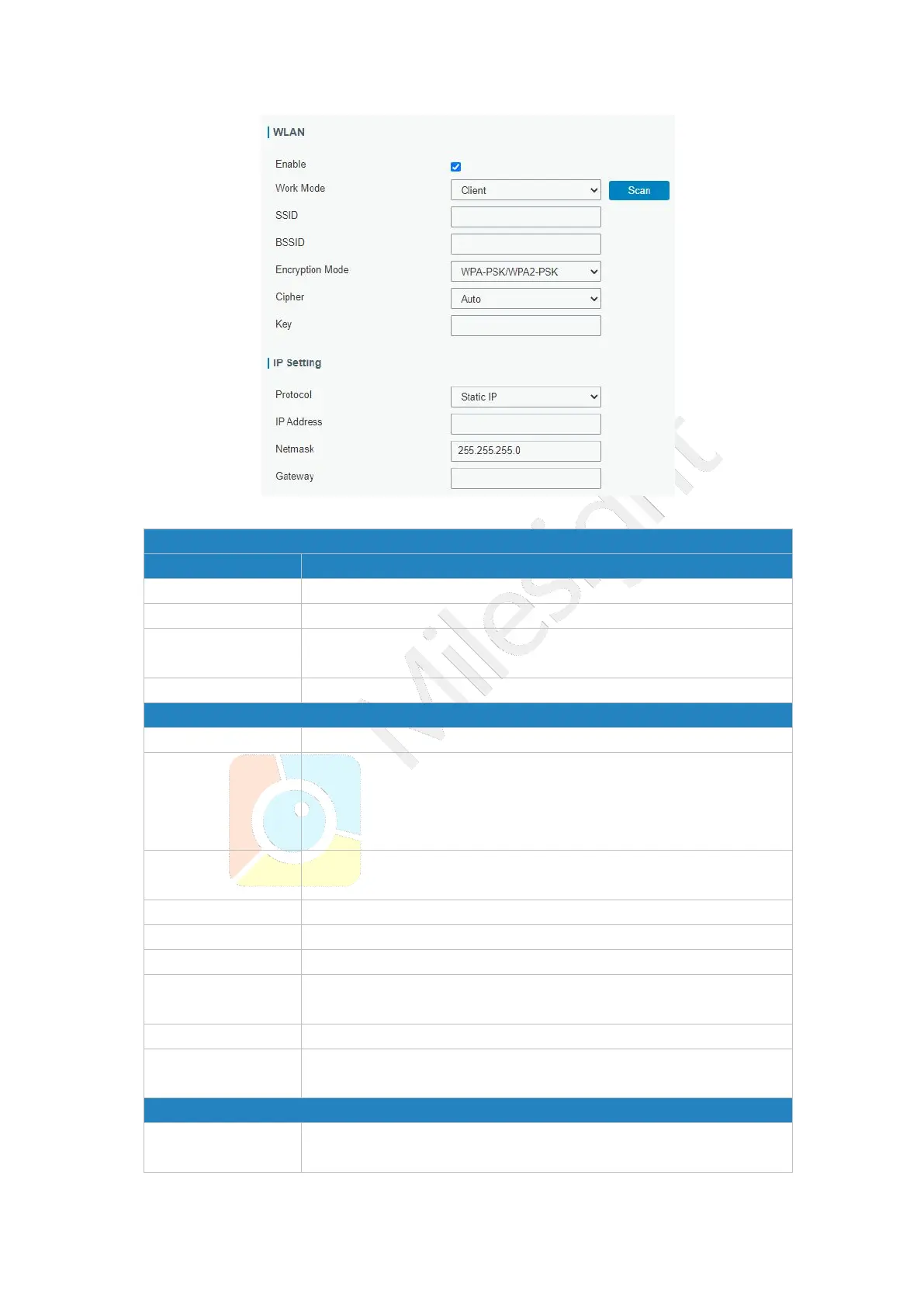
Figure 3-3-1-6
Select gateway's work mode. The options are "Client" or "AP".
Fill in the MAC address of the access point. Either SSID or BSSID
can be filled to joint the network.
Fill in the SSID of the access point.
Click "Scan" button to search the nearby access point.
Select encryption mode. The options are “No Encryption", “WEP
Open System" , “WEP Shared Key", “WPA-PSK", “WPA2-PSK" ,
“WPA-PSK/WPA2-PSK", “WPA-Enterprise”, “WPA2-Enterprise”and
“WPA-Enterprise/WPA2-Enterprise”.
Select cipher. The options are “Auto", “AES", “TKIP" and
“AES/TKIP".
Fill the pre-shared key of WEP/WPA encryption.
Select from “Peap”, “Leap”, “TLS” and “TTLS”.
Fill the user of WPA/WPA2-Enterprise.
Fill the anonymous identity of WPA/WPA2-Enterprise.
Fill the phase2 of WPA/WPA2-Enterprise.
The public server certificate used for verifying with
WPA/WPA2-Enterprise access point.
When SSID broadcast is disabled, other wireless devices can't not
find the SSID, and users have to enter the SSID manually to



 To Next Page