Key Description
Printout of the menu settings from the current position/printout of the info da-
ta
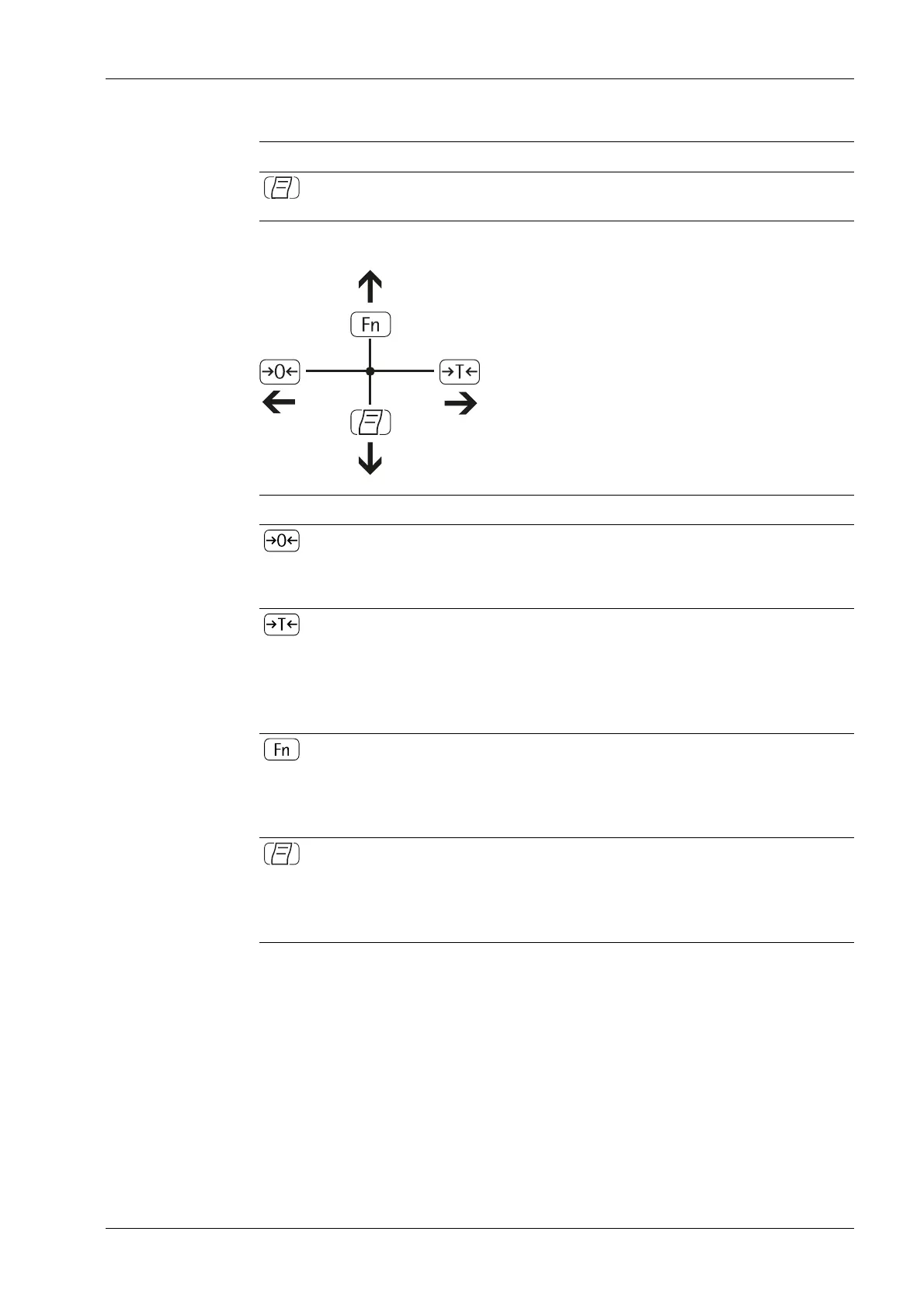
3.3.3.4 Entering numbers and letters
Key Description
- Press key for less than 2 seconds: Activate character to the left of the cur-
rent character (in the case of the rst character: exit input without saving)
- Press key for more than 2 seconds: exit input without saving
- Press key for less than 2 seconds: adopt currently selected character and
move cursor one position to the right (behind the last character: adopt in-
put with storage)
- Press key for more than 2 seconds: adopt and save input, and display the
associated menu item
- Cursor on 1st character and no characters have been edited yet: delete cha-
racter chain and insert 0
- Change the displayed character, scroll forwards (sequence: 0 … 9, decimal
point, minus sign, Z … A, space)
- Cursor on 1st character and no characters have been edited yet: delete cha-
racter chain and insert blank spaces
- Change the displayed character, scroll backwards (sequence: blank space,
A … Z, minus sign, decimal point, 9 … 0)
3 Device description Ex Indicator Midrics 1 (MIXS1)
Minebea Intec EN-17



 To Next Page