- Additions to the weighing parameters: e.g. linearization
- [CLR.LEG.S] Deleting the internal Alibi memory
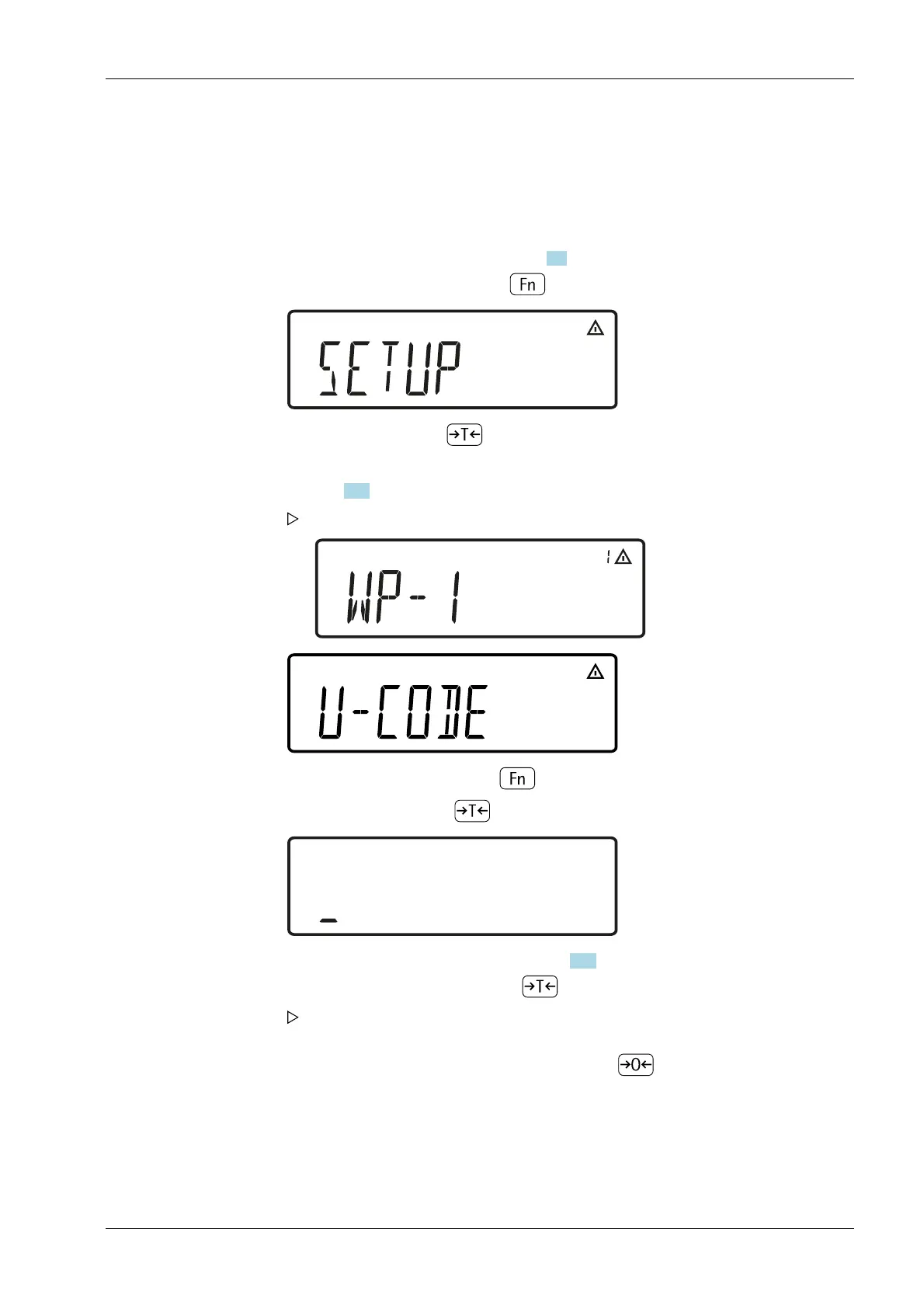
5.5.2 Activating the service mode
Menu: [SETUP]- [U-CODE].
If a code word is requested at this point, enter the service access code (see
Chapter 13.5) and continue with "Adopt service access code".
5.5.3 Analog-to-digital converter (ADC)
Adapt the parameters of the analog-to-digital converter to the connected load cell or
weighing platform. After the ADC conguration, the A/D converter is dened as a scale in
conjunction with the load receptor.
1. Switch to the menu mode (see Chapter 5.3).
2. Open the menu [SETUP] with key .
3. Select [SETUP] with key .
The rst parameter in the sub-menu [SETUP] is displayed: [WP-1].
4. Select menu [U-CODE] with key .
5. Open [U-CODE] with key .
6. Enter the service access code (see Chapter 13.5).
7. Adopt service access code with key .
The service mode is active: an "S" is shown in the upper right-hand corner of the
display.
8. Return to menu [SETUP] in service mode with key .
5 Getting started Ex Indicator Midrics 1 (MIXS1)
Minebea Intec EN-33



 To Next Page