Chapter 6 Programming 6-47
103 ~ 106 should be replaced when all parts of feeder 106 are
processed.
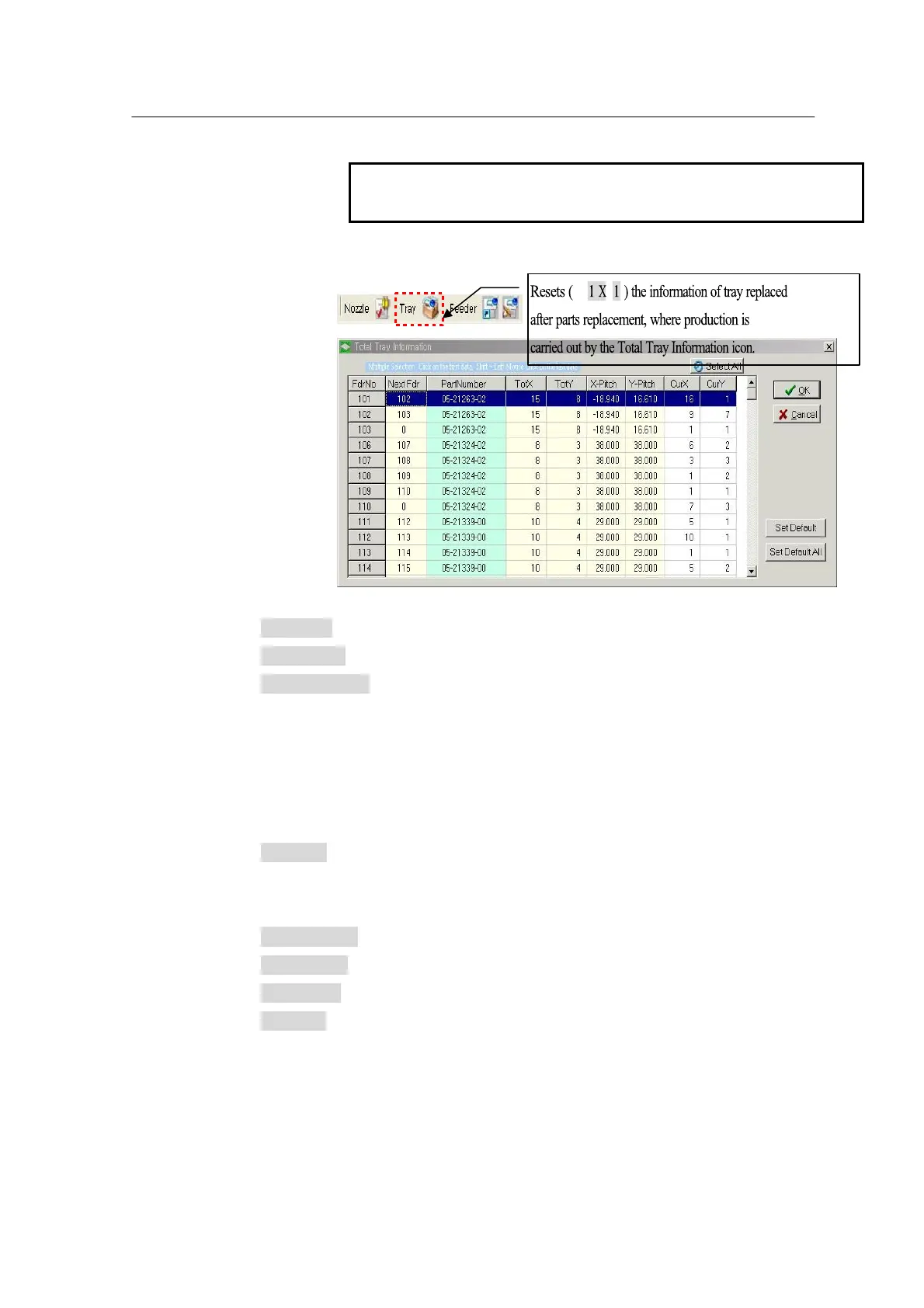
After parts replacement, enter Total Tray Information to reset the tray infomration.
Select All: Selects all tray feeders currently registered
Set Default: Resets CurX , CurY (X:1, Y:1) of the selected tray.
Set Default All: Resets CurX , CurY (X:1, Y:1) of all tray feeders registered. For
a program that processes parts with several part numbers, pay attention
to using Set Default All. In the case this option is used carelessly,
manually take out the affected tray from the Tray Feeder, open ‘Total
Tray Information’ and individually modify CurX , CurY information for the
affected Tray Feeder No.
Next Fdr: Used to make a tray followed by one with the same Part Number in
order to reduce part replacement (The current window displays just tray
information and does not permit modification.)
Part Number: Registered part number
TotX , TotY : Columns and rows of parts
X , Y Pitch: X , Y pitch between parts of the registered tray
CurX , Y : Current pocket position of the tray



 To Next Page