DESCRIPTION
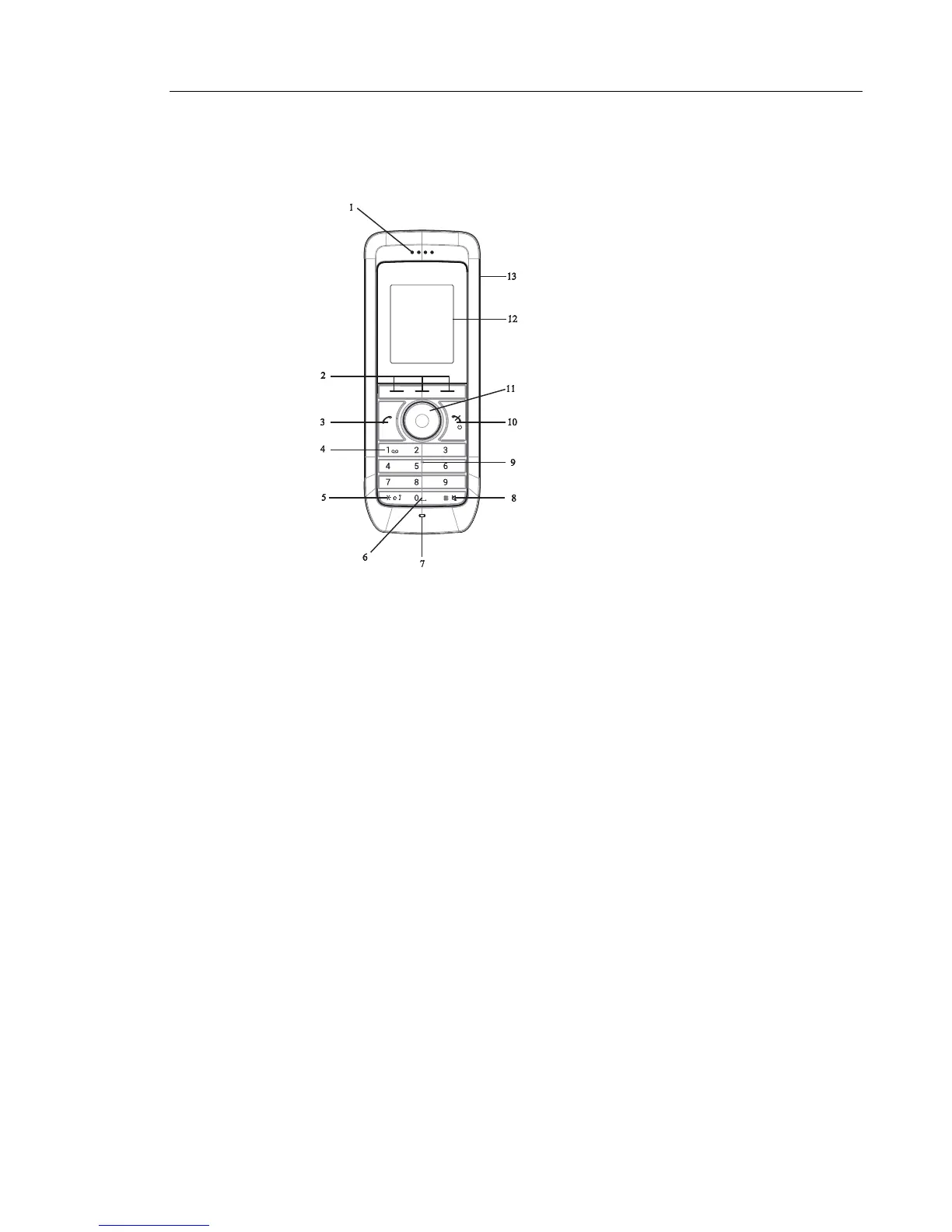
Figure 1: Description of the handset.
1 Earpiece speaker
2 Soft keys
The 3 Soft keys is used with GUI, that is, the functions of each Soft key is indicated by
text in the display just above the keys.
3 Off-hook key
To answer a call, to pre-dial a number, and as a short cut to the Call list.
4 Voice mail access*
A quick access to the handset’s Voice mail.
5 Key lock and Upper/Lower case
Combined key lock and Upper/Lower Case.
6Space
To add space between text.
7 Microphone
8 Sound off key
To turn on/off audible signals in idle mode, silencing the ring signal at incoming call,
and to turn the microphone on/off during a call.
9 Tactile indicators
There are two tactile indicators to indicate the centre of the key pad.
10 On-hook and On/Off key
Combined button; to end a call, to return to standby mode, and to switch the handset
on/off by long press.
GHI
PQRS TUV WXYZ
JKL
ABC DEF
MNO



 To Next Page