Mitel 5613 DECT Phone User Manual for MiVB
MAINTENANCE OF BATTERIES
BATTERY WARNINGS
During a call, only the corresponding battery warning signal will notify the user. The warning
signal cannot be silenced during a call. When not in call, the warning signal can be silenced
by pressing .
CHARGE THE BATTERY
Place the handset in the desktop charger or in the rack charger. An animated battery icon is
shown in the display indicating charging by starting with its current charge and ending with the
full charge. A filled battery icon indicates a fully charged battery.
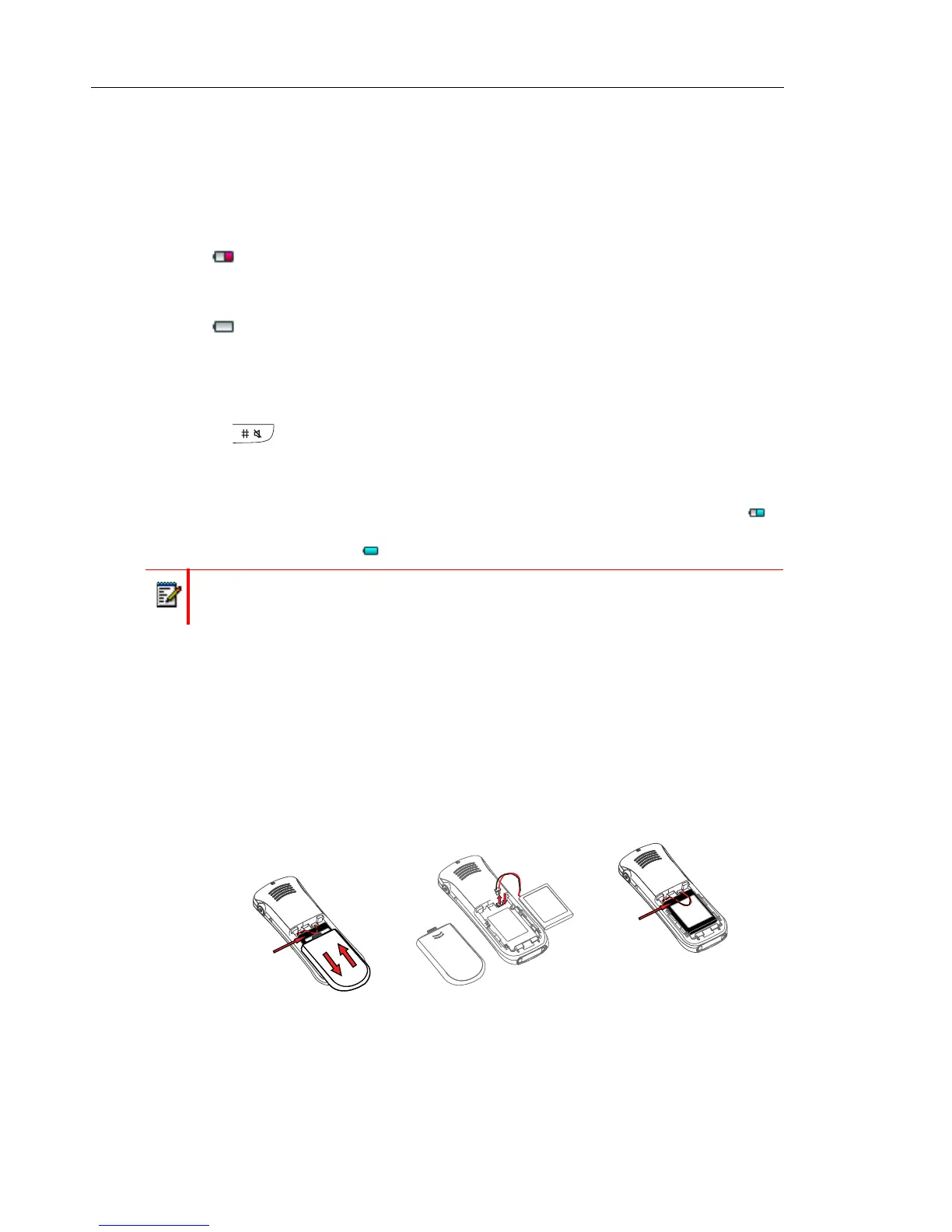
REPLACE THE BATTERY
If the standby time for the handset becomes too low, the battery should be replaced by a new
one. Please contact your system administrator or your supplier, for information about new
batteries. Attach the battery as described in the illustration below. The battery is easy to replace.
It is attached inside the battery lid and is connected to the handset in such a way that no
misalignment is possible.
Figure 1: Easy Replaceable Battery.
The "Low battery" icon is displayed when the battery has 10% or less remaining
capacity left. In addition; a warning signal sounds every minute and the dialog
window "Battery low. Charge now." appears.
The "Empty battery" icon is flashing when the battery has 5% or less remaining
capacity left. In addition; a warning signal sounds every second and the dialog
window "Battery empty. Shutting down." appears.
Note: Only use the prescribed chargers for charging.



 To Next Page