26/1531-ANF 901 14 Uen S 2019-10-18 6
S
ETTING UP THE SOFTWARE SERVER
5 SETTING UP THE SOFTWARE SERVER
The software and the configuration files used by the IP phones shall be stored on a
server where the IP phones can fetch them. The server is called IP Phone SW Server.
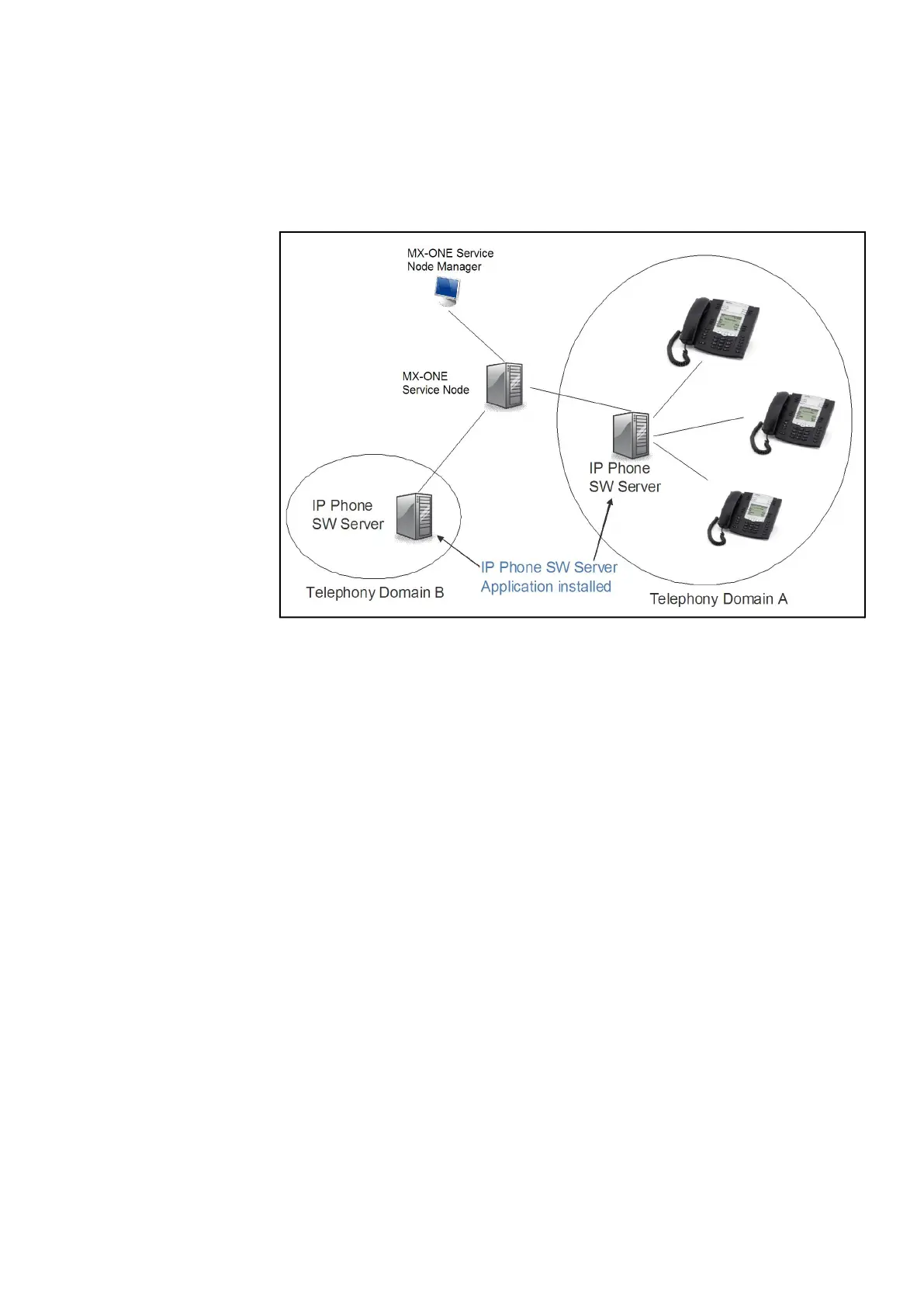
Figure 1: Deployment Scenario when telephony domains use different SW
servers
In the MX-ONE Service Node you can define multiple telephony domains. The tele-
phony domains are managed through the MX-ONE Service Node Manager web inter-
face.
The IP phone configuration files are preferably generated through the MX-ONE Service
Node Manager. To enable the files to be generated through MX-ONE Service Node
Manager, the IP Phone SW Server Configuration Management Application must be
installed on the IP Phone SW Server. Once generated the configuration files can
viewed directly on the IP Phone SW Server.
The IP phones can use the following protocols to download the software and configu-
ration file(s): http, https, ftp, tftp. The recommendation is to use the http protocol and it
is described in these installation instructions.
If MX-ONE Service Node Manager for some reason is not used, stop reading and go
to chapter “How to start a new phone”.
For details how to set up the software server see installation instruction for IP PHONE
SOFTWARE SERVER.



 To Next Page