EasyManua.ls Logo

mru Optima 7 - Menu structure

mru Optima 7
78 pages
Print Icon
To Next Page IconTo Next Page
To Previous Page IconTo Previous Page
Loading...
USER MANUAL OPTIMA 7
MRU GmbH, D-74172 Neckarsulm 18 / 78
Menu structure
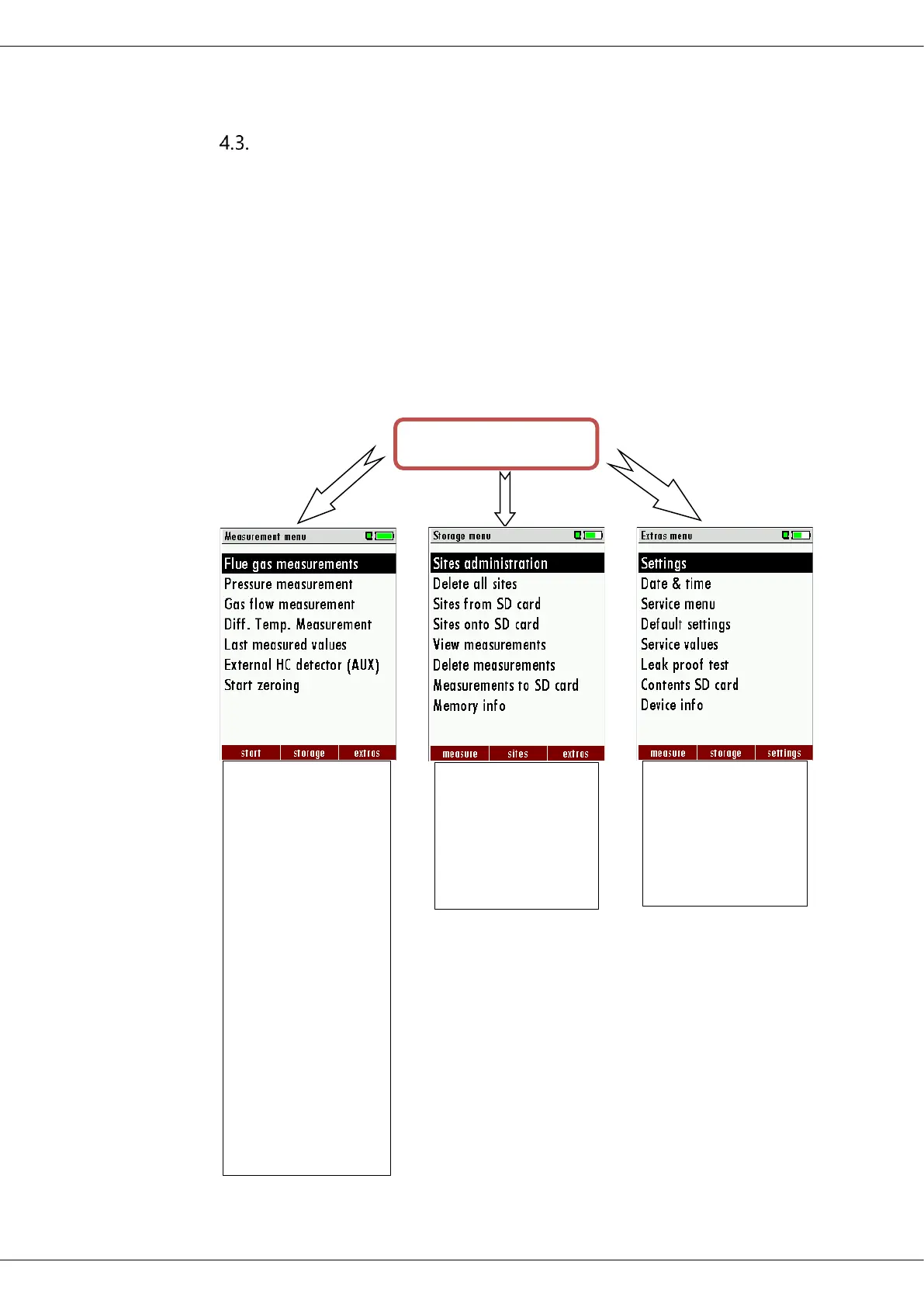
The analyzer organizes all available actions in three main menus:
Menu Measurement
All available measurement options will be displayed and can be se-
lected here.
Menu Storage
All available storage options will be displayed and can be selected
here.
Menu Extra
All other actions are available here to manage and customize the
device.
You can jump in between the 3 main menus with the 3 function keys
(according to the displayed name on the screen).

OPTIMA 7
The topic „Flue
gas measure-
ments „is a
standard feature
in every analyzer
and is explained
in chapter
7 Per-
forming meas-
urement
, Page
35
. Other menu
points are op-
tional and will be
explained either
in this manual or
in an additional
manual or flyer.
.
The menu Stor-
age is explained
in chapter
8
Data
Storage
, Page 48.
The menu Extra is
explained in
Chapter
9
Extras /
Adjustment
,
Page
59.

Table of Contents

Related product manuals