USER MANUAL OPTIMA 7
23 / 78 MRU GmbH, D-74172 Neckarsulm
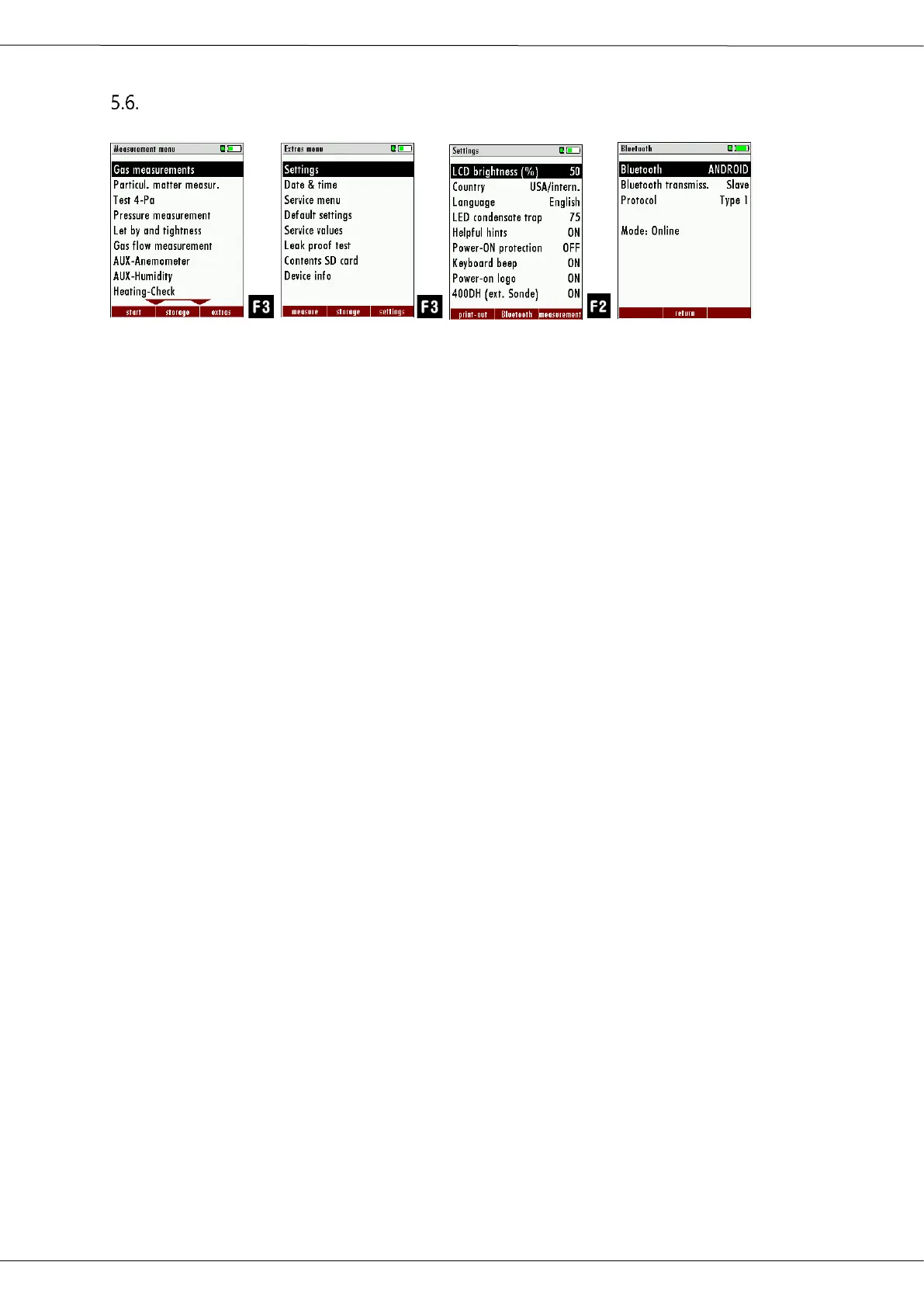
Setting Bluetooth parameters
► Press F3.
The Extras menu appears.
► Press F3.
The menu Settings appears.
► Press F2.
The menu Bluetooth appears.
The following MRU software can be used:
MRU4u (Bluetooth) Available in the Apple App Store and Google Play
For iOS communication with PC, tablet or smartphone
is additionally the Low power module # 66173 re-
quired
SMARTdata (Bluetooth) (SMARTdata Version 1.2.0 or newer)
MRU-Win (USB) (MRUwin Version 2.7.4.0 or newer)
ONLINEview (USB/Bluetooth) (ONLINEview Version 2.9.5 or newer)
The Bluetooth passkey is: 1234
Devices as of firmware version 1.66.00 with dual Bluetooth module:
The Bluetooth mode can be selected under EXTRAS / SETTINGS.
For Android devices, select the mode: ANDROID
For Apple- devices, select the mode: iOS.
Always set the BLUEGAZsmart setting to OFF!
ONLINEview must be operated in master mode - please select "Master"
under Setup.
Please select "Master" under SETUP



 To Next Page