USER MANUAL OPTIMA 7
31 / 78 MRU GmbH, D-74172 Neckarsulm
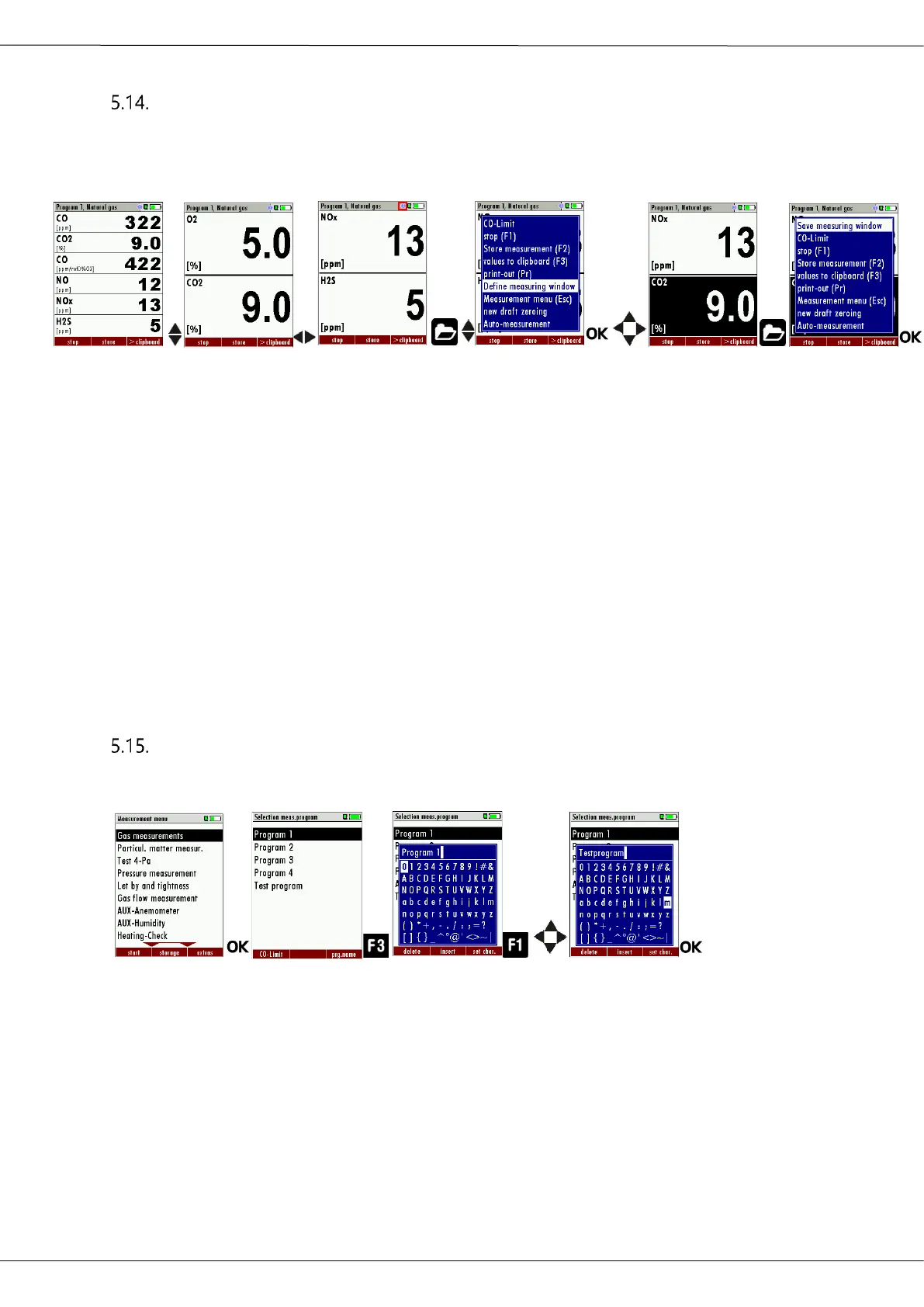
Configuring zoom window
Three zoom windows are available in each measuring program for the
zoomed display of 2 measured values each.
Which values are displayed zoomed is configurable.
► Start a measuring program.
In this example Programm1, Natural gas.
► Select the zoom function using the up / down arrow keys.
► Select one of three measurement windows.
► Press the menu key.
A selection list appears.
► Select Define measuring window.
► Press OK.
► Select the desired measured value that you want to change.
► Press the Menu Key.
A selection list appears.
► Select Save measuring window.
► Press OK
The change is saved.
Changing measurement program names
In the menu Selection meas. program the name of the measurement
program van be changed.
,
► Press OK
The menu Selection meas. Program appears
► Press F3.
A window appears.
► Change the name of the measurement program to your needs
► Press OK.
The changed name is displayed in the menu Selection meas. pro-
gram



 To Next Page