USER MANUAL OPTIMA 7
25 / 78 MRU GmbH, D-74172 Neckarsulm
► Press the Menu Key.
A selection list appears.
► Select Default settings.
► Press OK.
The BT module is set to default settings
A message appears.
► Power down the analyzer.
► Wait 10 seconds until you power on the analyzer again.
► After switching on, you must initialize the BT module.
The baud rate and service name of the BT module are initialised here
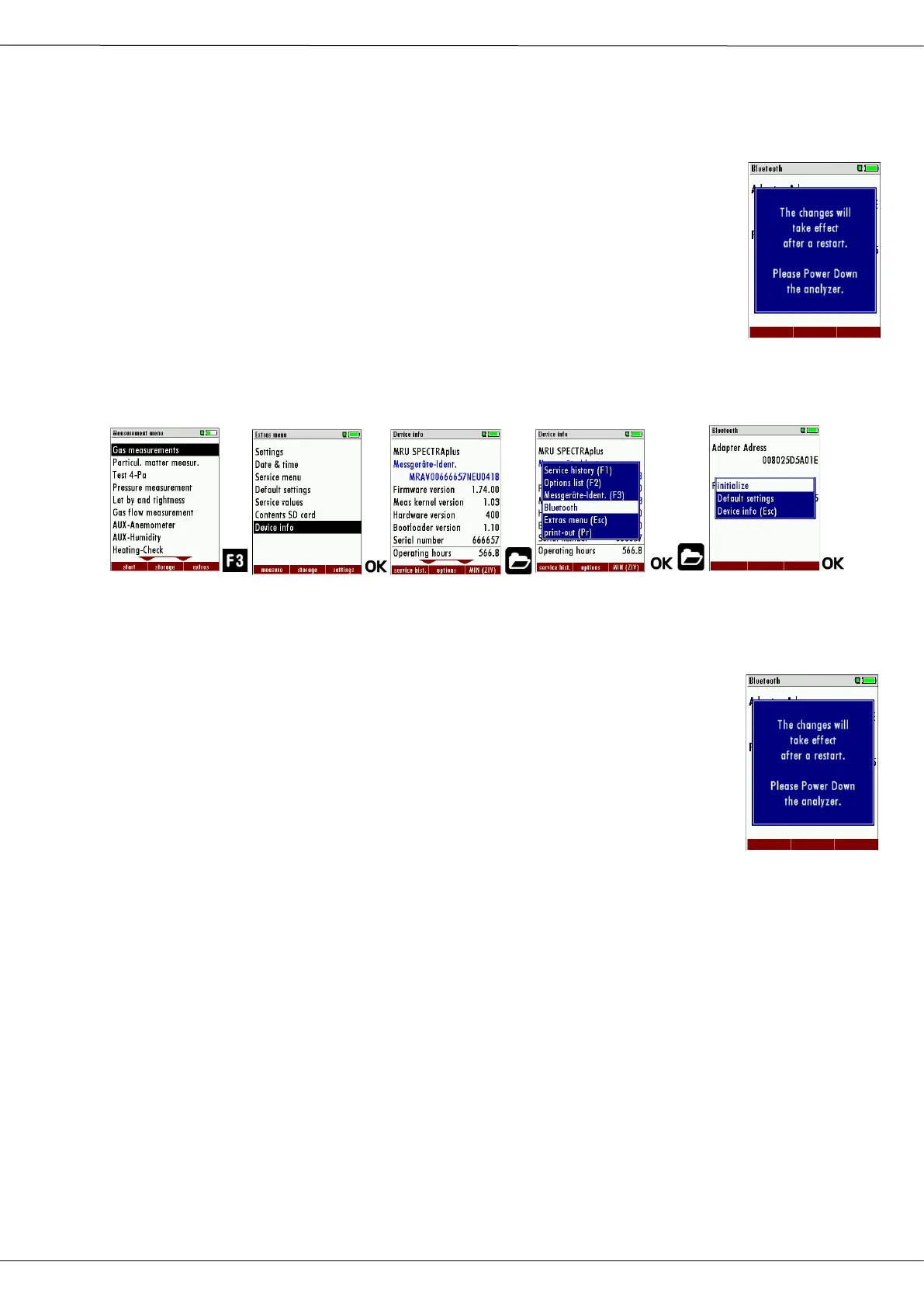
The "initialize" function of the BT module is located here:
► Press F3.
The Extra menu appears.
► Select Device info.
► Press OK.
The menu Device info appears.
► Press the Menu Key.
A selection list appears.
► Select Bluetooth.
► Press OK.
The menu Bluetooth appears.
► Press the Menu Key.
A selection list appears.
► Select initialize.
► Press OK.
The BT module is initialized.
A message appears.
► Power down the analyzer.
► Wait 10 seconds until you power on the analyzer again.
► To check whether the BT module has been correctly initialized, the
MAC address and firmware version of the BT module must be dis-
played after the restart.



 To Next Page