Operation of the System
SUPREMATouch
65
US
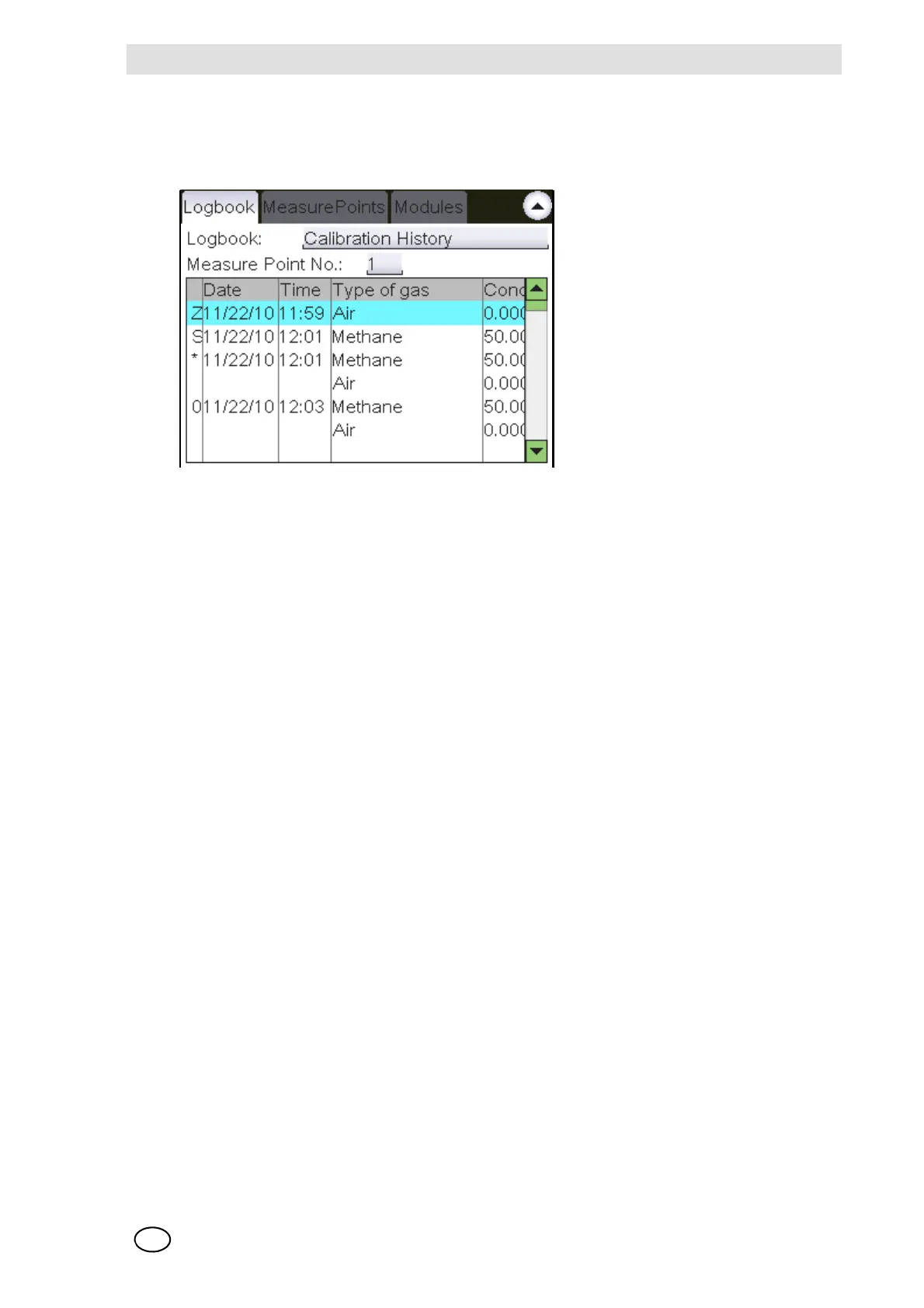
Calibration history
This history saves the calibration process data for each input. Up to four entries can be stored for
each input, and older entries are overwritten, except for the first calibration and pre-settings.
Fig. 37 Calibration history
When an input is selected, the appropriate calibration history is displayed in the corresponding
field, if the input has already been calibrated. The entry for each calibration process consists of
two rows, first the test gas and then the zero gas setting. A pre-setting entry is made up of only
one row.
If a separate zero adjustment has been carried out, the values for “Concentration” and “Measure-
ment value” are blanked in the Span Gas Measurement line by “———”.
The type of entry is identified by a character in the first column:
I Bridge current setting [IBR]
Z Presetting Zero point [ZERO]
S Presetting Sensitivity [SPAN]
* First calibration
Number n n-last calibration



 To Next Page