HYDROCAL 1005 Manual for Installation and Operation Page 50/111
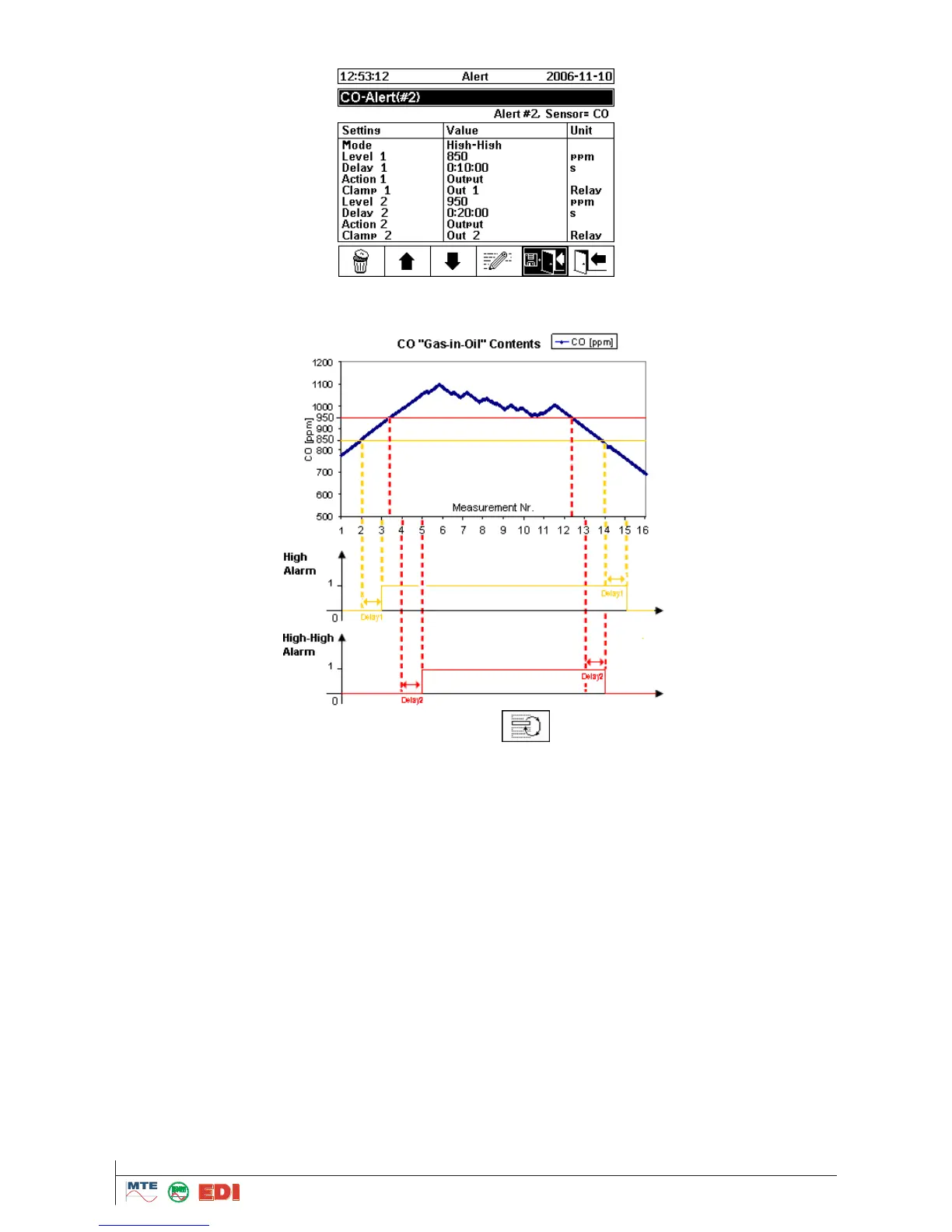
For example: if CO Alarm is setup as follow (delay 1: 10min and delay 2: 20min)
In the event of alarms, CO alarms will be activated as follow:
Note: CO measurement interval is 20 min.
The following actions can be selected by pressing the
button:
Log entry: An entry in the history of alarms is made; this has to be confirmed (see history of
alarms).
Output: An entry in the history of alarms is made; this has to be confirmed (see history of alarms)
and an output is switched on (If the measured value exceeded the limits in the field "Level 1 & 2").
The status „on“ described above is activated. If the measured value falls under the limit, the out-
put is switched off again.
Out, hold: An entry in the history of alarms is made; this has to be confirmed (see history of
alarms) and an output is switched on (If the measured value exceeded the limits in the field "Level
1 & 2"). The status „on“ described above is activated. If the measured value for this output falls
under the limit, the output remains switched on. Only a manual deleting of alarm allows that the
output is switched off again (see chapter 5.11 or 4.6).
Log & SMS: An entry in the history of alarms is made; this has to be confirmed (see history of
alarms) and an entry in the history of alarms is made, this has to be confirmed (see history of
alarms) and an SMS is sent to the number indicated.
Output & SMS: An entry in the history of alarms is made; this has to be confirmed (see history of
alarms) and an output is switched on (If the measured value exceeded the configured limits in the
field "Level 1 & 2"). The status „on“ described above is activated. If the measured value falls un-
der the limit, the output is switched off again. In addition, an SMS is sent to the number indicated.



 To Next Page