HYDROCAL 1005 Manual for Installation and Operation Page 63/111
B. RS485-Bus
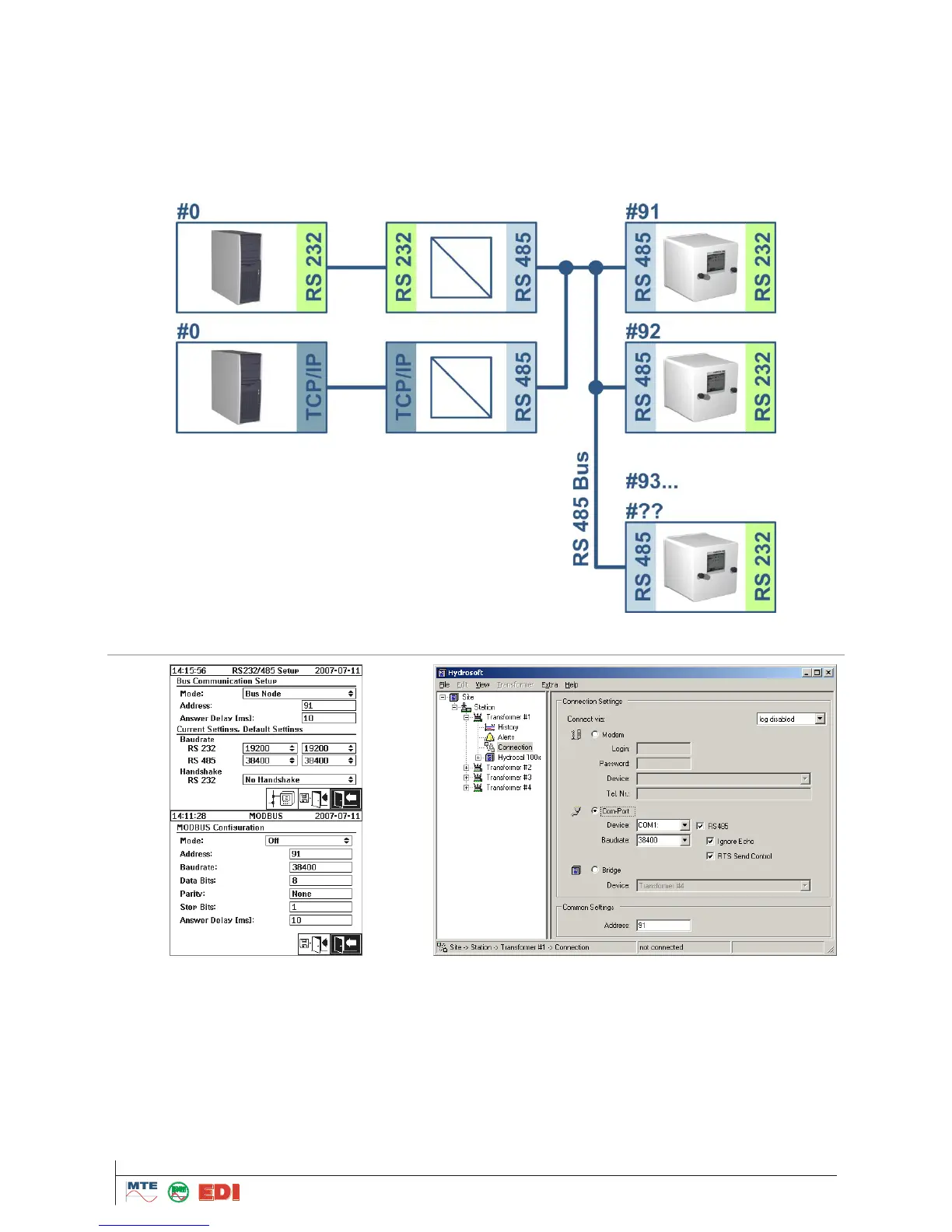
Using the RS485 interface it is possible to connect more the one HYDROCAL to a host. Nonetheless
it is only possible to communicate with one device at a time. The illustration below shows the sche-
matic topology.
Remark: The host (PC) must only be present once (the host connected via the TCP/IP adapter is
only present to show an alternate way to connect to the RS485 bus, as it is offered by third party
network-to-serial bridges).
On HYDROCAL device:
Configure the device as "Bus Node"
Set an unique address for each device on the RS485 bus (1..254). Note: Communication with
HYDROCAL1002-1003 can be made right now with up to 32 units
Setup "Answer Delay" as required by the RS485 adapter in use (see also chapter: “PC RS485
Adapters” and “Answer delay”)
MODBUS must be off
Configure RS485 baudrate



 To Next Page