HYDROCAL 1005 Manual for Installation and Operation Page 64/111
In the HydroSoft connection dialog:
Use "Connect via:" "Com-Port"
Select RS485 baudrate chosen for the devices
Check RS485
Set RS485 related checkboxes are required by the adapter (see also: “Answer delay”)
Enter correct bus address
C. Bridge
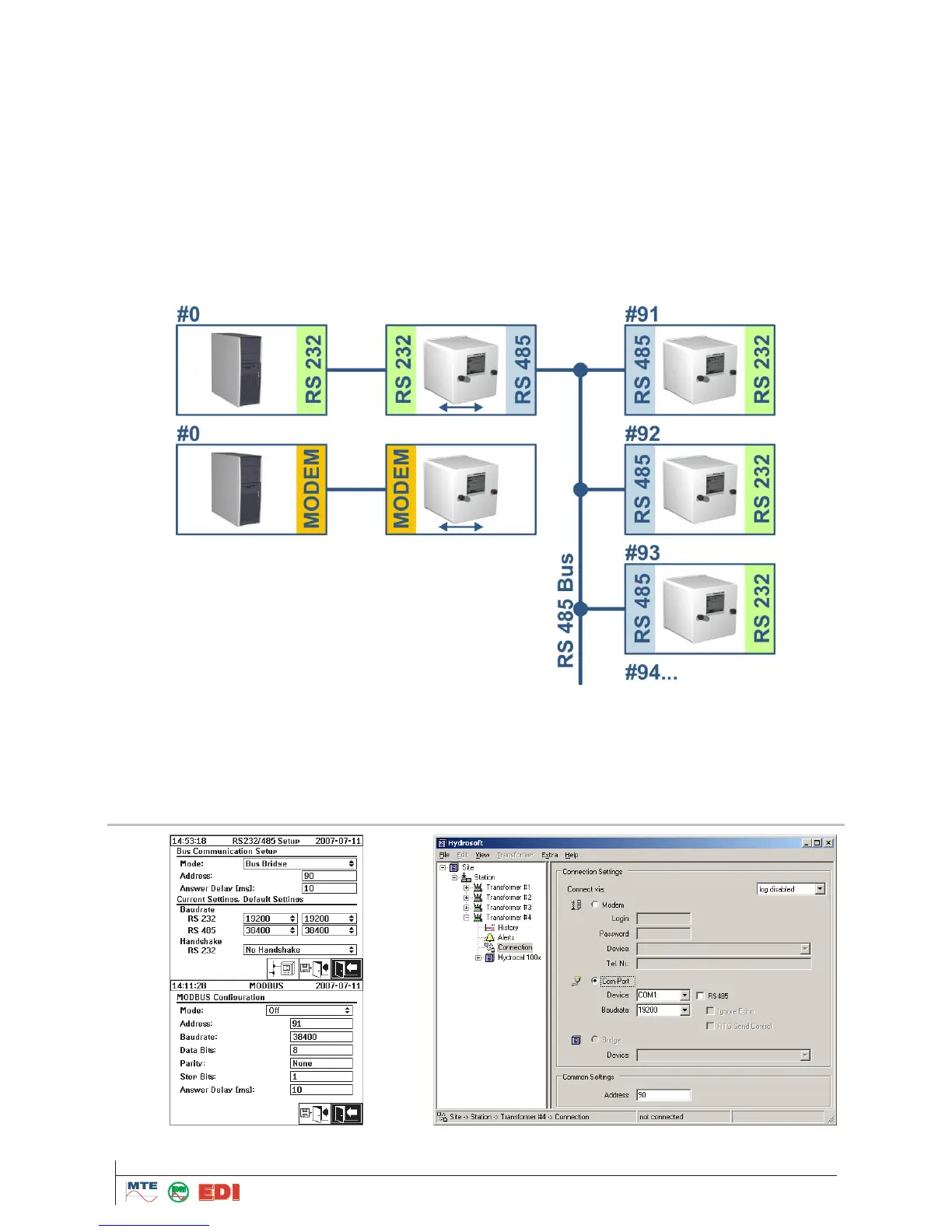
The (RS485-Bus-) bridge is an extension to access a range of HYDROCAL devices on a RS485 bus.
In this setup the host (PC) is not directly connected to the RS485 bus but is using one of the HY-
DROCAL devices as communication gateway.
The bridge functionality can be used for an RS232 or Modem primary connection as indicated by the
illustration below.
The setup of all HYDROCAL devices must be according to a standard RS485 bus setup, with one
exception. The HYDROCAL that shall serve as the communication gateway must be configured as a
(bus-) bridge.
I. Bridge Setup



 To Next Page