MP7505 Series User Manual
the parameters that can be set are different.
Note: The following setting waveform uses CH1 channel as an example. If you need
to set CH2 channel, please refer to CH1 channel specific operation.
Output Sine Wave
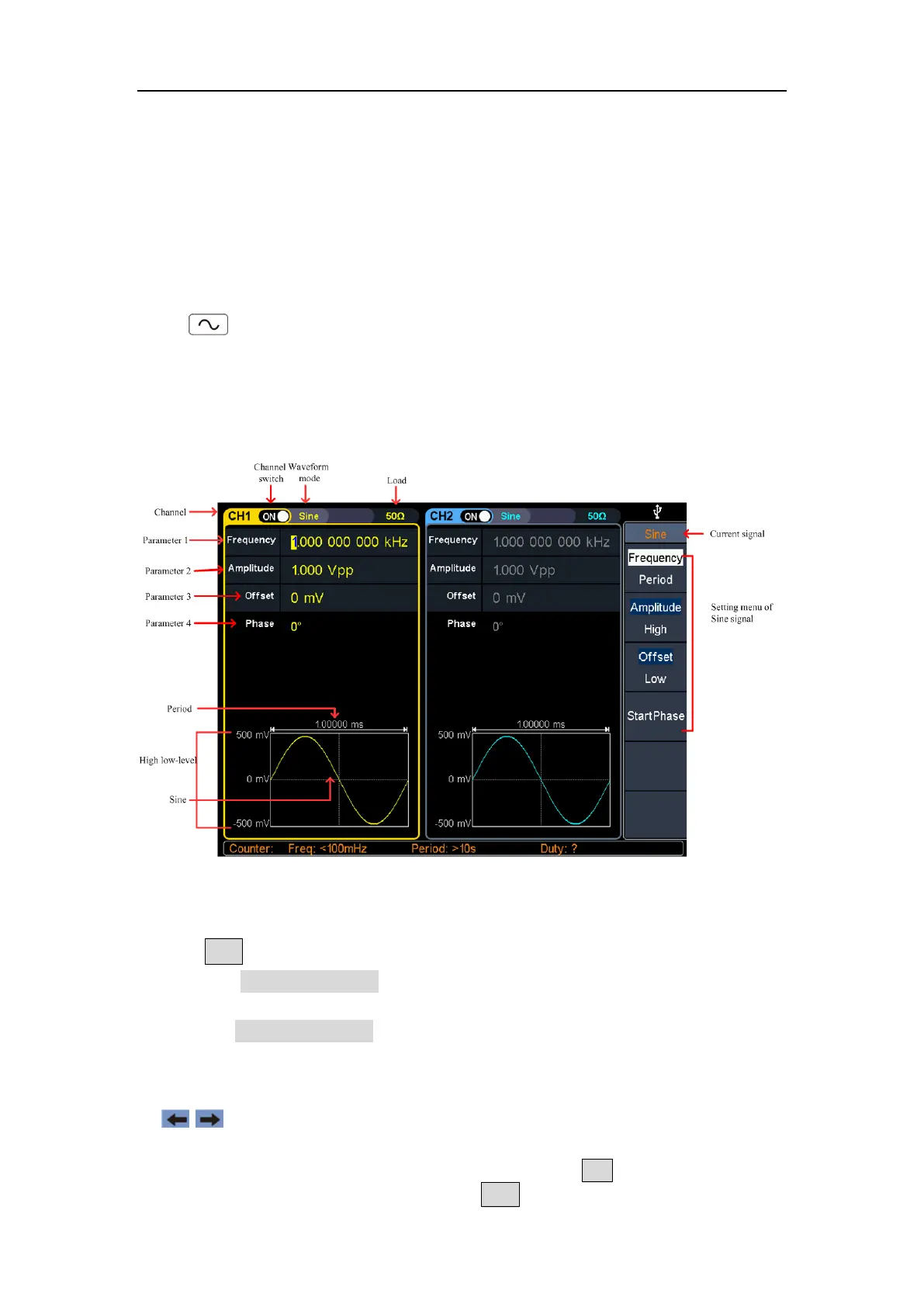
Press , the screen displays the user interface of the sine wave. The Sine
waveform parameters can be set by operating the Sine setting menu on the right.
The sine wave menu includes: Frequency/Period, Amplitude/High Level, Offset/Low
Level, and Start Phase. The menu can be operated by the menu selection button on
the right.
Figure 5-1: Sine wave user interface
Set the frequency/period
Press CH1, all currently selected CH1 menu items are highlit.
Press the Frequency/Period softkey, the selected menu item is highlit in white,
and a cursor will display on the corresponding parameter item in Parameter 1.
Press the Frequency/Period softkey to switch the frequency and period.
There are two ways to change the selected parameter value:
Turn the rotary control to increase or decrease the value at the cursor. Press the
/ arrow key to move the cursor left or right.
Press a number key on the numeric keypad directly, the screen will display the
data input box, input the desired value. Press the X key on the numeric
keypad to delete the last digit, press the ← Back key to cancel the input, and



 To Next Page