MP7505 Series User Manual
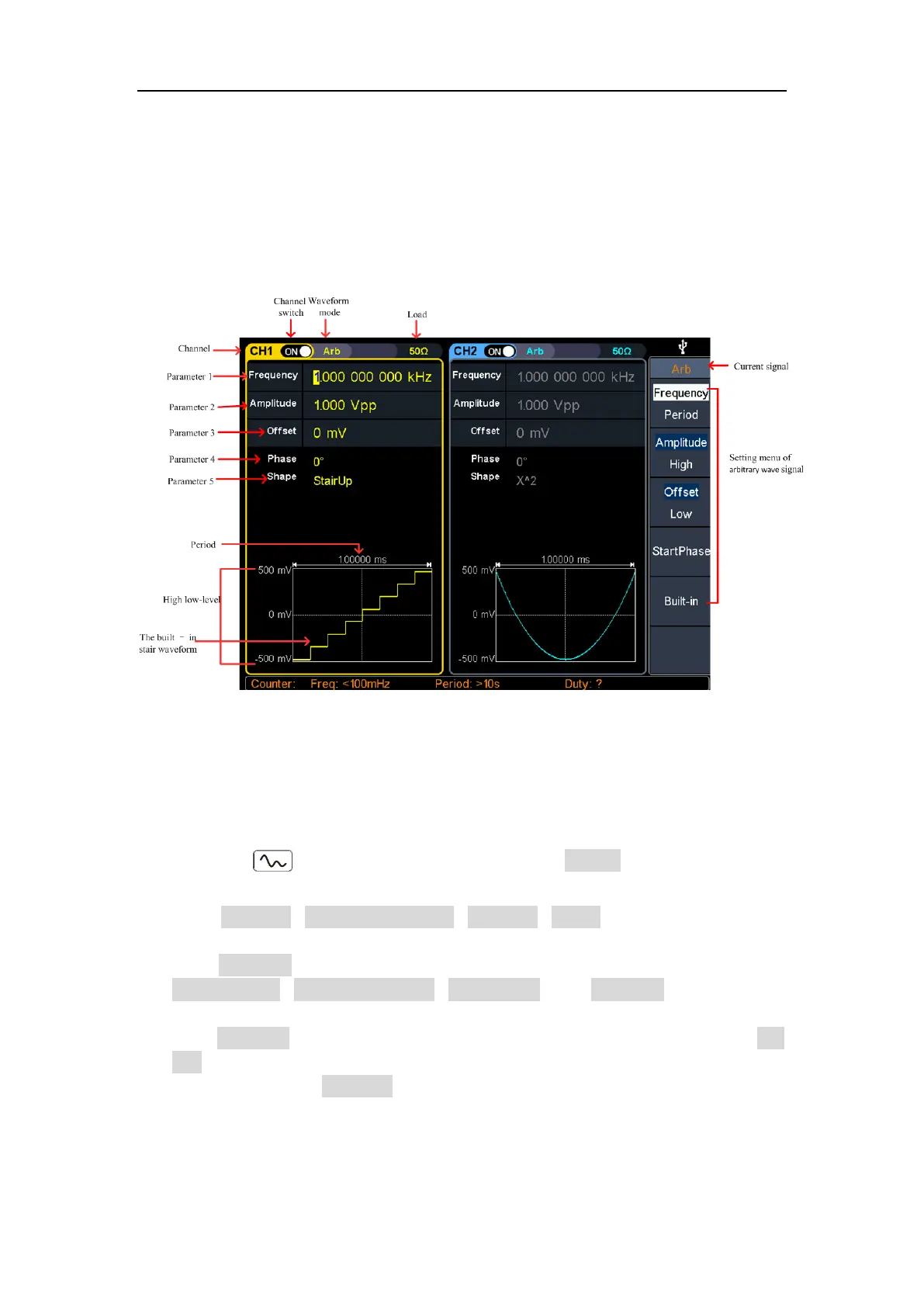
The arbitrary wave menu includes: Frequency/Period, Amplitude/High Level,
Offset/Low Level, Start Phase, and Built-in Waveform.
To set the Frequency/Period, Amplitude/High Level, Offset/Low Level, Start Phase,
please refer to Output Sine Wave on page 10.
The Arbitrary signal consists of two types: the system built-in waveform and the
user-definable waveform.
Figure 5-9: Arbitrary wave user interface
Select build-in wave (including DC)
There are 152 types of waveforms built in the generator, the number of waveform
points is 8192 points, and the highest upper limit frequency is 15MHz. To select a
built-in waveform, the steps are as follows:
(1) Press the Arb wave button, then press the Built-in softkey to enter the
built-in wave menu.
(2) Press Common, Medical treatment, Standard, Maths softkeys to select the
built-in wave type.
Press NextPage softkey to enter the next page, select the built-in wave type:
Trigonometric, Window function, Engineering, and Seg Mod (Segmentation
Modulation).
Press NextPage softkey to enter the next page, select the built-in wave type Fan
test.
For example, select Common to enter the interface shown below.



 To Next Page