MP7505 Series User Manual
(6) Set modulating wave frequency:
Press the AM Frequency softkey to set the modulating wave frequency. The
range is 2 mHz – 1 MHz (for internal source only).
(7) Set modulation depth:
Press the Depth softkey to set the modulation depth. The range is 0% - 100%.
Generate Sweep (Sweep)
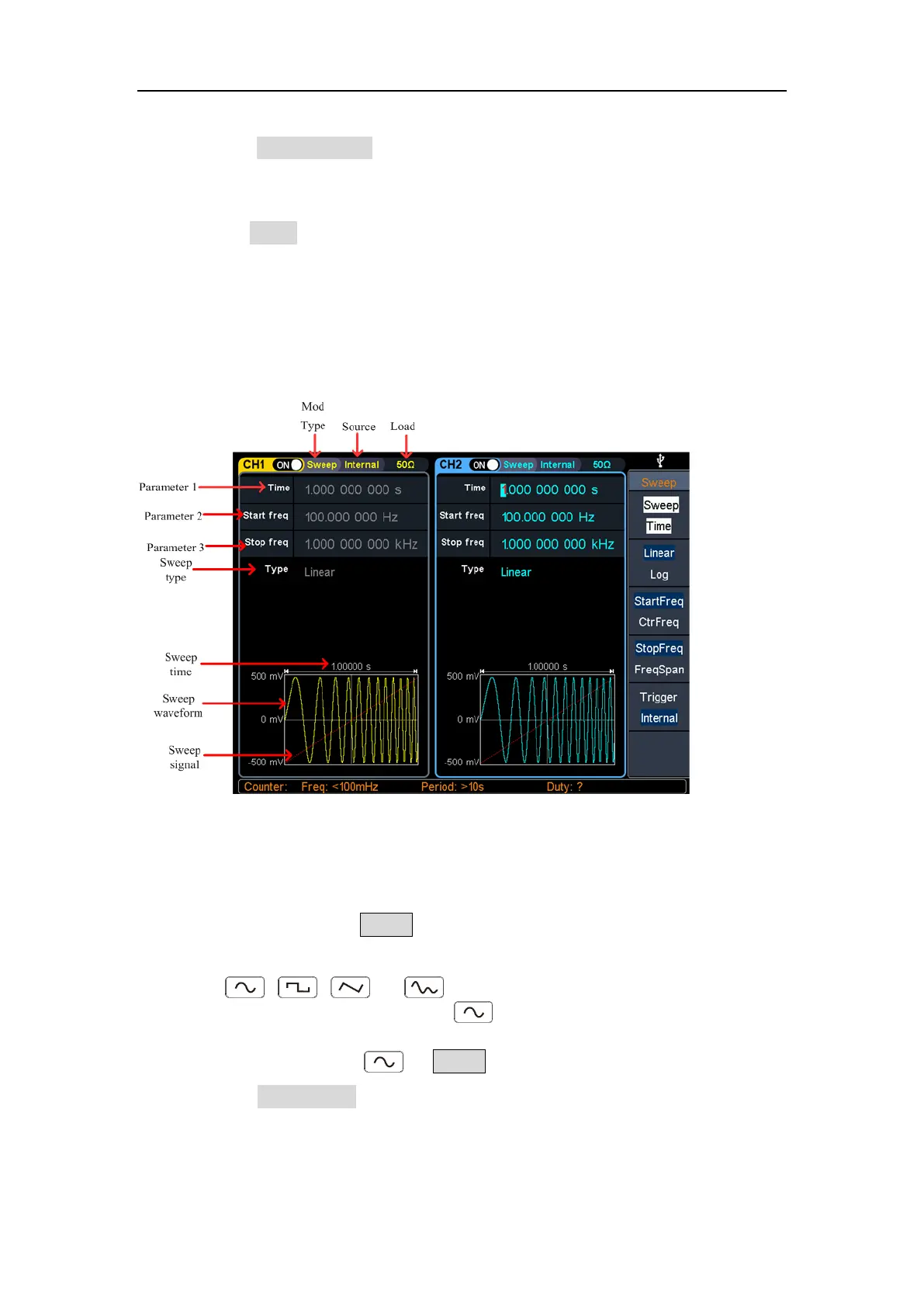
In sweep mode, the generator varies its output from the start frequency to the stop
frequency within the specified sweep time. Sweep can be generated by Sine, Square,
Ramp or Arbitrary wave (except DC).
Figure 5-25: Sweep mode user interface
How to set the parameters of Sweep
(1) When the output signal is Sine, Square, Ramp or Arbitrary wave (except DC),
press the front panel Sweep function key to enter the sweep mode (the
backlight of the key lights up).
(2) Press , , , or to select the sweep waveform. For example,
when selecting a sine wave, press to display the sweep waveform and
parameters, and change the parameters. For details, please refer to Output Sine
Wave on page 10. Press or Sweep to return to the sweep mode interface.
(3) Press the Sweep Time softkey to set the sweep time, the time span of the
sweep for which the frequency changes from the start frequency to stop
frequency. The range is from 1ms to 500s.



 To Next Page