MP7505 Series User Manual
4FSK (4 Frequency Shift Keying)
4 Frequency Shift Keying modulation is a modulation technique that shifts the
output signal frequency among four preset frequencies: the carrier frequency and
three hop frequencies. The shift frequency (4FSK rate) is determined by the internal
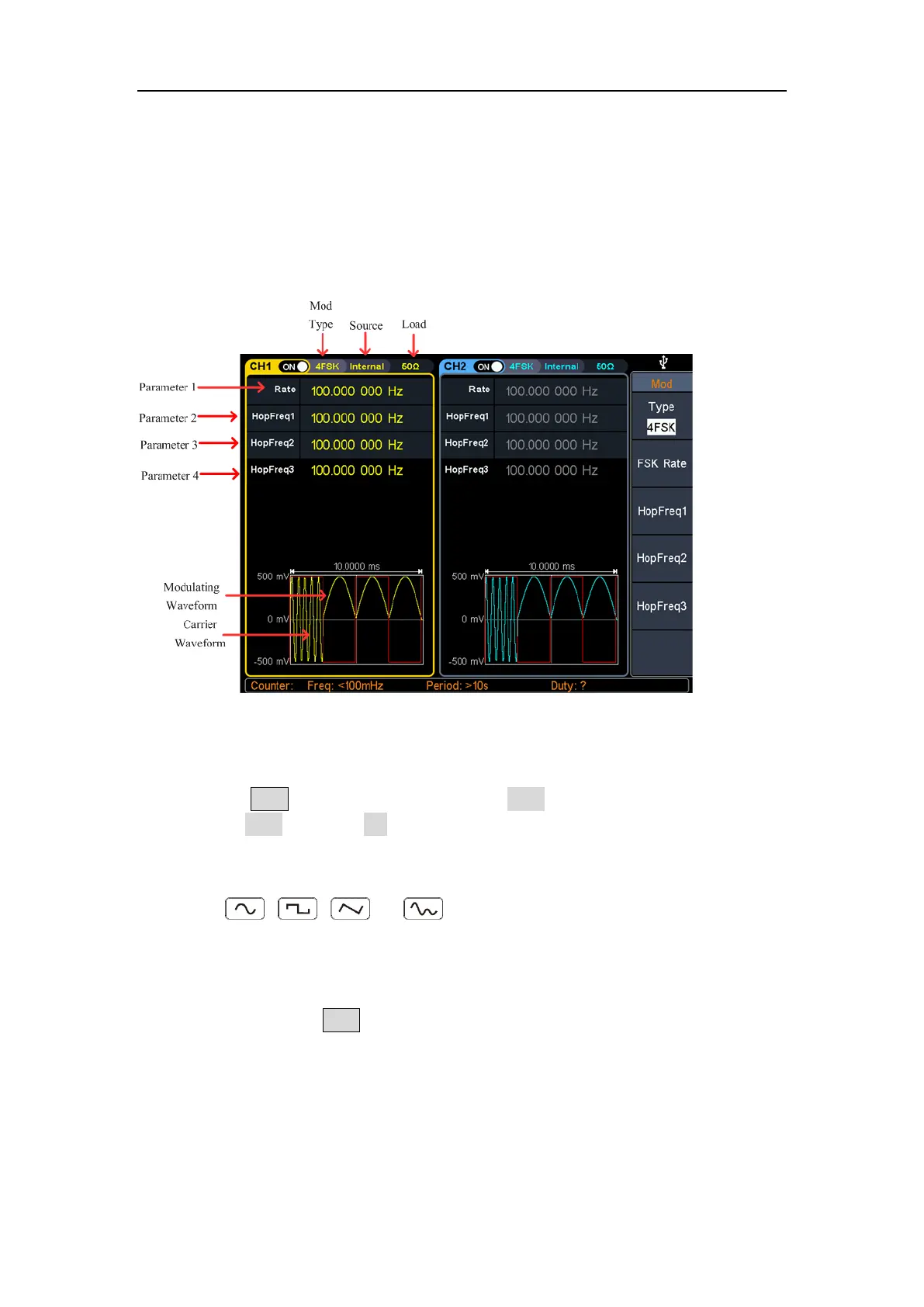
signal level of the instrument. The 4FSK user interface is shown below.
Figure 5-20: 4FSK user interface
How to set the parameters of 4FSK
(1) Press the Mod function key, then press the Type softkey, turn the rotary control
to select 4FSK, press the OK softkey.
(2) Select carrier wave shape:
The carrier wave can be Sine, Square, Ramp, or Arbitrary wave (except DC).
Press , , , or to select a desired carrier wave shap.
(3) Set carrier wave parameters:
Press the wave shap key of the selected carrier wave to display the waveform
and parameters of the carrier wave. You can change the parameters of the
carrier wave. Press Mod to return to the modulation mode interface.
(4) Modulating wave source:
4FSK uses internal modulation source, and the modulating wave is set as a
Square with 50% duty cycle.



 To Next Page