3.5.3 Replacing PF Encoder Assy P.3-65
3.5 Replacement of PF Driving Section Components VJ1324E-M-02
3.5.3 Replacing PF Encoder Assy
1. Remove Side Cover L.
"3.2.3 Removing Side Cover L and Replacing Maintenance Cover Holder" p.3-11
2. Remove Paper Guide R2.
"3.2.7 Removing Paper Guide R2" p.3-17
3. Remove PF Encoder Assy connector from MAIN board Assy.
"3.4.4 Replacing MAIN Board Assy" p.3-42
4.
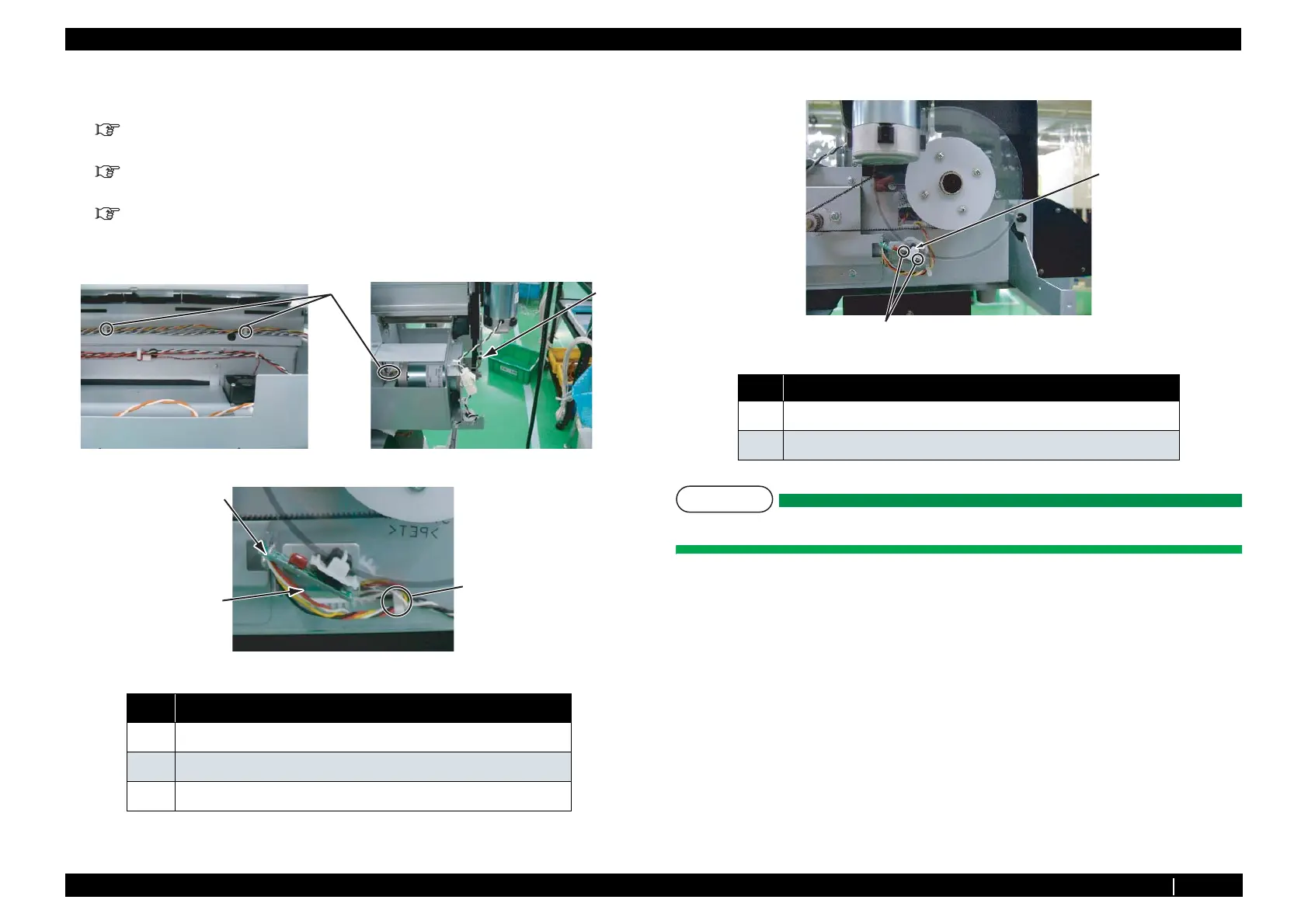
Remove PF encoder Assy cable from the clamp, then pull it out from L frame cable
inlet.
5. Remove the screws (2 pieces) that retaining PF encoder Assy.
NOTE
Do not damage or bend PF scale, or touch the circumference of scale.
6. Replace PF encoder Assy.
7. To reassemble unit, reverse the removal procedure.
8. Perform adjustments by following the instructions in"4.2 Adjustment Item" p.4-2.
No. Name
1
PF Encoder Assy
2
Clamp
3
Cable hole
2
1
1
2
1
3
No. Name
1
Pan head screw M2 × 8
2
PF Encoder Assy
1
2














 To Next Page