2.3 Troubleshooting Without Error Messages VJ1324E-M-02
2.3.1 Initial Operation Problems P.2-35
2.3 Troubleshooting Without Error Messages
This section describes the symptoms of errors without an error message as well as the check items and recovery actions.
2.3.1 Initial Operation Problems
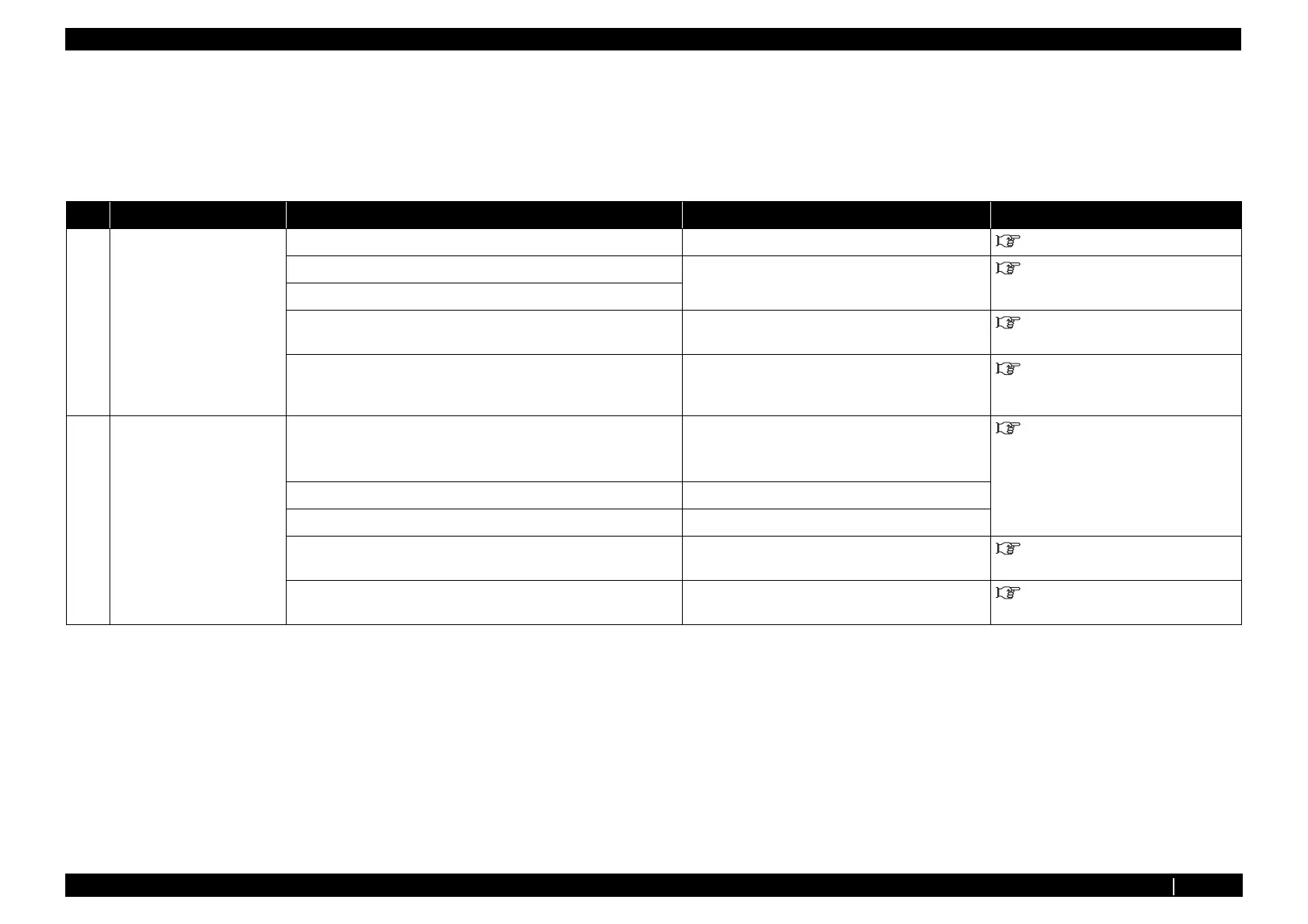
Table 2-6 Symptoms, Check Items and Actions for Initial Operation Problems
No. Symptoms Check Item Action Reference
1 Printer cannot be turned on 1. Is Power Cable connected? Connect Power cable securely. Operation Manual
2. Is FFC of Panel unit Assy cut or shorted out? Replace Panel FFC. "3.3.2 Replacing Panel FFC (Panel
tape wires)" p.3-22
3. Panel unit Assy may be damaged.
4. Panel unit Assy may be damaged. Replace Panel unit Assy . "3.3.1 Replacing Panel Unit" p.3-21
5. Inlet Assy may be damaged. Replace Inlet Assy .
"3.4.15 Replacing AC Inlet、 AC
Cable Noise Filter-Fuse Assy、 Noise
Filter FG_Assy" p.3-58
2 LCD display malfunction 1. Check the connection of Panel FFC connector area on the Panel
unit Assy side and MAIN board Assy side.
• Is Panel FFC obliquely inserted?
Correctly plug the following connectors again.
•Panel FFC
"3.3.1 Replacing Panel Unit" p.3-21
2. Panel FFC may be damaged. Replace Panel FFC.
3. Is LCD monitor of Panel unit Assy damaged? Replace Panel unit Assy .
4. MAIN board Assy may be damaged. Replace MAIN board Assy . "3.4.4 Replacing MAIN Board
Assy" p.3-42
5. Power board Assy may be damaged. Replace Power board Assy . "3.4.10 Replacing Power Board
Assy" p.3-50














 To Next Page