2.3 Troubleshooting Without Error Messages VJ1324E-M-02
2.3.7 Other Problems P.2-65
2.3.7 Other Problems
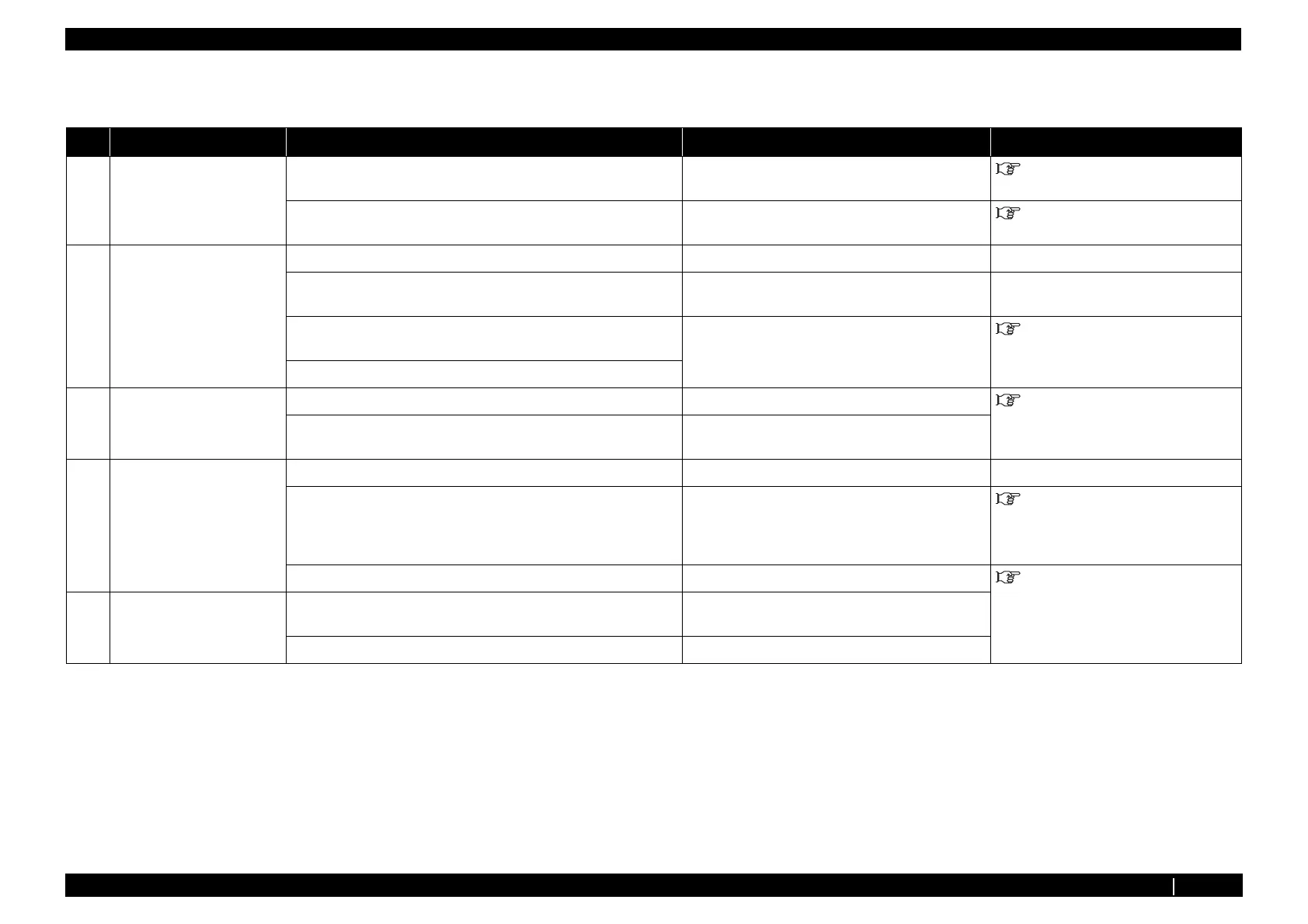
Table 2-12 Symptoms, Check Items, and Actions
No. Symptoms Check Item Action Reference
1 Machine hangs up. 1. Internal process of MAIN board Assy may be abnormal. Initialize parameters and reenter or modify them. "4.3 Working with MUTOH Service
Assistance Software" p.4-4
2. MAIN board Assy may be damaged. Replace MAIN board Assy . "3.4.4 Replacing MAIN Board
Assy" p.3-42
2 Machine power is shut off
during printing.
1. Is power cable shorted? Check by a circuit tester.
―
2. Is there any electric leakage? Check for short to chassis ground due to damaged
cable insulation.
―
3. Check power supply voltage (AC100V). Replace power board Assy . "3.4.10 Replacing Power Board
Assy" p.3-50
4. Check power supply voltage (DC5V).
3 Ink cartridge cannot be
inserted.
1. Is the needle of frame Assy deformed or damaged? Replace frame Assy needle. "3.9.1 Replacing Cartridge Holder
Assy" p.3-146
2. Is ink NOT sensor (black resin lever switch) of ink sensor Assy
damaged?
Replace ink sensor Assy .
4 Ink spills out of waste fluid
tank.
1. Check if the waste fluid tank is full. Replace waste fluid tank.
‐
2. Check presence of ink cartridge from "Sen.: Ink NOT" of self-
diagnosis function.
Remove all cartridges and lightly push the switch of
ink NOT sensor (K, C, M, Y) with something with a
flat tip such as ballpoint pen to check that the display
of "Sen: Ink NOT" changes.
"5.5.4 Sensor Menu" p.5-12
3. Is waste fluid tube coming out of flushing box bent? Reinstall it. "3.8 Replacing Maintenance
Section" p.3-138
5
Ink spills out of flushing
box.
1. Is flushing box clogged with dust? • Remove dust.
• Replace flushing box Assy .
2. Is waste fluid tube coming out of flushing box bent? Reinstall waste fluid tube.















 To Next Page