3.2.2 Remove Side Cover R P.3-8
3.2 Removing Covers VJ1324E-M-02
3.2.2 Remove Side Cover R
1. Remove I/H Cover.
"3.2.1 Removing I/H Cover" p.3-7
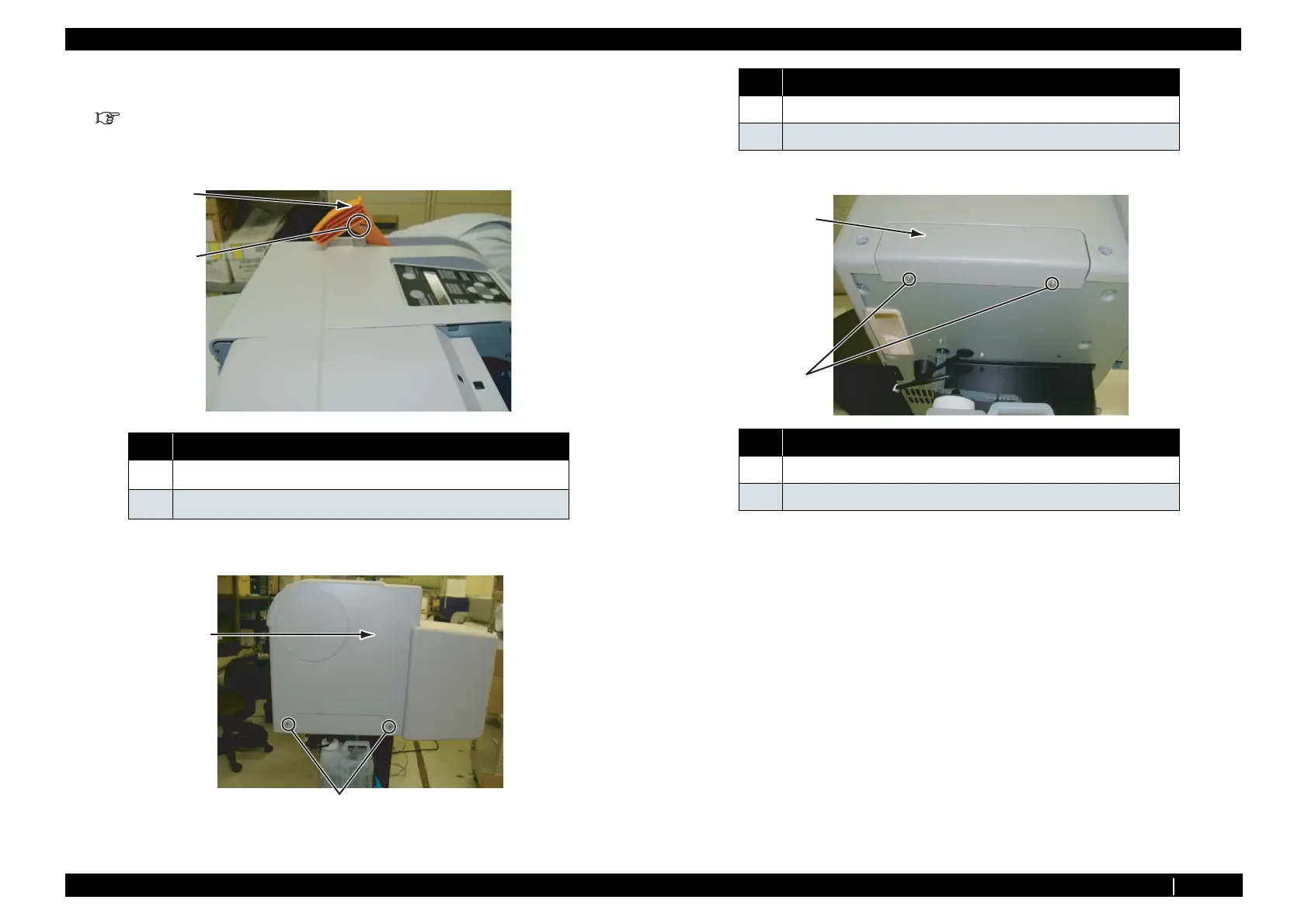
2. Move pressure lever to the UP status.
3. Remove the screw (1 piece) retaining pressure lever cap.
4. Remove the screws (2 pieces) on the out side of side cover R.
5. Remove Screws (2 pieces) retaining Waste Fluid Cover.
6. Remove Waste Fluid Cover.
7. Open Front Cover.
No. Name
1
Pressure lever cap
2
M4 × 10, P tight binding
2
1
2
No. Name
1Side Cover
2 Tapping screw M4 × 8, S tight cup
No. Name
1 Waste fluid Cover
2
Tapping screw M3 × 6 S Tight cup
1
2














 To Next Page