3.2.2 Remove Side Cover R P.3-9
3.2 Removing Covers VJ1324E-M-02
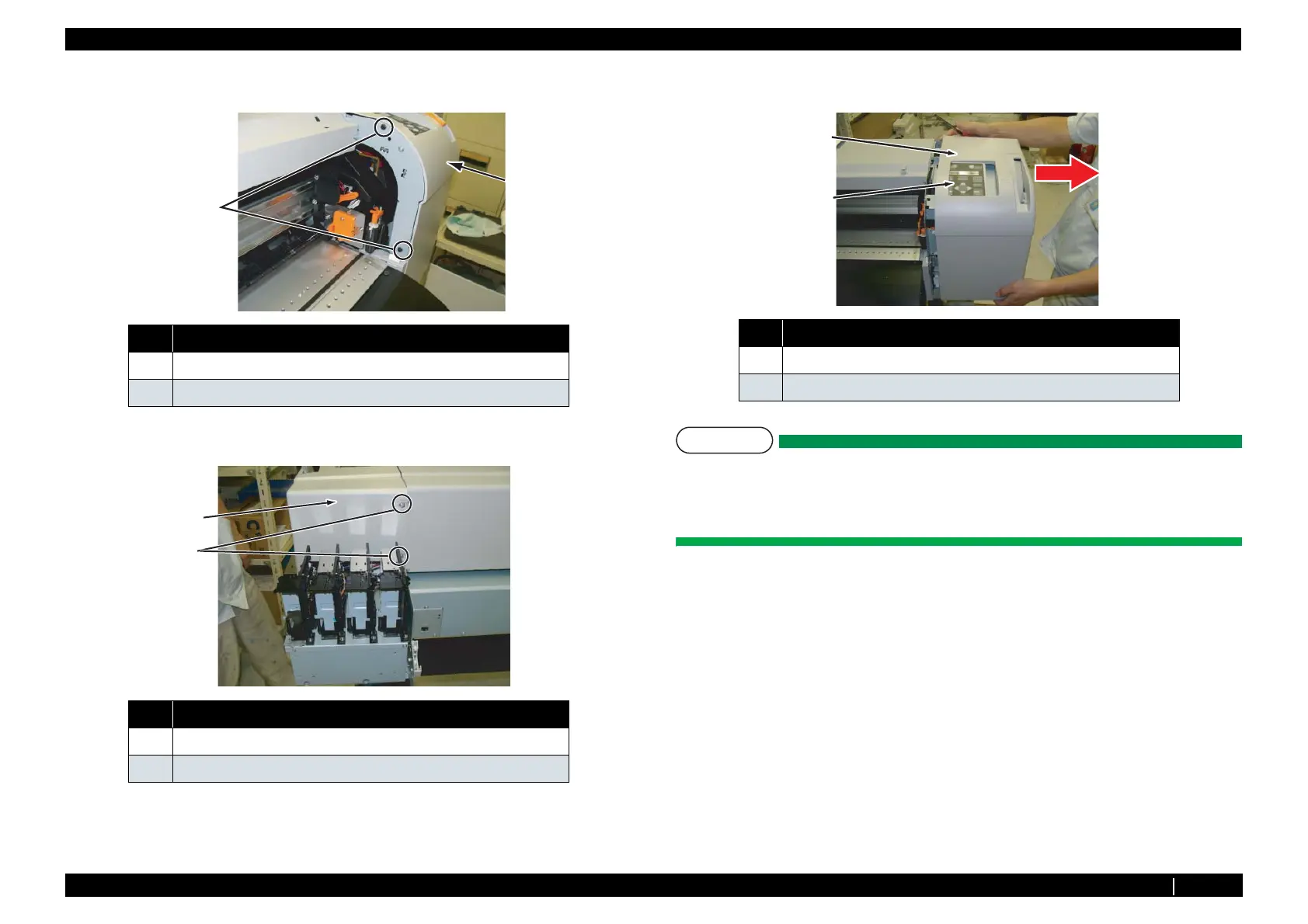
8. Remove screw (2 pieces) retaining inside of Side Cover R.
9. Remove screws (2pieces) retaining back side of Side Cover R.
10. Return pressure lever to the Down status and remove side cover R to the right direction (shown
with a red arrow in the figure).
NOTE
When removing side cover R, the switches on panel unit Assy may be stuck. To avoid this,
lift up the side cover R from the switches.
Also, in case pressure lever is stuck, remove side cover R to the right direction slowly. The
pressure lever’s material is elastic, therefore it is laterally distortion-resistant to an extent.
To install, follow the steps below.
11. Make sure that pressure lever is in the Down status.
No. Name
1 Side Cover R
2
Tapping screwM4 × 12 P Tight bind Black
No. Name
1
Tapping screwM4 × 12 S Tight cup
2 Side Cover R
2
1
1
2
No. Name
1Side Cover R
2 Panel Unit Assy
1
2














 To Next Page