3.2.2 Remove Side Cover R P.3-10
3.2 Removing Covers VJ1324E-M-02
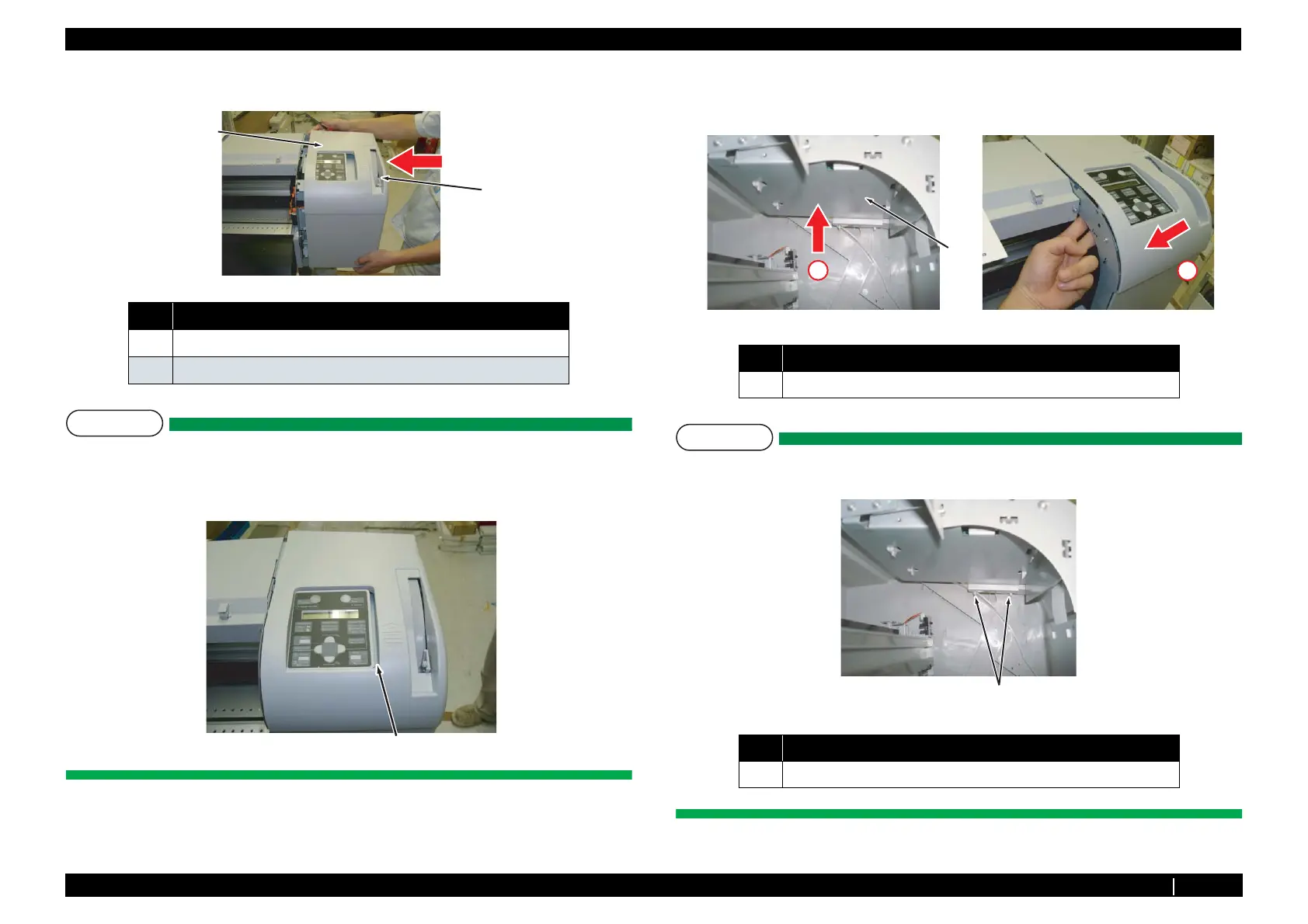
12. Assemble Side Cover R.
NOTE
• While bending pressure lever to the right with your left hand, place the tip of pressure
lever through the slit on side cover R.
• At this stage, there is a gap between panel unit Assy and side cover R. To get rid of this
gap, proceed to the step 13.
13. While pushing up panel unit Assy from the bottom (red arrow 1), push side cover R further to the
left direction (red arrow 2), and mount side cover R completely.
NOTE
If you try to mount side cover R without pushing up the panel unit Assy, side cover R tabs
shown in the next figure may break.
14. To reassemble unit, reverse the removal procedure.
No. Name
1 Pressure lever
2 Slit of Pressure lever
1
2
Gap
No. Name
1 Panel unit Assy (bottom)
No. Name
1 Side cover R tabs
1
1
2
1














 To Next Page