5.7.12 Feed Pitch Check Menu P.5-55
5.7 Adjustment Menu VJ1324E-M-02
5.7.12 Feed Pitch Check Menu
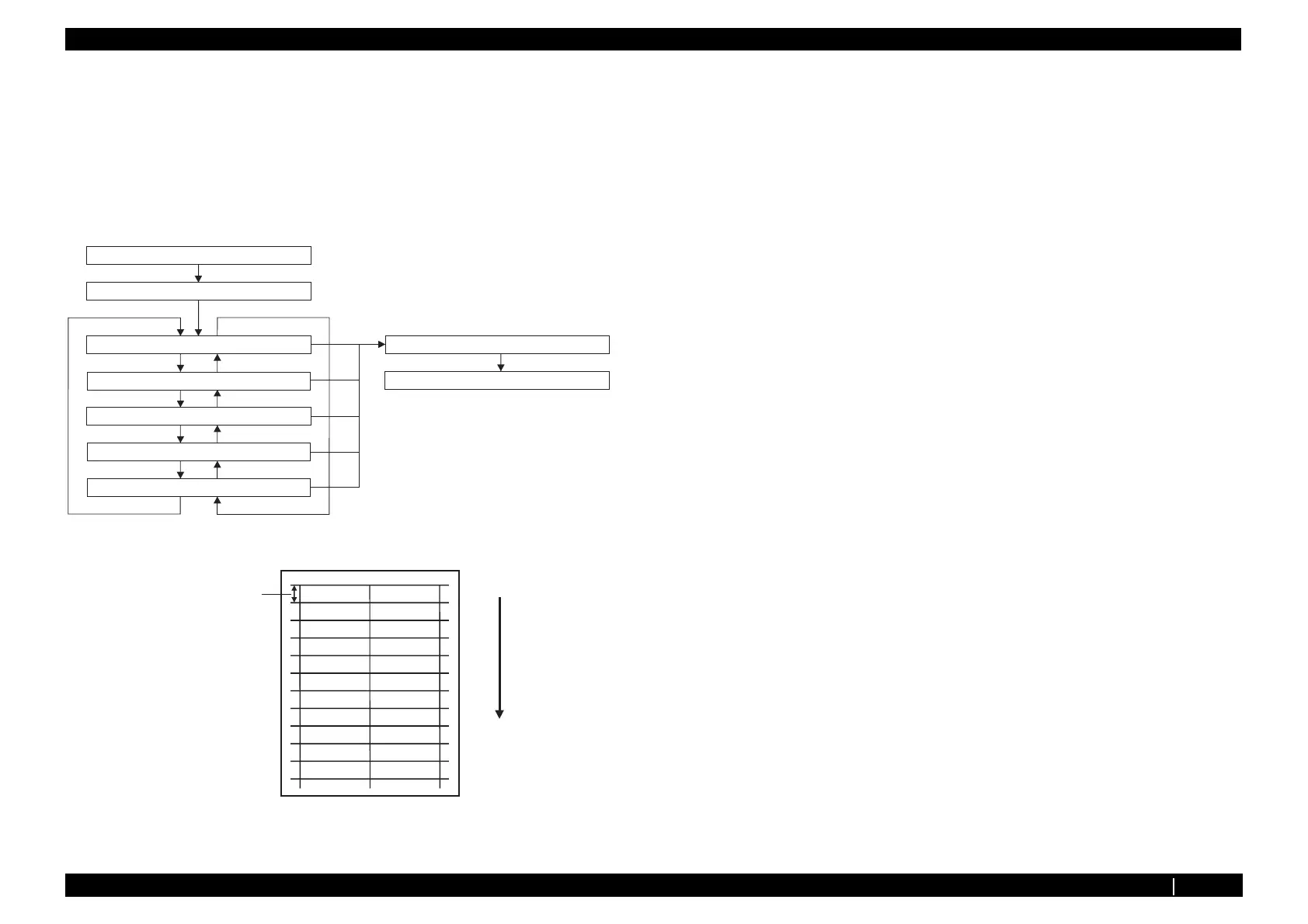
This menu is used to check whether there is an error in the media feed amount for one band by
reviewing a sample printing. There are no adjustment items.
To check the feed pitch, follow the procedure below.
1. Set media as necessary.
2. Select "Adj 11: SendPitch".
3. Select the feed pitch.
4. Print out with 320cps, VSD4, and Large dots.
㧭㨐㨖㨡㨟㨠㨙㨑㨚㨠ޓ㧼㨞㨕㨚㨠
Finish printing or [Cancel]
='PVGT?
㧭㨐㨖㧚㧦㧿㨑㨚㨐ޓ㧼㨕㨠㨏㨔
=?-G[
=?-G[
=?-G[
=?-G[
=?-G[
= ?-G[
= ?-G[
= ?-G[
= ?-G[
= ?-G[
㧼㨕㨠㨏㨔㧝㧦ޓ㧝㧞㧚㧣㨙㨙
㧭㨐㨖㧚㧝㧟㧦㧿㨑㨚㨐㧼㨕㨠㨏㨔
㧯㨔㨑㨏㨗ޓ㧟㧦㧭㨐㨖㨡㨟㨠㨙㨑㨚㨠
㧼㨕㨠㨏㨔㧞㧦ޓ㧢㧚㧟㧡㨙㨙
㧼㨕㨠㨏㨔㧟㧦ޓ㧟㧚㧝㧣㧡㨙㨙
㧼㨕㨠㨏㨔㧠㧦ޓ㧝㧚㧡㧤㧣㧡㨙㨙
㧼㨕㨠㨏㨔㧡㧦㧳㨞㨕㨐ޓ㧸㨑㨚㨓㨠㨔
='PVGT?
='PVGT?
Paper feed direction
Feed amount
for 1 band






 To Next Page