6.10 The Marker function
Narda IDA-3106 109
6.10.2 Using the markers separately
You can set and display the two markers A and B independently using the
Marker: Single marker function.
To use the markers separately:
You have selected the necessary trace types (see Selecting the trace
type (Trace) on page 101).
The Marker sub-menu is active.
1. Press the Marker softkey until Marker: Single is shown.
2. Press the Active Marker softkey to select marker A or B.
3. Select a trace type / detector: Press the Active Trace softkey, select an
entry with the rotary control knob and then press the OK key.
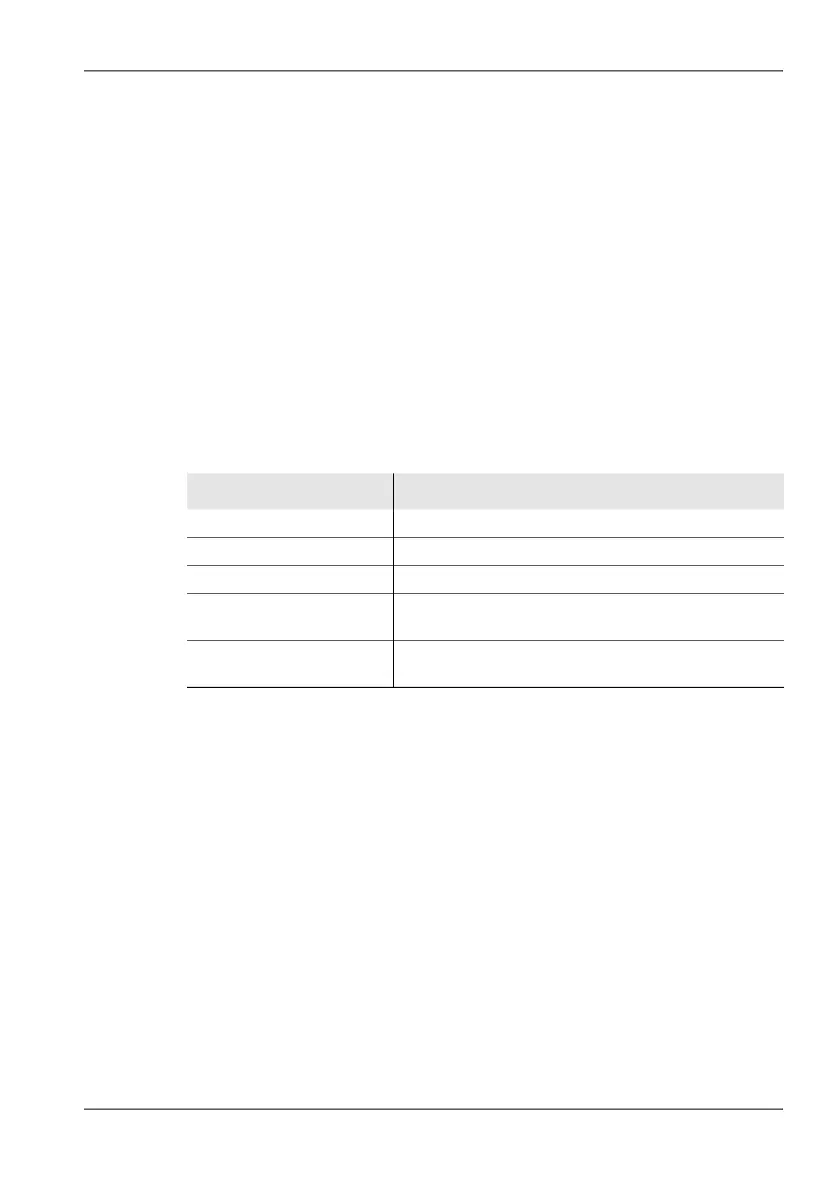
You can now use the available functions separately for markers A and B:
NOTE: An algorithm that covers all the existing measurement values contained in
the spectrum is used for peak markers. Peak values are indicated by “Pk”
after the trace type / detector (e.g.: Max Pk: 105.8 mV/m). If the marker is
not on a peak value, “Val” is shown after the trace type / detector (e.g.: Max
Val: 105.8 mV/m). Another special feature of the peak marker is that the
frequency is tracked and follows the peak value (Peak Tracking: On).
Table 28: Marker functions for selecting peak values
Selection Function
Rotary control knob Moves the marker to the desired position manually.
Highest Peak softkey Places the marker on the highest peak value.
Softkey Next Peak Places the marker on the next higher peak value.
Peak Left softkey Places the marker on the next peak value to the left of
the previous position.
Peak Right softkey Places the marker on the next peak value to the right
of the previous position.



 To Next Page