10.5 Using the trigger function
Narda IDA-3106 193
To use the Single or Multiple trigger types:
1. Press the Trigger Mode softkey and select the appropriate function.
2. Press the Trigger Level softkey and use the rotary control knob to set a
threshold value.
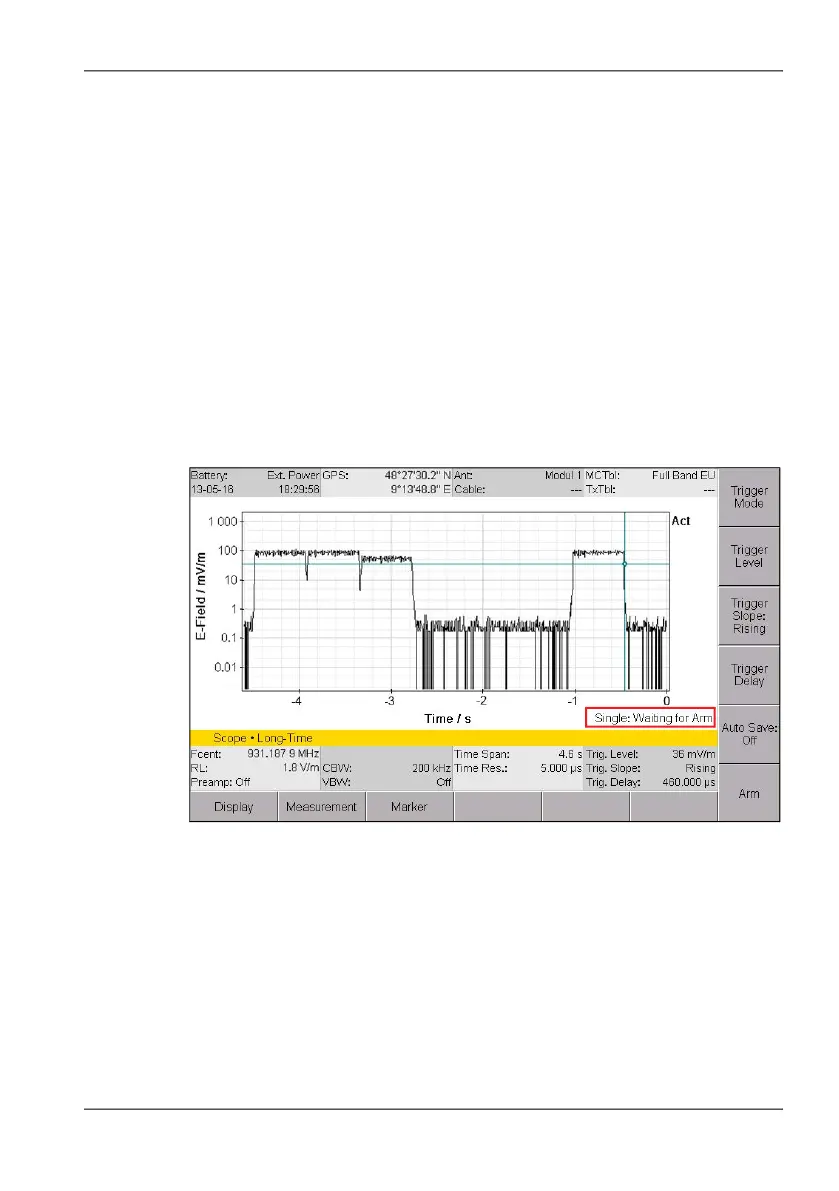
The threshold is indicated by a horizontal blue line on the screen.
3. Press the Trigger Slope softkey to select the edge:
– Softkey Trigger Slope: Rising: Rising edge is selected.
– Softkey Trigger Slope: Falling: Falling edge is selected.
4. Press the Trigger Delay softkey and select a value:
– Negative value: earlier time
– Positive value: later time
When you select a negative value, the trigger delay will be shown as
a vertical blue line on the screen.
When you have selected Single or Multiple, the readiness of the trigger
function is indicated at the lower right of the measurement screen:
Figure 44: Time Domain (Scope) operating mode, trigger function Single selected
but not yet started



 To Next Page