Page 3-22 V10/V7.5/V5/V3.5 Installation and Operation Manual
Issue 3.5 Section 3 Operating Instructions
3.6.3 View Faults
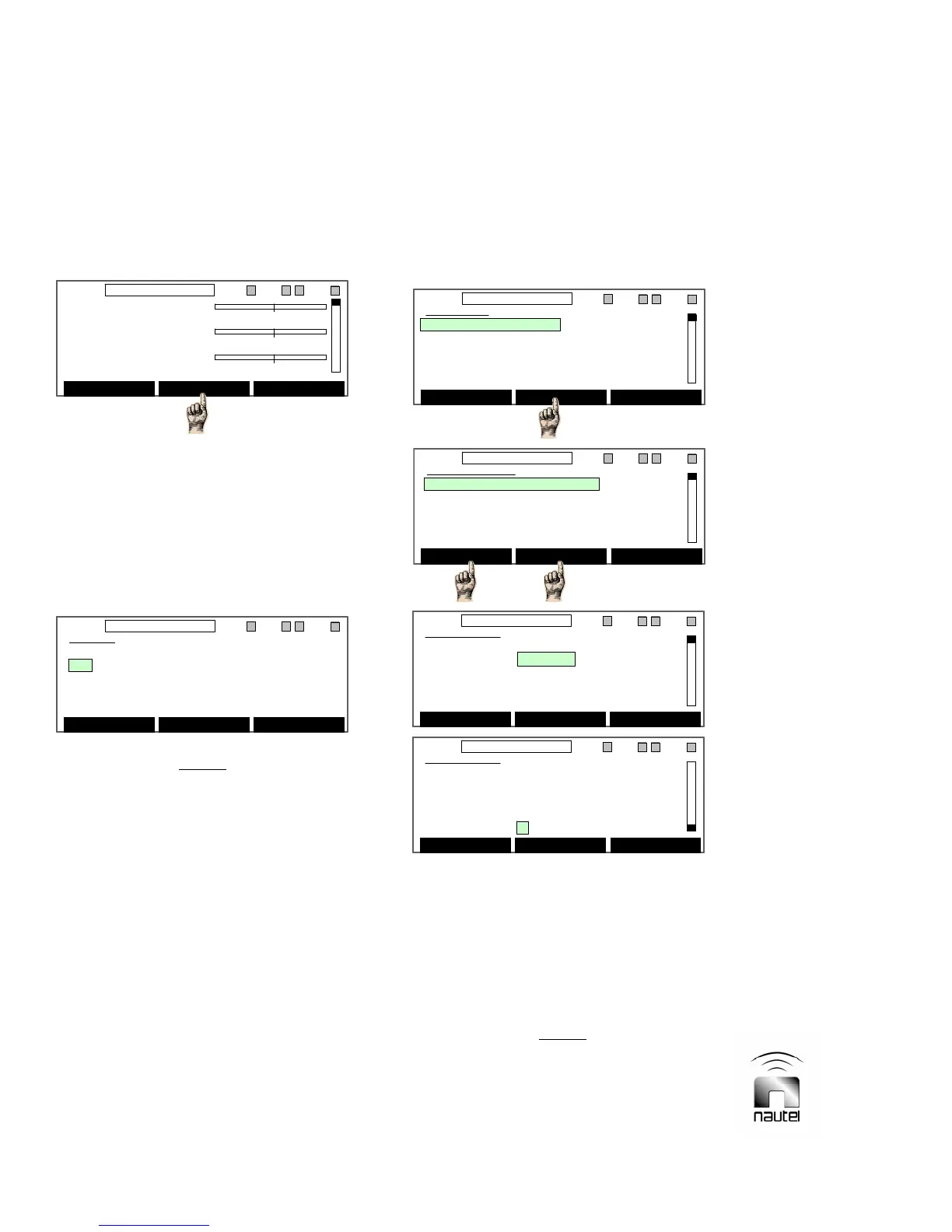
In addition to the system diagram’s fault
indicators, a list of current faults can be
viewed on the diagnostic display. View the
list of active faults as follows:
(a) From the main screen, press Status, if
displayed. A list of current faults is
displayed. If Status is flashing, there is
a new fault that has not been
acknowledged. If Status is not
displayed, no faults are being
recognized.
NOTE
Use the Events Log (see 3.6.6) to view
alarm history.
(b) If a new fault is displayed, press
Acknowledge. If applicable, press f
or g to scroll through faults.
(c) If the fault has been cleared, press
Reset to restore the transmitter to its
pre-alarm state. PA/PS faults,
cutback/shutback faults, or PA/IPA
latch-off faults can be cleared by a
Reset.
(d) Press Back to return to previous
menu.
3.6.4 Change Power, Frequency or
Mode
Power level, frequency, mode, IPA power, and
PA/IPA ALC can be controlled using the GUI.
Edit the transmitter’s presets as follows:
(a) From the main screen, press Menu.
Highlight Power Control (using f and g)
and press Select. The six presets (1-6)
are displayed, with their pre-programmed
parameters (frequency, operating mode
and RF output power level). The active
preset is indicated in the status bar.
NOTE
A preset can be edited without making it the
active preset. Pressing Select on a highlighted
preset in the Power Control screen is the only
way to activate a preset from the GUI.
Fwd Power 0 kW
0 6.00
Refld Power 0 W
0600
PA VDC 0 V
0 60.0
Menu Status Changeover
11:26 98.10MHz 0.00kW 1 ExA IPAA/A FanA
Fwd Power 0 kW
0 6.00
Refld Power 0 W
0600
PA VDC 0 V
0 60.0
Menu Status Changeover
11:26 98.10MHz 0.00kW 1 ExA IPAA/A FanA
Status
NEW Exciter Comm Failed
Acknowledge Reset Back
11:26 98.10MHz 0.00kW 1 ExA IPAA/A FanA
Status
NEW Exciter Comm Failed
Acknowledge Reset Back
11:26 98.10MHz 0.00kW 1 ExA IPAA/A FanA
Power Control
1 98.10 MHz FM 5.50 kW
2 98.10 MHz FM 1.50 kW
3 98.10 MHz FM 1.50 kW
4 98.10 MHz FM 1.50 kW
5 98.10 MHz FM 1.50 kW
Select Edit Back
11:26 98.10MHz 0.00kW 1 ExA IPAA/A FanA
Power Control
1 98.10 MHz FM 5.50 kW
2 98.10 MHz FM 1.50 kW
3 98.10 MHz FM 1.50 kW
4 98.10 MHz FM 1.50 kW
5 98.10 MHz FM 1.50 kW
Select Edit Back
11:26 98.10MHz 0.00kW 1 ExA IPAA/A FanA
Main Menu
Power Control
Module Status
Events Log
Software Version
Meters Presets
Select Back
11:26 98.10MHz 0.00kW 1 ExA IPAA/A FanA
Main Menu
Power Control
Module Status
Events Log
Software Version
Meters Presets
Select Back
11:26 98.10MHz 0.00kW 1 ExA IPAA/A FanA
Top of
Screen
Bottom of
Screen
or
Edit Preset
Preset 1
Power 5.50 kW
Frequency 98.10 MHz
Mode FM
PA ALC Y
Edit Back
11:26 98.10MHz 0.00kW 1 ExA IPAA/A FanA
Edit Preset
Preset 1
Power 5.50 kW
Frequency 98.10 MHz
Mode FM
PA ALC Y
Edit Back
11:26 98.10MHz 0.00kW 1 ExA IPAA/A FanA
Edit Preset
Preset 1
Mode FM
PA ALC Y
IPA Power 250W
IPA ALC Y
Edit Back
11:26 98.10MHz 0.00kW 1 ExA IPAA/A FanA
Edit Preset
Preset 1
Mode FM
PA ALC Y
IPA Power 250W
IPA ALC Y
Edit Back
11:26 98.10MHz 0.00kW 1 ExA IPAA/A FanA



 To Next Page