29Presets
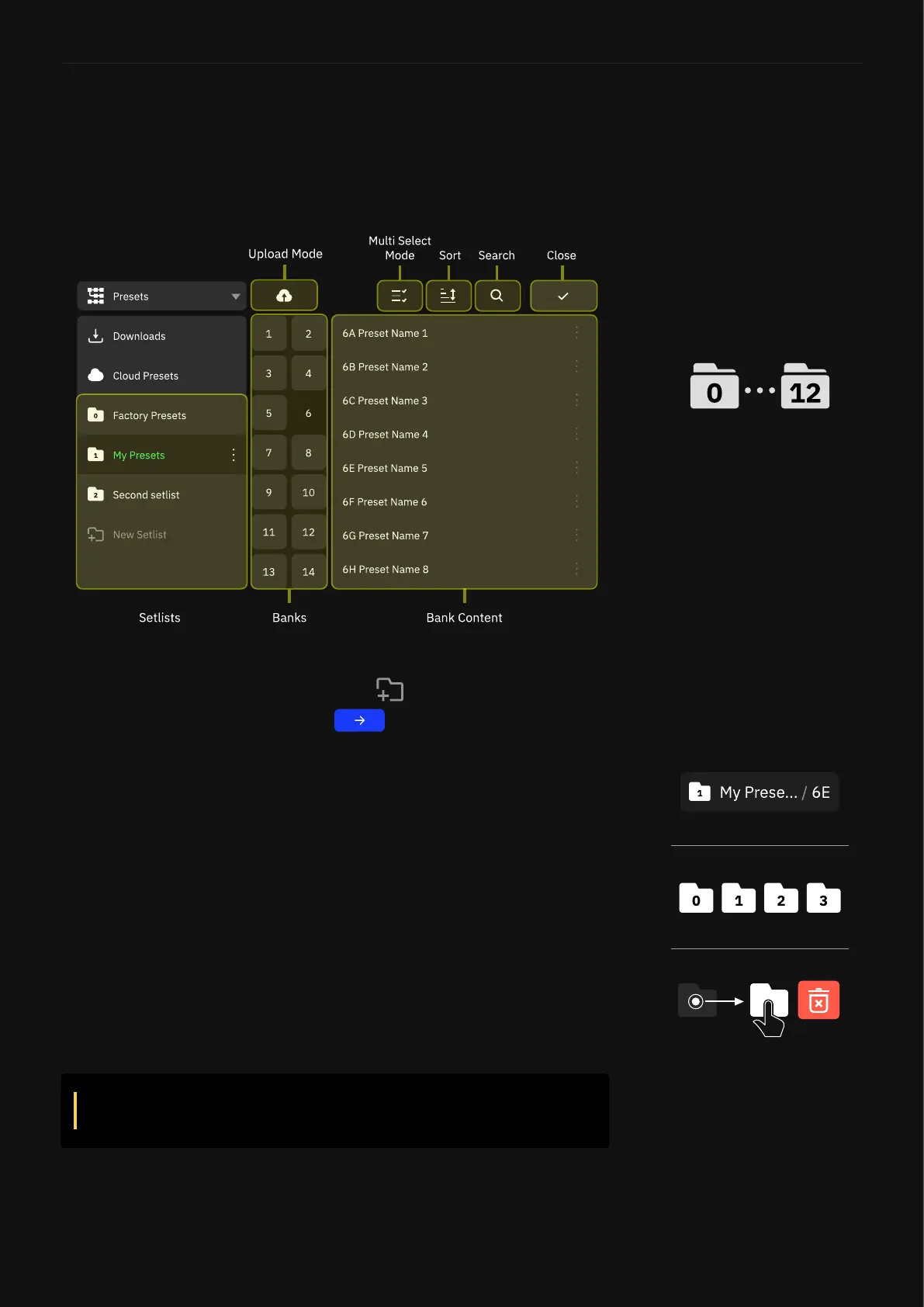
Setlists
A Setlist can store 32 banks of 8 Presets. You can have up to 12
User Setlists. This feature allows you to categorize your Presets by
band, project, album, or anything else!
To create a new Setlist, tap the active Preset name at the top of The
Grid to open the Directory. Then tap below the latest Setlist.
Give your Setlist a name and tap .
To change the active Setlist, open the Directory, navigate to the
Setlist you’d like to activate, then load any Preset stored in it.
To delete a Setlist, you can drag-and-drop it from the Device
Directories list to the upper-right corner of the screen. A warning
dialog will popup for conrmation to complete this action.
IMPORTANT: Deleting a Setlist will also remove all its
Presets as well.
By default, Presets will save in the active Setlist. When you save a
Preset, you have the option to specify the Setlist where you would
like to save the Preset.
Quad Cortex can store up to 13
Setlists, including the Factory
Presets and User Setlists.



 To Next Page