30Presets
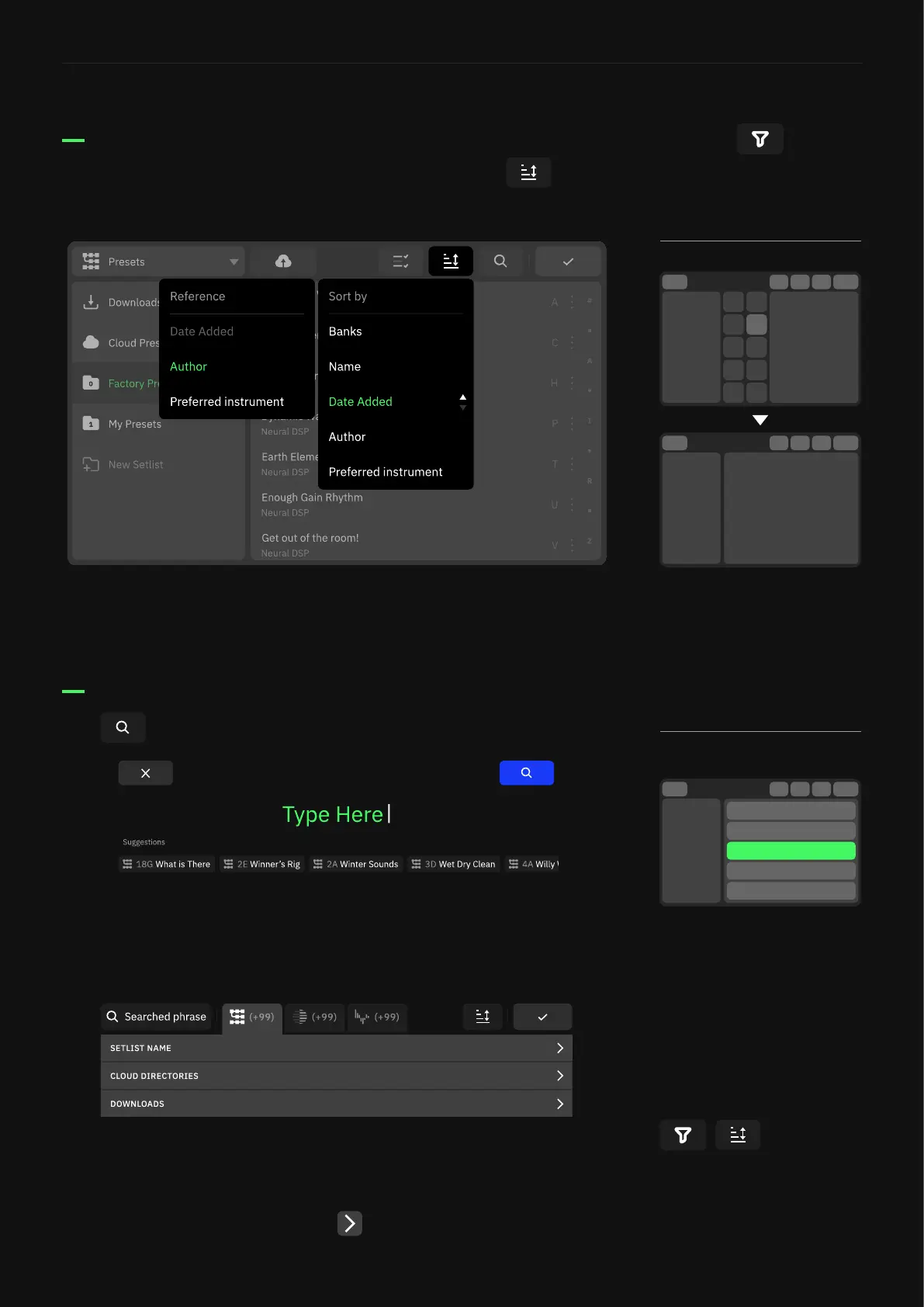
Sort and Search items
Sorting options are also available in the Directory. Tap to sort
items by Name, Date Added, Author, and more.
Tap to search items.
Tap an option a second time to change between ascending and
descending order.
Recently searched terms are displayed beneath the text entry.
Suggestions are also displayed beneath the text entry as you type.
Search results are separated into categories and tabs for Presets,
Neural Captures, and IRs. Subcategories can be collapsed or
expanded by tapping the arrows on the right-hand side.
Sort and lter items
Search items
Tapping an item will take you to
the le’s location in the Directory
and highlight it. From there
you can interact with the item,
continue browsing the Directory,
or tap the Search button to
return to the search results.
Search results can be sorted
and ltered depending on the
category selected.
Like Neural Captures, Presets
can be sorted. Banks is now
a sort option, so if Presets are
sorted by anything else, they will
display in a List rather than in
Banks.
Tap the Funnel to lter Neural
Captures by Amp, Cab, Pedal,
Made by Me, or more.



 To Next Page