56Modes
Hybrid Mode is ideal for users who want to quickly access new
Presets while being able to have granular control within them, or for
users who want to have both Scene and Stomp control within their
active Preset.
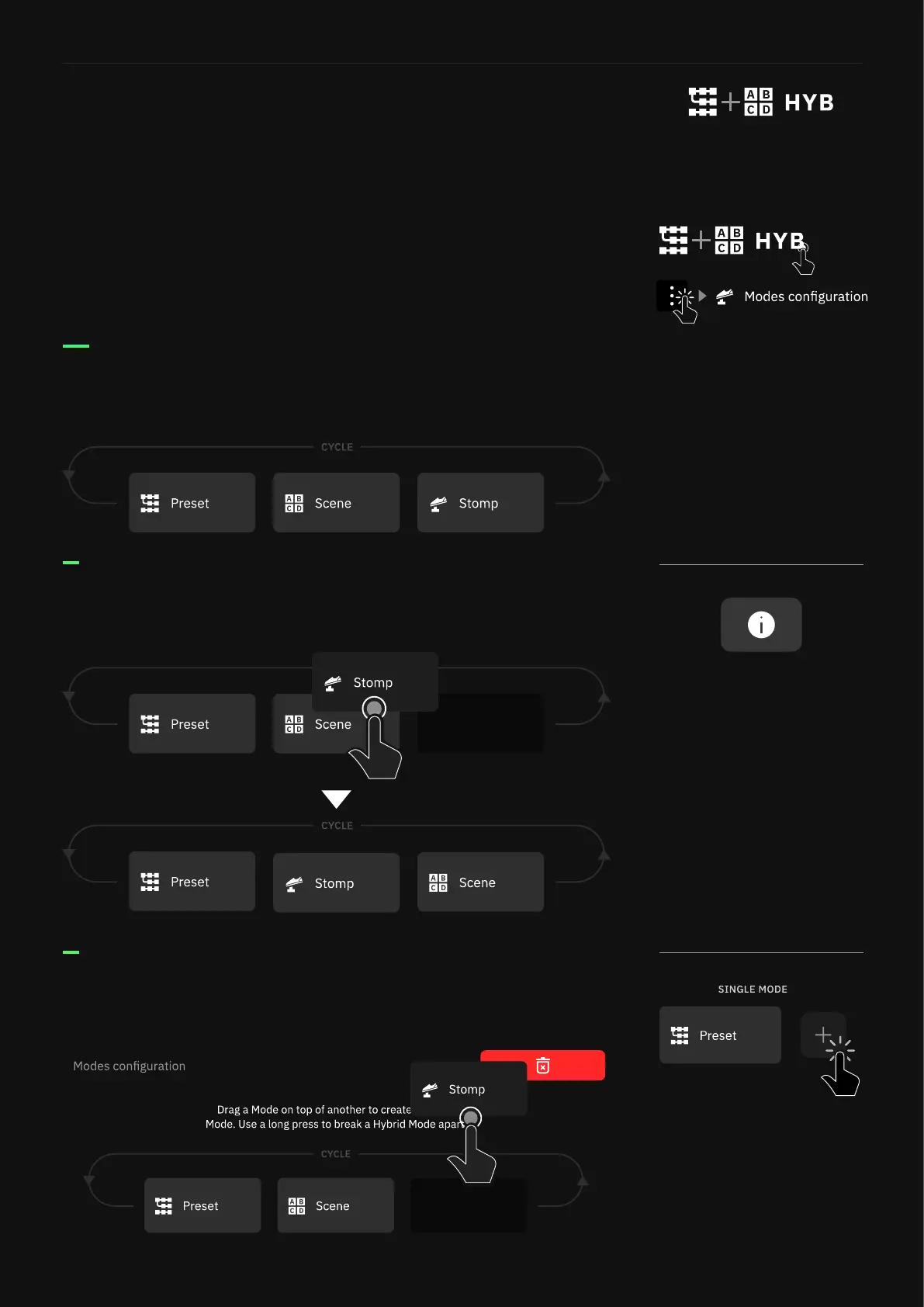
Press-and-hold the active mode to access the Modes conguration
screen.
Hybrid Mode
Modes conguration screen
On the Modes conguration screen, you can re-order modes as well
as create a Hybrid Mode.
Drag and drop Modes between slots to change their order when
cycling through Moder on The Grid.
Drag and drop Modes to the top-right corner to remove them from
the cycle completely.
When a Mode has been removed,
it can be added again by pressing
the add button.
It is not possible to remove all
three Modes.
When Modes are re-ordered,
MIDI CC values will not adapt to
these changes.
For example, by defaulty Preset
Mode is in Mode Slot 1 and it’s
recalled via CC#47 value 0.
If Stomp Mode is moved to Mode
Slot 1, then the same CC#47
value 0 will now recall Stomp
Mode.



 To Next Page