33Presets
Expression Bypass
First, assign an expression pedal to a device block. Tap a block on
The Grid, tap its contextual menu, then tap “Assign Expression
Pedal”.
Blocks can be engaged and bypassed via Expression Pedals.
Use the “ASSIGN” button to assign the expression
pedal to the BYPASS parameter. Use the button
to access its parameters.
ASSIGNED
BYPASS
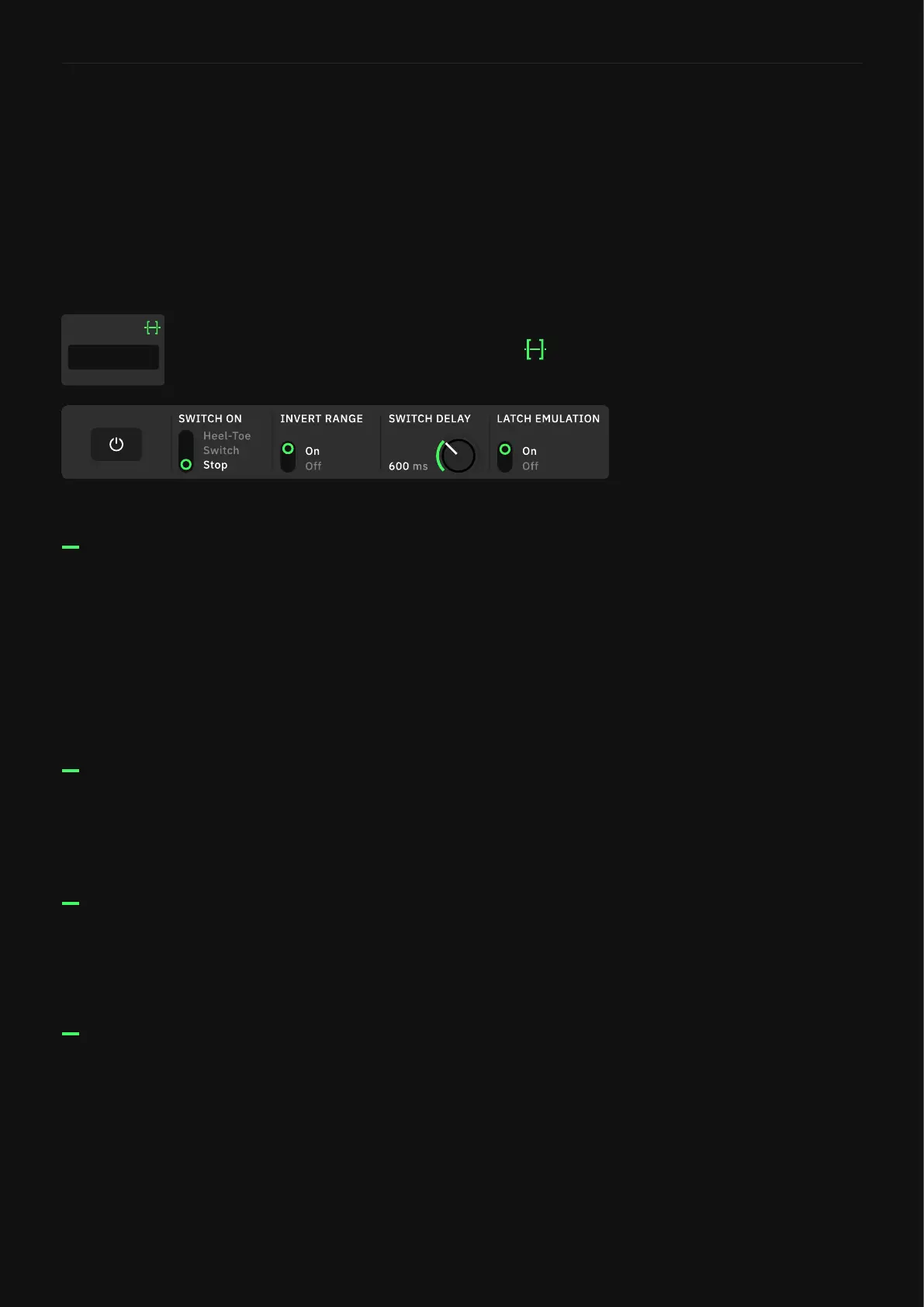
SWITCH ON
INVERT RANGE
SWITCH DELAY
• Heel-Toe: The block will be bypassed at Heel position. When
INVERT RANGE is set to “On” the block will be bypassed at Toe
position.
• Switch: Pressing the toe-switch of the expression pedal will
bypass the device block.
• Stop: Keeping the expression pedal still will bypass the device
block
(Heel-Toe and Switch modes)
• ON/OFF SWITCH: Reverses the value where the bypass is
engaged.
(Heel-Toe and Switch modes)
• TIME KNOB: Sets the time it takes for the device block to be
bypassed (Up to 5000ms).
LATCH EMULATION
(Switch mode)
• ON/OFF SWITCH: Modies momentary toe-switches behavior
to emulate latching response.



 To Next Page