43
Here is how it works:
You program a sequence with Niryo Blocks
You save the sequence on the robot
You add the sequence to the sequence autorun
Now you can trigger the sequence with the top button, without having to open Niryo
One Studio
This is very useful when you use Niryo One in an exhibition event or for a demo. You’ll
just need to power on the robot, wait for the LED to be blue or green, and then press the
button to run a given set of sequences (that you previously programmed).
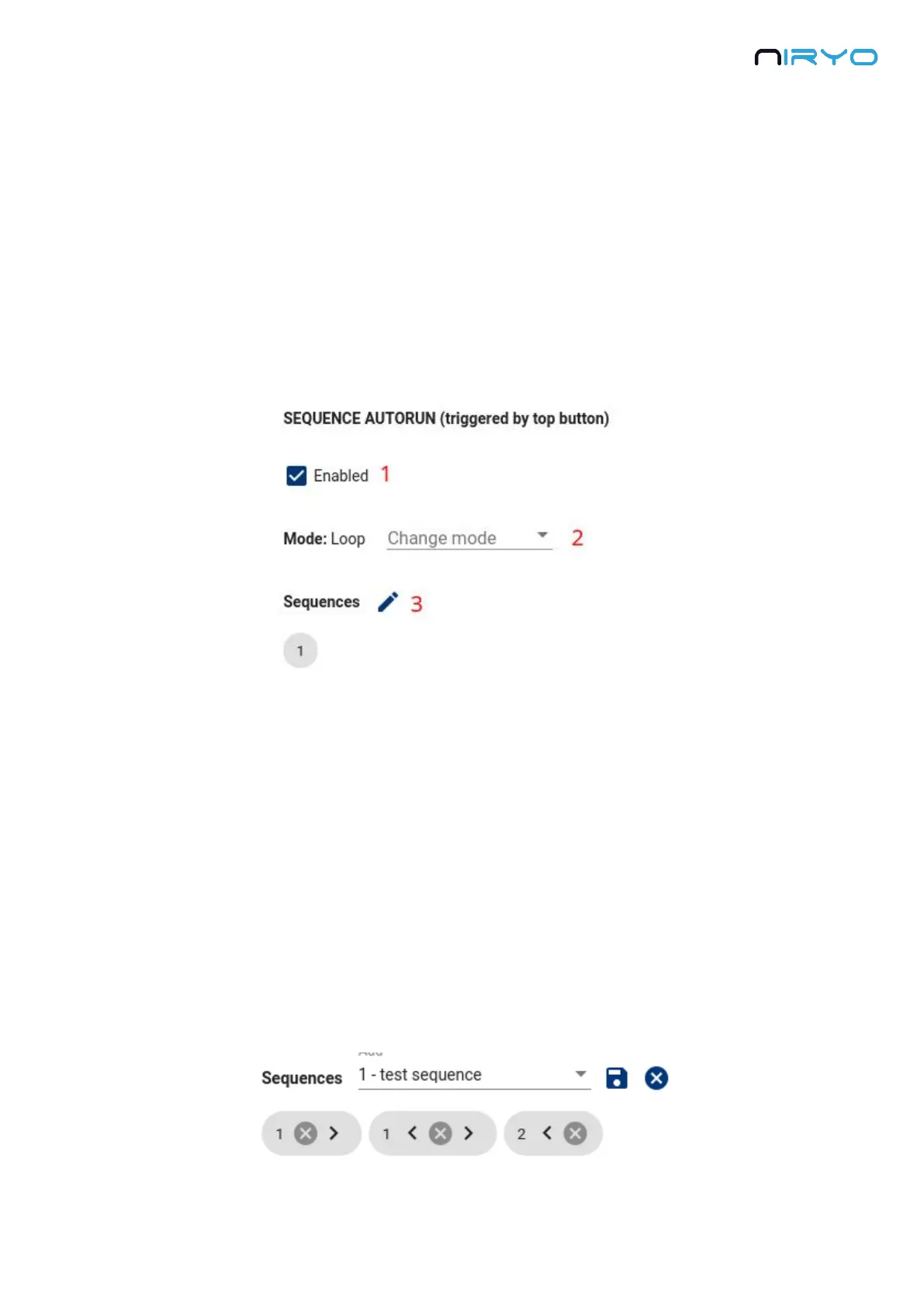
In Niryo One Studio, go on the “Sequence” panel → “Sequence autorun” section.
1. Check/Uncheck to enable/disable the sequence autorun functionality (if disabled, pressing
the top button will not run any sequence).
2. Choose the sequence autorun mode. Here you have 2 choices:
One shot: when you press and release the top button, the given set of sequences will
be run once. After that, the robot will go back to a “resting position” and activate the
“learning mode”. You can start another run by pressing the button again. If you press
the button while the set of sequences is running, it will stop the execution.
Loop: when you press and release the top button, the given set of sequences will be
run in a loop, forever. You can press the button again to stop the execution.
3. Modify the set of sequences to run. Click on the “edit” icon button to choose which sequence
to include in the set, and modify the sequence order. Click on the “save” icon button to save
this set of sequence.



 To Next Page