PROPlus / PRO Series Automated Dispensing Systems
85www.nordsonefd.com info@nordsonefd.com +1-401-431-7000 Sales and service of Nordson EFD dispensing systems are available worldwide.
How to Use Marks to Dispense onto a Plain Workpiece (continued)
To Create Horizontal and Vertical Marks on a Plain Workpiece (continued)
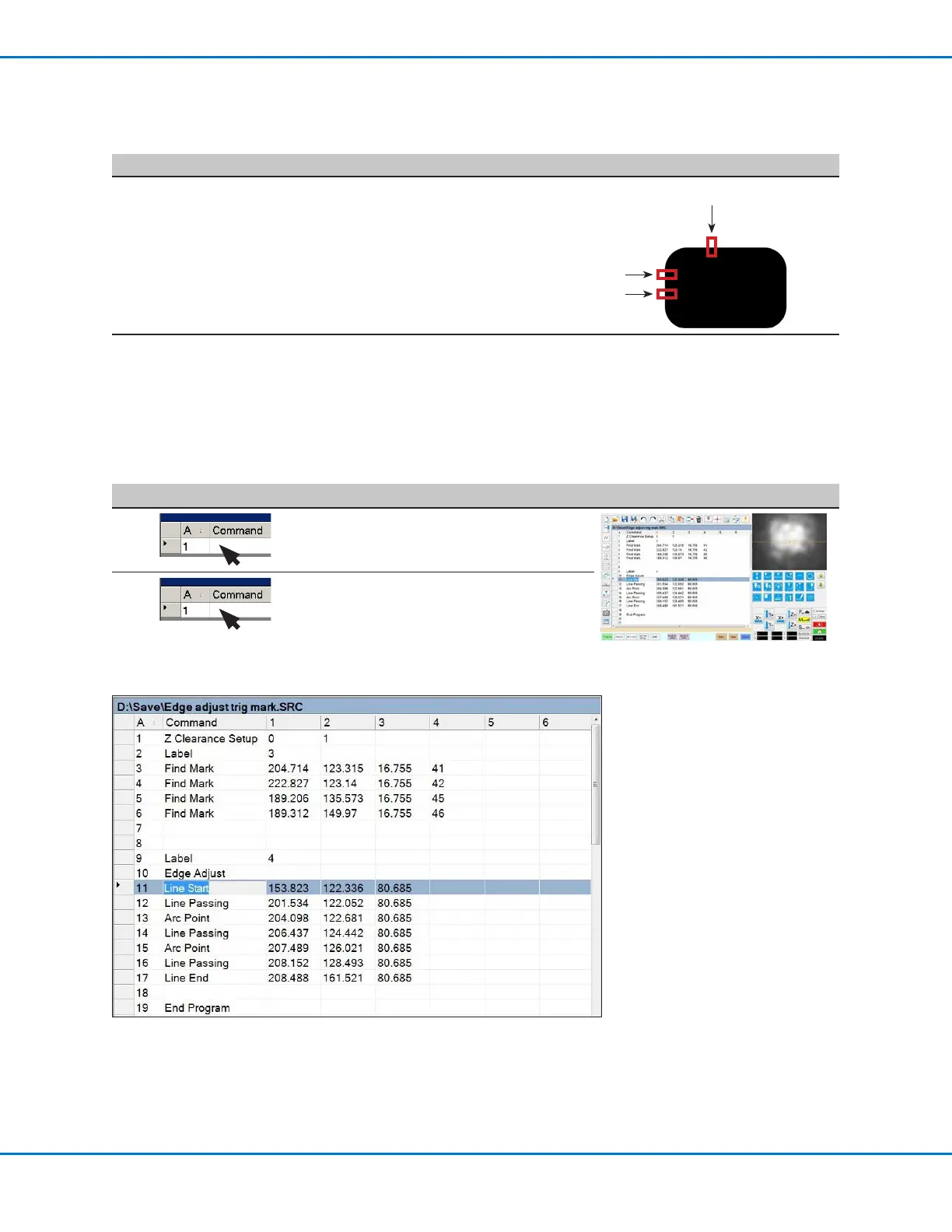
Example program using Edge Adjust and four Find Mark commands
To Use the Edge Adjust Command in a Program
#
Click Step Reference Image
1
• Insert four Find Mark commands near the
top of the program, one for each mark image
created in the previous procedure.
2
• Insert an Edge Adjust command after the Find
Mark commands.
Refer to the sample program provided below
as a guideline.
# Click Step Reference Image
8
• Repeat steps 3–7 to create horizontal
mark 2.
• Repeat steps 3–5 to create vertical
marks 3 and 4. This example uses 40 for
Width and 20 for Height.
3
4
2
9
• Continue to “To Use the Edge Adjust
Command in a Program” on page85.



 To Next Page