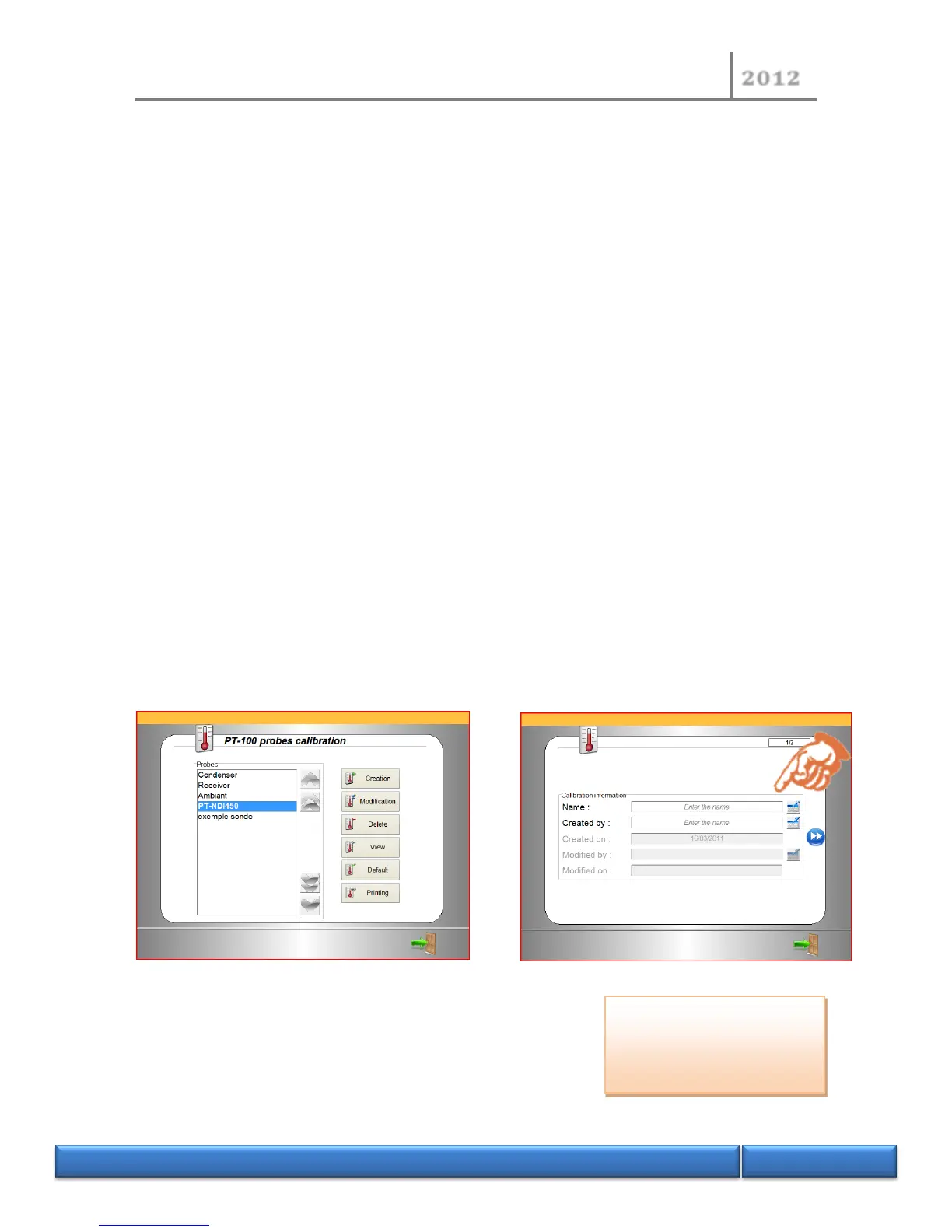
For each calibration, it is possible to:
- Creation: Create a new calibration (case of a new probe).
- Modification: Modify a calibration (in the event of a deviation or erroneous
measurements).
- Delete: Delete a calibration (if the probe is destroyed or calibration is false).
- Display: See a calibration (allows checking the points entered).
- Default: Declares a probe selected by default (this is the probe called up when starting a
test).
- Printing: Print out the calibration.
For sample probes, it is possible to store 1,000 calibrations. This allows carrying out a
calibration session when the measuring instruments are available and storing the calibrations
under the probe reference number. In operation, if it is necessary to change the probe
(following breakage or deviation in results), simply connect the new probe and declare it in
the instrument.
The display mode allows displaying the current calibration points and reading the value of
the temperature in real time.
4.3.1 Example of creation of a new calibration
In the event of a modification, the previous
fields remain completed and the ‘modified by’
and the ‘modified on’ fields must be
completed before you can move on to the
next sequence.


 To Next Page