49 EV2 Series DVR
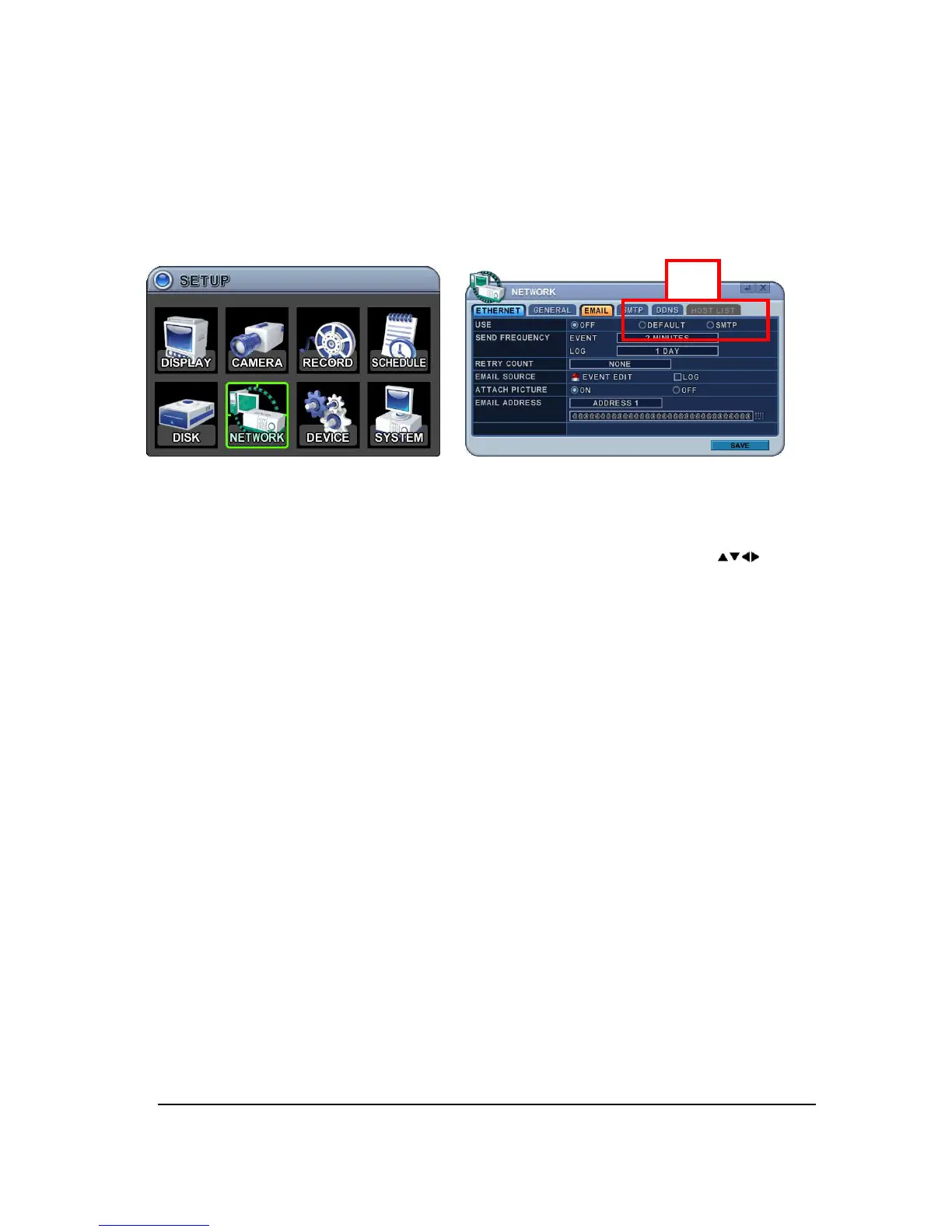
6.3. EMAIL
This DVR allows you to specify the events that generate notification. Sends e-mail
notification if an event occurs such as alarm or motion is detected and so forth.
The mail server can use either the DVR mail server or your existing e-mail settings.
The menus are displayed with options on the left-hand column and settings in the right hand
column. A cursor (highlighted menu) can be moved using the Direction buttons [ ].
1. USE: Select the e-mail notification on or off. The default is off. Press [-, +] button to
select. Using the mouse, click the option to select mail server.
1) Default: Default it is provided by manufacture. Mail notification options and mail
address settings are available.
2) SMTP: SMTP Configuration TAP will be activated to set up your own mail settings.
2. Send Period: e-mail will be sent by selected intervals.
1) Event: [Immediately, 10 Minutes, 1 hour, 1 Day]
2) Log: [1 Day, 1 Week]
3. Retry Count: Sets number of times an email will be sent again after a send failure.
4. E-mail Source: Event must be specified using notification options.
1) Event Edit: Notifications can be enabled for each channels for Alarm, Motion,
Video Loss and System (HDD Fail, Record Fail, HDD Full and etc). Press [ENTER]
button to select.
ON



 To Next Page