50 EV2 Series DVR
5.
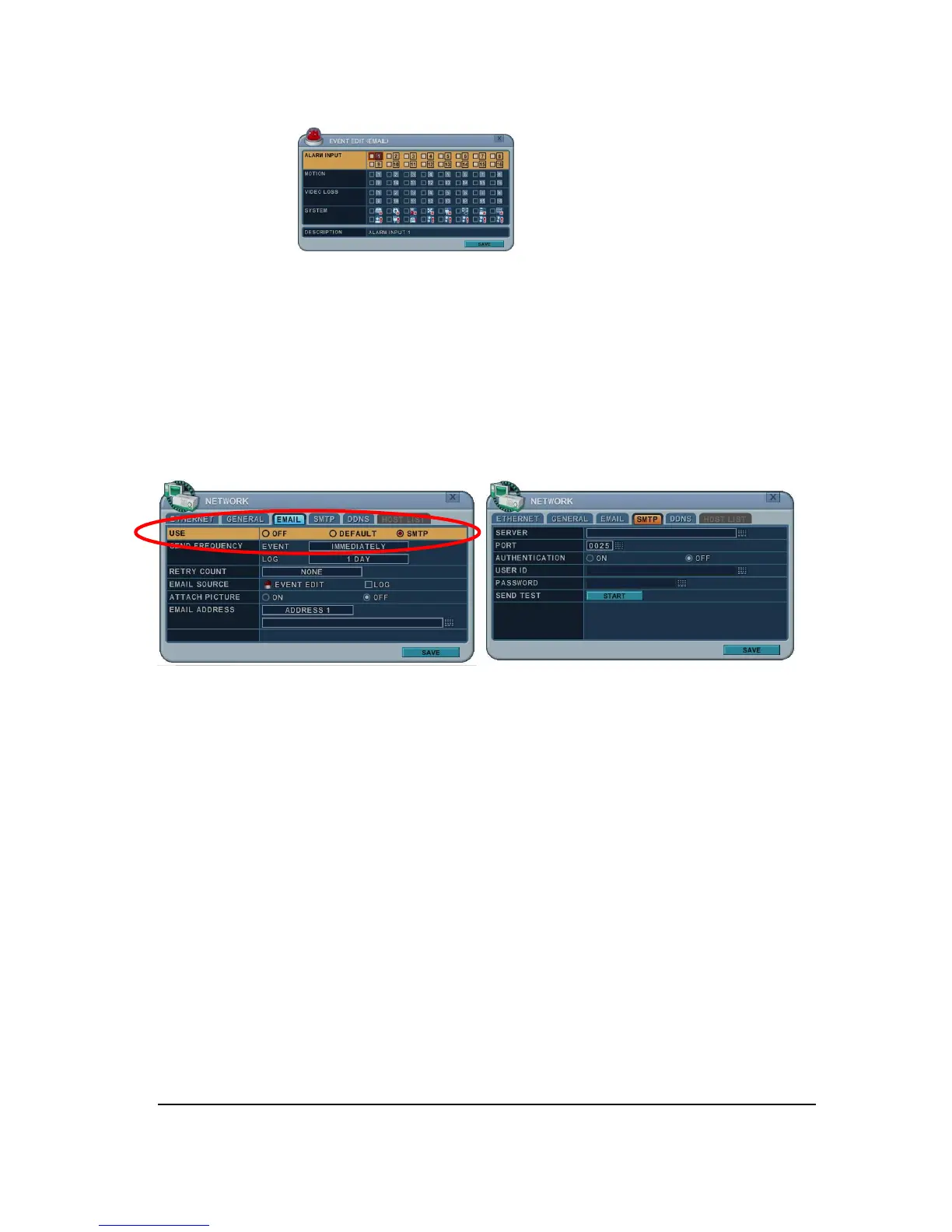
6) Log: This DVR will mail Log list at selected intervals.
6. Attach Picture: While you are in recording mode, picture can be attached for mail.
7.
E-mail Address: 5 mail addresses can be configured for mail notification.
6.4. SMTP
This menu will be activated when you check <SMPT> on EMAIL.
The following settings are only needed if you are NOT using the DVR mail server.
1. Server: Enter the e-mail server name or IP. To server name, using the virtual
keyboard, or pressing appropriate Numeric button on IR Remote or front panel.
2. Port: Define the port that the SMTP server will communicate through. By default, it set
to 25.
3. Authentication: Check this <on> if your mail server requires authentication.
4. User ID & Password: Enter the user ID/name and password for the SMTP Server.
(It is recognized as a small letter, even it’s displayed as a Capital Letter).
5. Sent test: Test to send e-mail.
6. Select SAVE to save changes and press [ENTER] button to exit the menu.
Exit the menu without making changes, press [CANCEL] button.



 To Next Page