40 EV2 Series DVR
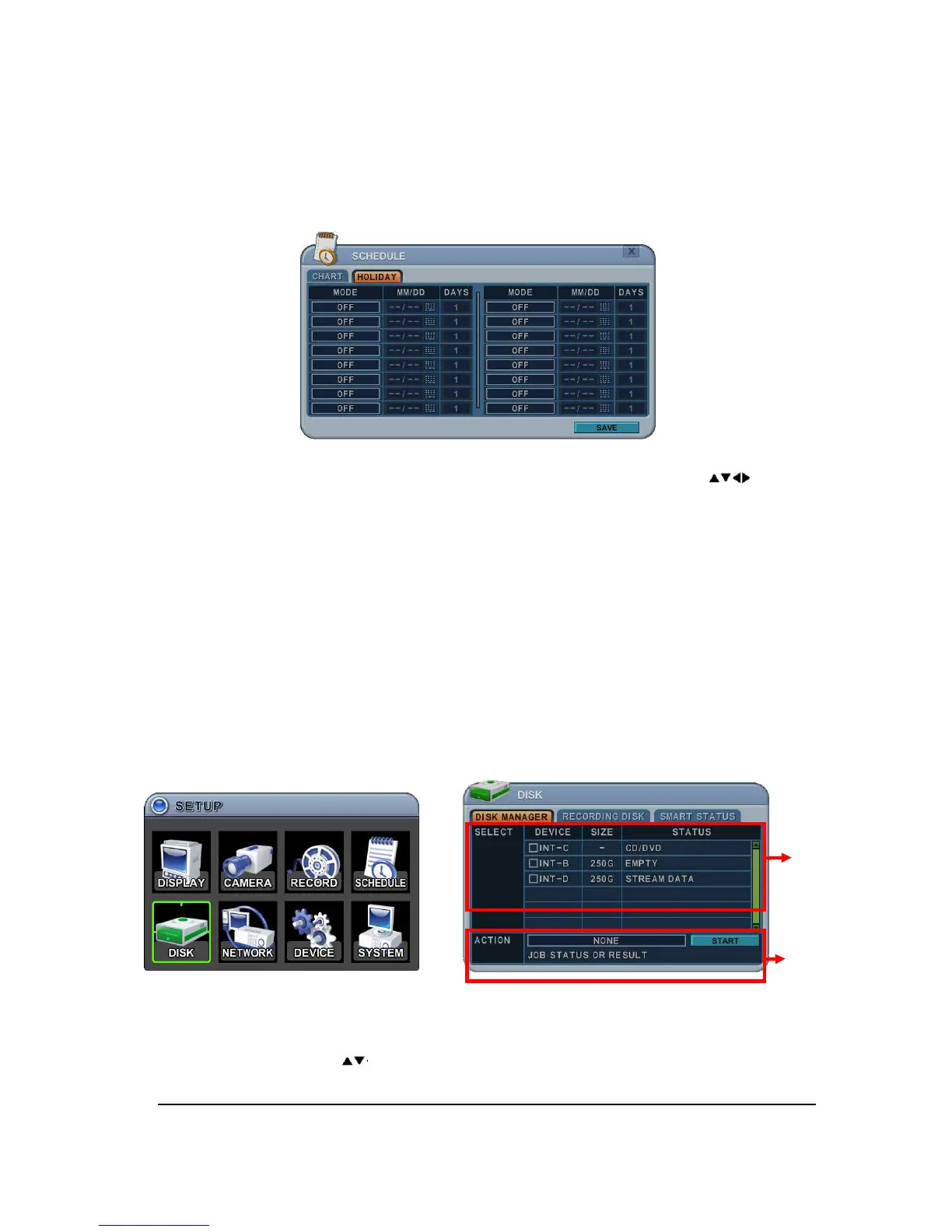
4.2. Holiday Setup
This allows you to create up to 32 holidays. If a holiday schedule occurs on the same date
as a weekday schedule, the holiday schedule will override the weekday schedule.
1) A cursor (highlighted menu) can be moved using the Direction buttons [ ].
2)
Select each day to configure, press [ENTER] or clicking by mouse.
3)
Use [-, +] button to change the values.
Mode : [OFF]
[Day]
[Night]
[No Rec]
[Sun~Sat]
[Custom]
Date: The date of Holiday start. .
Days: The time of holiday duration [1 to 15 days]
5. DISK
5.1. DISK Manager
Disk Manager is used to format hard disk and to assign the HDD usages such as backup or
mirroring.
1. Select
1) The menus are displayed with options all installed HDD or ODD list.
1) Press up/down [ ] buttons to highlight Hard Disk or ODD, then press [-, +]
button to select. Using the mouse, click the HDD option.
①
②



 To Next Page