58 EV2 Series DVR
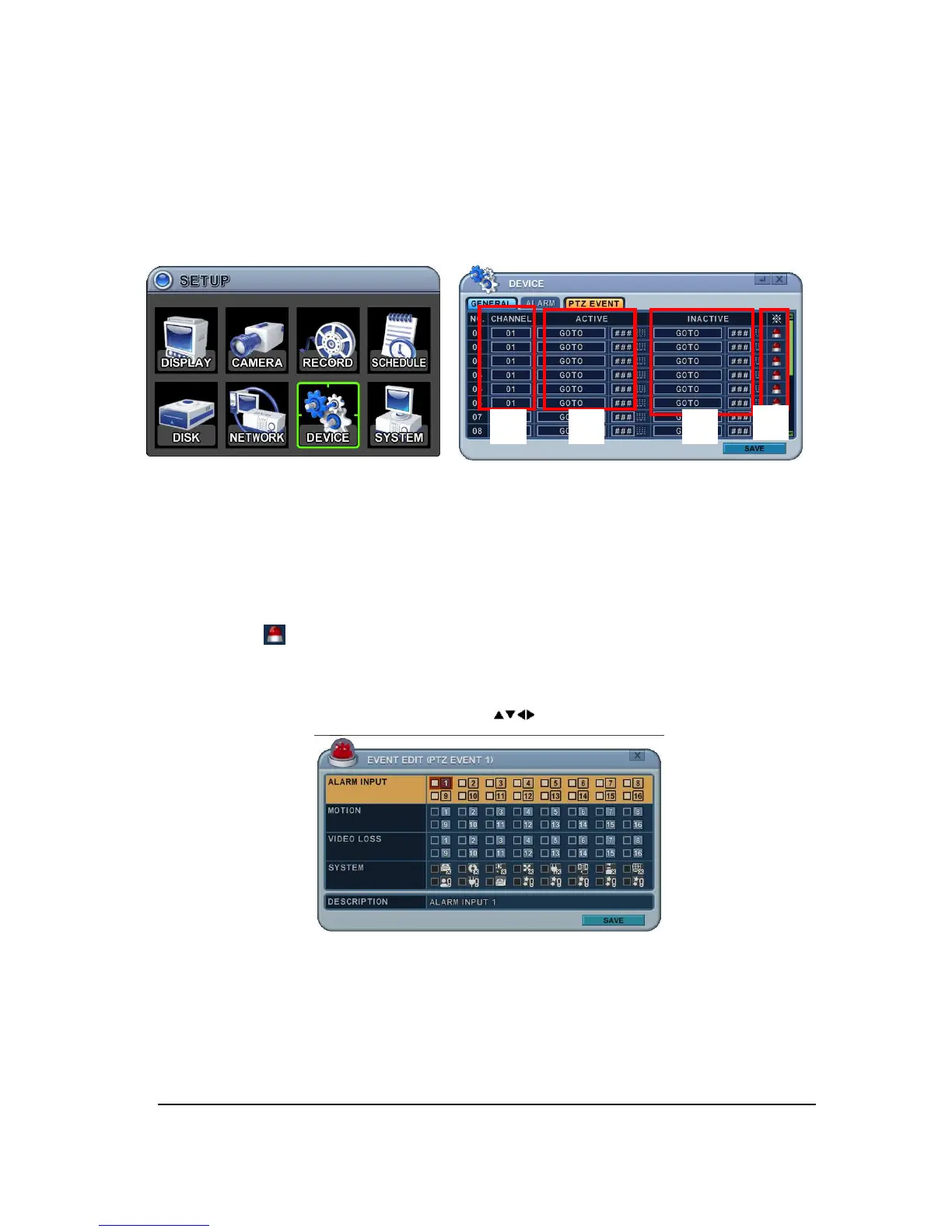
7.3. PTZ EVENT
When such as alarm trigger, motion detected or video loss occurs, this DVR sends preset
command to PTZ camera. PTZ option must be enabled and a protocol must be assigned to
the camera channel.
1. Channel: Select desired PTZ camera.
2. Active: configure PTZ action [ NONE
GOTO
TOUR ] and Preset number or Tour
group when event detected.
3. Inactive: Select Camera position after event duration expires.
4. Event Edit.
Press [ENTER] to edit multiple events. The menus are displayed with options on the
left-hand column and settings in the right hand column. A cursor (highlighted menu)
can be moved using the Direction buttons [ ] on IR remote or front panel.
<Note> Do not set up Motion detection on PTZ camera for PTZ event. The signal will be
looping
5. Select SAVE to save changes and press [ENTER] button to exit the menu.
Exit the menu without making changes, press [CANCEL] button.
③
④
① ②



 To Next Page