MS51
Nov. 28, 2019 Page 216 of 491 Rev 1.00
MS51 32K SERIES TECHNICAL REFERENCE MANUAL
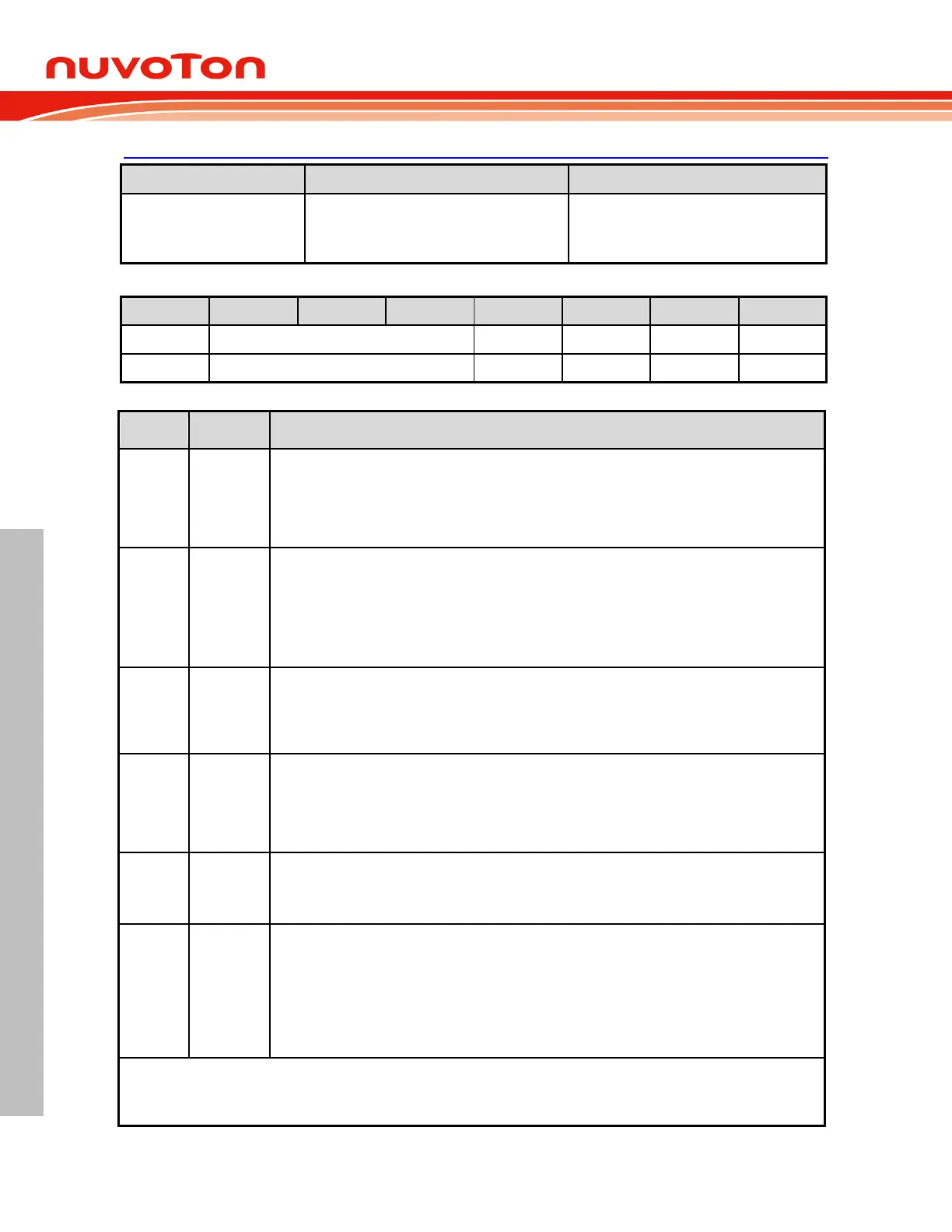
BODCON0 – Brown-out Detection Control 0
A3H, Page 0, TA protected
POR,CCCC XC0X b
BOD, UUUU XU1X b
Others,UUUU XUUX b
Brown-out detection enable
0 = Brown-out detection circuit off.
1 = Brown-out detection circuit on.
Note that BOD output is not available until 2~3 LIRC clocks after enabling.
Brown-out voltage select
11 = V
BOD
is 2.2V.
10 = V
BOD
is 2.7V.
01 = V
BOD
is 3.7V.
00 = V
BOD
is 4.4V.
Brown-out interrupt flag
This flag will be set as logic 1 via hardware after a V
DD
dropping below or rising above V
BOD
event
occurs. If both EBOD (EIE.2) and EA (IE.7) are set, a brown-out interrupt requirement will be
generated. This bit should be cleared via software.
Brown-out reset enable
This bit decides whether a brown-out reset is caused by a power drop below V
BOD
.
0 = Brown-out reset when V
DD
drops below V
BOD
Disabled.
1 = Brown-out reset when V
DD
drops below V
BOD
Enabled.
Brown-out reset flag
When the MCU is reset by brown-out event, this bit will be set via hardware. This flag is
recommended to be cleared via software.
Brown-out status
This bit indicates the V
DD
voltage level comparing with V
BOD
while BOD circuit is enabled. It keeps 0
if BOD is not enabled.
0 = V
DD
voltage level is higher than V
BOD
or BOD is disabled.
1 = V
DD
voltage level is lower than V
BOD
.
Note that this bit is read-only.
NOTE:
1. BODEN, BOV[2:0], and BORST are initialized by being directly loaded from CONFIG2 bit 7, [6:4], and 2 after all resets.
2. BOF reset value depends on different setting of CONFIG2 and V
DD
voltage level. Please check Table 6.2-1 BOF Reset
Value



 To Next Page