MS51
Nov. 28, 2019 Page 445 of 491 Rev 1.00
MS51 32K SERIES TECHNICAL REFERENCE MANUAL
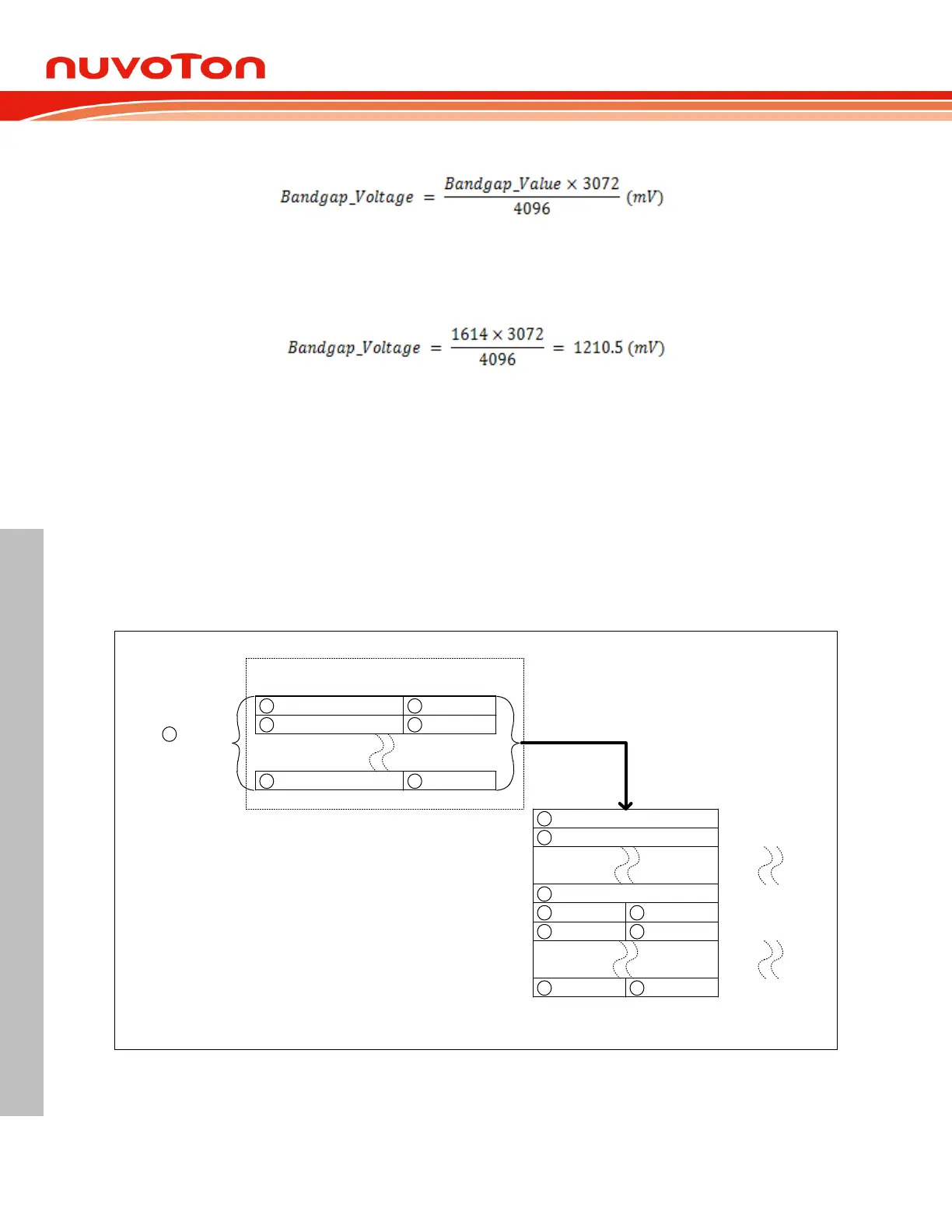
Formula as following
For example:
Read the 2 bytes value after the UID address, wherein the first byte value is 0x64, and the second
byte value is 0x0E, merged as 0x64E = 1614. The conversion result is as follows:
Band-gap as ADC input to calculate the V
DD
value:
MS51 internal embedded band-gap voltage also can be the internal ADC input. This input is useful to
measure Vref value then means can know the V
DD
value from ADC convert result
ADC Continues Conversion 6.13.2.5
The ADC controller supports continues convert function, which auto store the A/D conversion result.
The ADC continues mode can store 12-bit ADC result into XRAM buffer, and 12-bit ADC data will
auto-divide 8-bit high byte and 4-bit low nibble data two part. Considering to reduce XRAM memory
size, two 4-bit nibble data (continuing ADC conversion results) are automatically combine into one
byte size and stored in XRAM.
The store method as below illustrate. It will store 8-bit of conversion high byte data first, then store
combine data, the split point is ADC continue conversion length which define by ADCCN.
ADCR[11:4] ADCR[3:0]
XRAM ADDR
{ADCRH[7:0],ADCRL[3:0]}
1
ADCR[11:4] ADCR[3:0]
ADCR[11:4] ADCR[3:0]
2
1
2
N
ADCR[11:4]
ADCR[11:4]
ADCR[11:4]
1
2
N
ADCR[3:0]ADCR[3:0] 12
ADCR[3:0]ADCR[3:0] 34
ADCR[3:0]ADCR[3:0]
N
-
1
N
length
(ADCCN[7:0] + 1)
N
N
{ADCBAH[3:0],ADCBAL[7:0]}
ADCBA[11:0]
ADCBA[11:0] + 1
ADCBA[11:0] + N
ADCBA[11:0] + N + 1
ADCBA[11:0] + N + 2
ADCBA[11:0] + N + (N / 2)
ADC conversion result
ADC Continues Conversion schedule
XRAM
Figure 6.13-4 ADC Continues mode with DMA
A programing sequence is described below.
1. Set ADC channel and enable ADC as same as normal ADC setting method.



 To Next Page