NV5128 Multi-Format Router • User’s Guide 57
3. Installation
Making Reference Connections
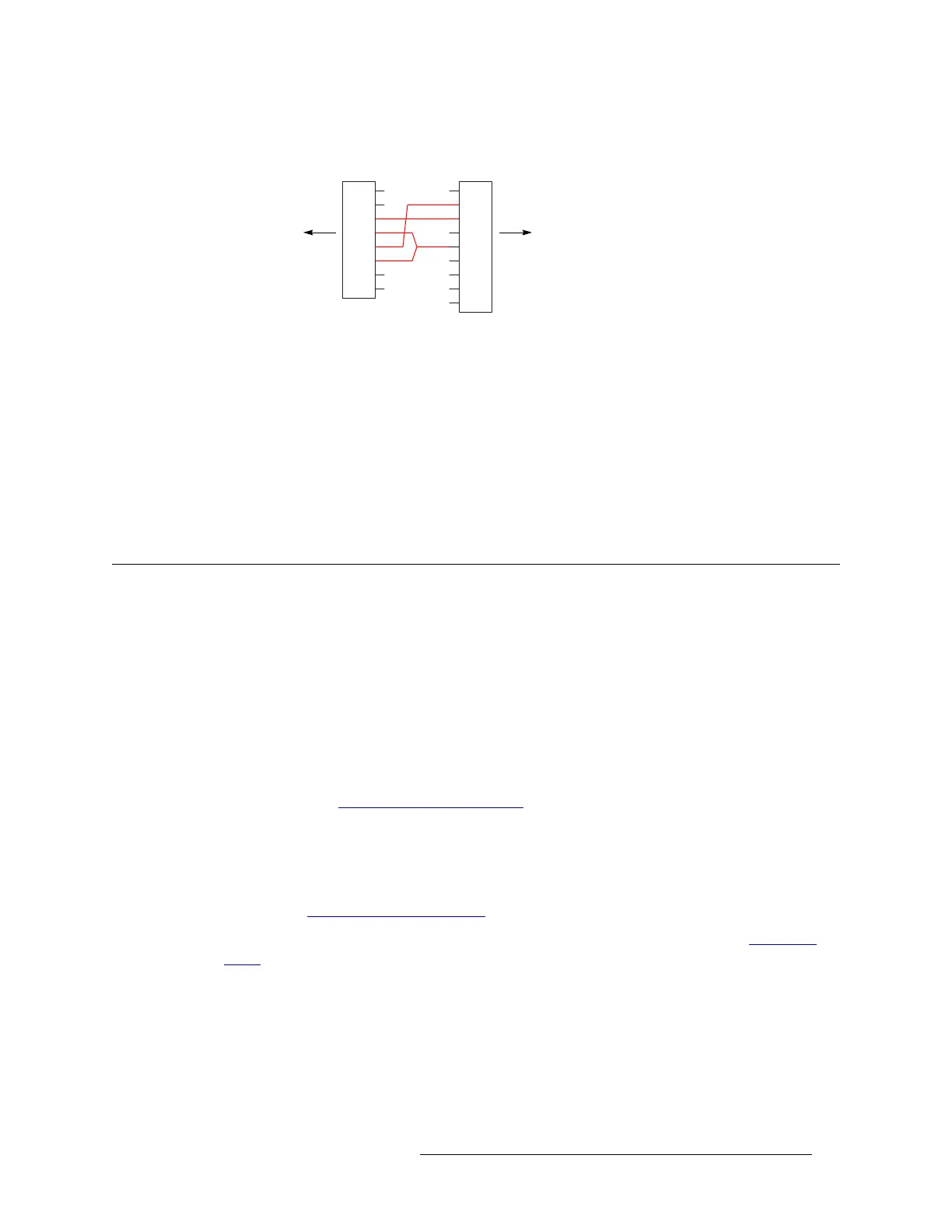
If you make your own RS-232 cables, follow this pattern:
This cable wiring is applicable whether the port is DTE or DCE.
How to Make Machine Control Signal Connections
1 Locate the machine control connections at the rear of the router. There are 16 RJ-45 connectors
on each machine control backplane.
2 If your machine control devices have RJ-45 connectors, use category 5 Ethernet cable to con-
nect the port to the devices.
3 If your machine control devices have DE9 connectors, either use the breakout panel to make the
connections or construct RJ-45 to DE9 cables to make the connections.
Making Reference Connections
The NV5128 uses reference signals to properly time the switching of signals and to avoid picture
disturbances and undesirable discontinuities in audio and time code signals. The reference signal
inputs are located on the left rear of the frame, as shown in Figure 2-4 on page 12.
AES Reference
The AES reference is used for clock generation and provides a timing reference for AES synchro-
nous signals and for the control card’s timing circuits. For optimum audio output, signals must be
clock-locked to the same reference. Input impedance is selected by setting jumper located on the
control card. (See Control Card Jumper Settings
on page 68.)
The NV5128 has two AES reference connections labeled ‘AES REF 1’ and ‘AES REF 2’. Both
connections are used by the primary and the secondary (optional for redundancy) control card. This
provides a backup reference source should one of the sources fail. The AES reference connection
requires a stable signal source set at 48
kHz. For a detailed description of the AES reference con-
nections, see AES Reference Connections
on page 19.
An AES reference must be connected when using AES synchronous I/O cards. (See Audio I/O
Cards on page 22.) When mixing analog audio and AES signals, an AES reference is not required
because the clock generator on the control card provides all necessary clock signals. However, the
AES reference makes it easier to inter-mix analog and AES audio formats.
The AES reference signals have two self-terminating inputs: one BNC and one Phoenix. Each input
supports either balanced or unbalanced formats, but only one connector can be used at a time for
any given input. The unused connection may not be used as a looping output.
1
2
3
4
5
6
7
8
9
RJ-45 DE9
1
2
3
4
5
6
7
8
to NV5128 backplane to your device


 To Next Page