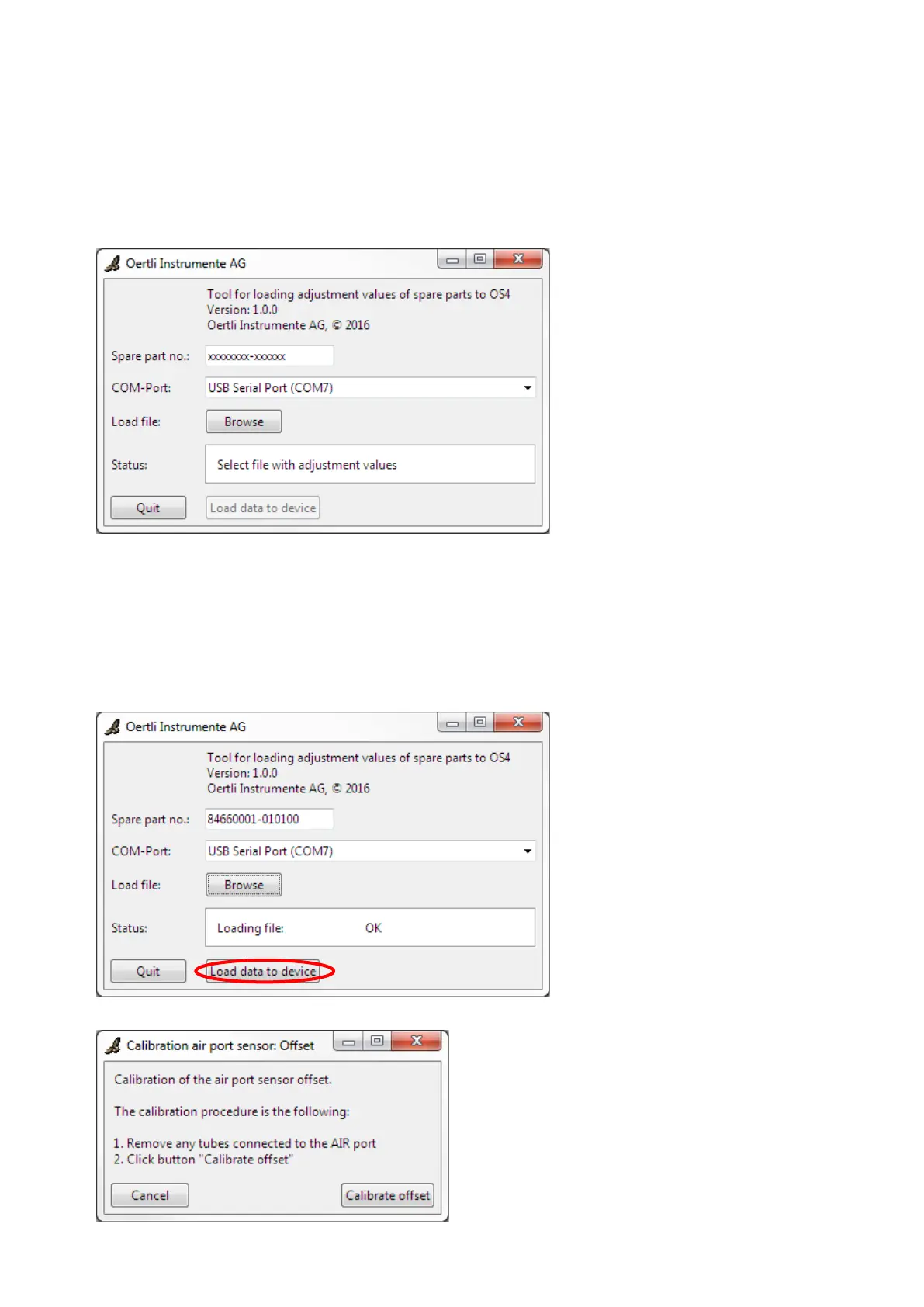
3. Insert the USB stick with stored adjust-
ment values into the USB port of the
laptop.
4. Switch on the device.
5. Start the software for loading the ad-
justment values.
6. Enter the serial number of the spare
part including the index in the field
„Spare part no.“ This number must be
read off the spare part.
Important: Enter the number including
the hyphen.
Example: 84660001-010100
7. Select COM port of the USB interface
cable. The correct COM port should
have been selected as default already.
Normally, the description of the COM
port is „USB Serial Port“.
8. If the correct COM port is not indicated:
Check if the USB interface cable
has been correctly connected (after
plugging it into the laptop, it may
take a few seconds before the ca-
ble is correctly recognised by the
operating system).
Restart the software for loading the
adjustment values.
9. Load the file with the stored adjustment
values by clicking the „Browse“ button.
Select the file „replacement.values“ on
the USB stick.
10. Load data onto the device by clicking
the „Load data to device“ button.
11. If the spare part is a fluidics unit
(VX210130): Perform actions according
to the descriptions in the popup win-
dows.
With all other spare parts, no popup
window will appear.



 To Next Page