48
MENUS
Time (Cont.)
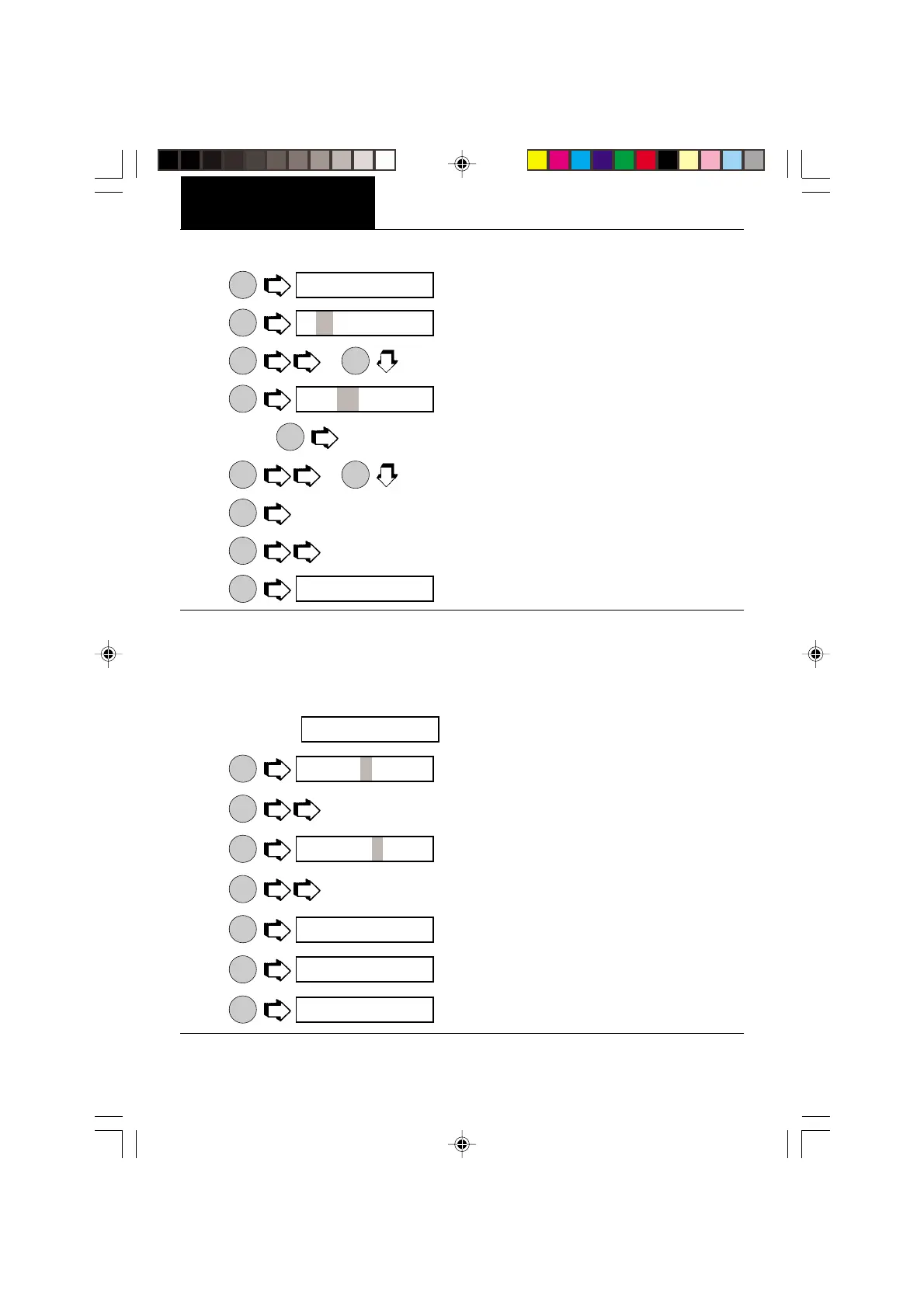
6.
MODE
.
7.
ON
TARE
first two digits are flashing.
8.
MODE
or
MODE
to change flashing digits to current local hour.
9.
ON
TARE
flashes the last two digits.
NOTE:
PRINT
will back up display.
10.
MODE
or
MODE
changes minutes display.
11.
ON
TARE
to accept. AM or PM is flashing, A for AM, P for PM.
12.
MODE
to select AM or PM.
13.
ON
TARE
.
Adjust
Adjust is a feature which enables the internal clock of the balance to be corrected + or - 59
seconds a day. The internal clock is accurate to within 8 seconds a day. To enter or subtract
time, proceed as follows:
1. Access the
submenu which is under the Time submenu.
2.
ON
TARE
. First digit is flashing.
3.
MODE
to change first digit (ten seconds) from 0 to +5 or -5.
4.
ON
TARE
, seconds digit is flashing.
5.
MODE
to change seconds from 0 to 9.
6.
ON
TARE
.
7.
MODE
.
8.
ON
TARE
.
seT
12 00 a
1 00 a
seT
aD∆`usT
aD` 00
aD` 00
aD∆`usT
eND
T I^]e








 To Next Page