58
MENUS
Reference
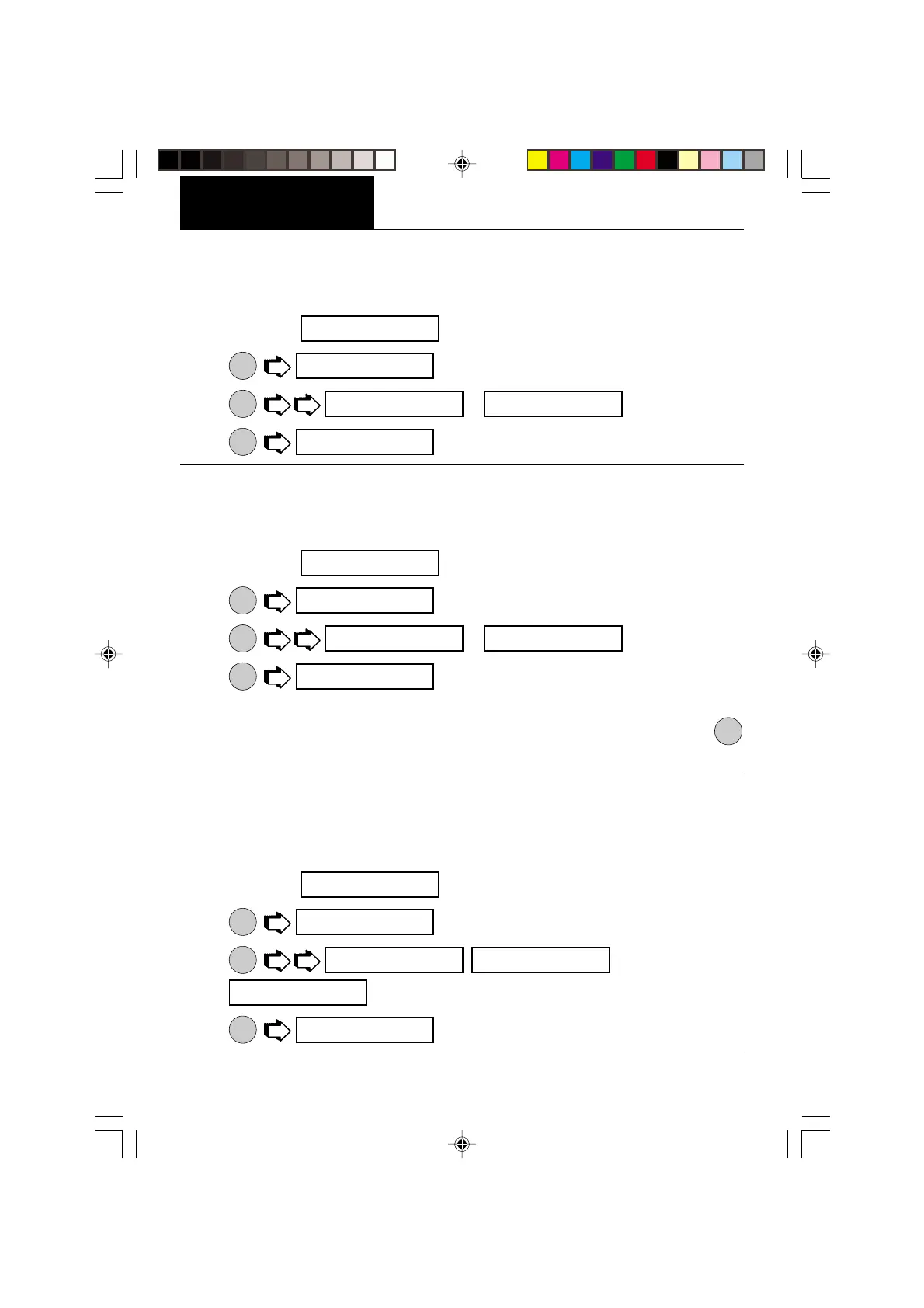
When the Reference function is set ON, prints the value of weight used as a reference in
either Check Weighing, Fill Guide, Percent and Parts Counting modes. When set to Current,
the printer prints the current reference immedediately.
1. Access the
submenu under the Print Options menu
2.
ON
TARE
.
3.
MODE
, or
.
4.
ON
TARE
.
Time
When the Time function is set ON, allows the balance to output the current time to the printer.
To set the Time feature ON or OFF, proceed as follows:
1. Access the
submenu under the Print Options menu
2.
ON
TARE
.
3.
MODE
or .
4.
ON
TARE
.
Date
When the Date function is set ON, allows the balance to output the current date to the printer.
To set the Date feature ON or OFF, proceed as follows:
1. Access the
submenu under the Print Options menu
2.
ON
TARE
.
3.
MODE
or .
4.
ON
TARE
.
NOTE: With Print Time or Date set to ON, if either current Time or Date has not been set in
Setup menu, “Set Time/Date !” is sent through the RS232 Interface with each press of
PRINT
button.
T I^]e
off
off oN
T I^]e
DaTe
off
off oN
DaTe
Ref
off
off oN
cURReNT
Ref








 To Next Page